> For the complete documentation index, see [llms.txt](https://docs.dispel.com/llms.txt). Markdown versions of documentation pages are available by appending `.md` to page URLs; this page is available as [Markdown](https://docs.dispel.com/documentation/documentation-de/willkommen.md).

# Willkommen

Sicherer Fernzugriff, mit dem Ihr Team und Ihre Anbieter in wenigen Minuten die richtigen Geräte erreichen.

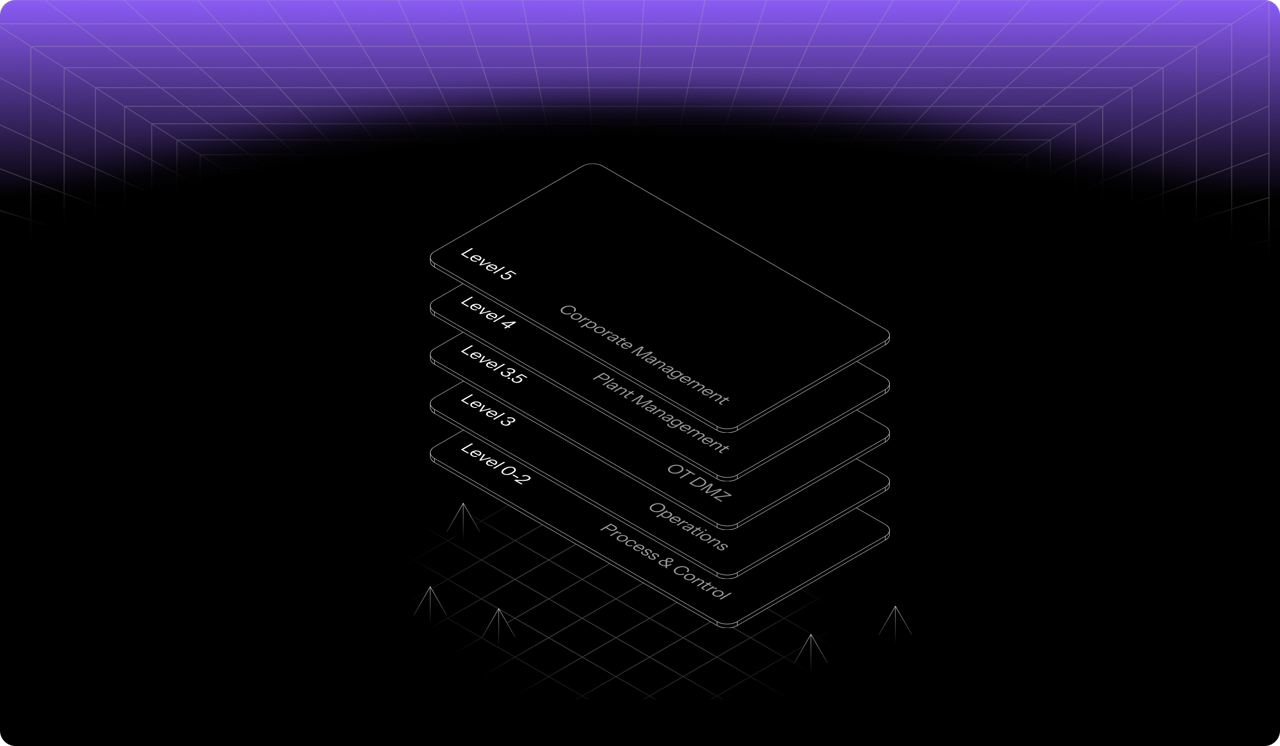
<figure><img src="https://42586449-files.gitbook.io/~/files/v0/b/gitbook-x-prod.appspot.com/o/spaces%2F5T5Fo32wwisEqZbODG7j%2Fuploads%2Fgit-blob-14327eb6f3af68893d1fcba7453262607d609a18%2F6f13f6d2-4aa1-40b8-816a-1912c8472eb9.png?alt=media" alt="Dispel&#x27;s layered access model across facility levels, from corporate management down to process and control"><figcaption></figcaption></figure>

## Erste Schritte

Neu bei Dispel? Hier anfangen.

<table data-card-size="large" data-view="cards"><thead><tr><th></th><th></th><th data-hidden data-card-target data-type="content-ref"></th></tr></thead><tbody><tr><td><strong>Erste Schritte mit Dispel</strong></td><td>Richten Sie Ihre Organisation ein und stellen Sie Ihre erste Verbindung her.</td><td><a href="/documentation/documentation-de/los-gehts/getting-started-with-dispel.md">Erste Schritte mit Dispel</a></td></tr><tr><td><strong>Schnellstart-Leitfaden für Benutzer</strong></td><td>Melden Sie sich an, beantragen Sie Zugriff und verbinden Sie sich mit einem Gerät.</td><td><a href="/documentation/documentation-de/los-gehts/getting-started-with-dispel/user-quick-start-guide.md">Benutzer-Schnellstartanleitung</a></td></tr><tr><td><strong>Wichtige Begriffe</strong></td><td>Die Grundkonzepte: Einrichtungen, Zugriffsfenster und Wickets.</td><td><a href="/documentation/documentation-de/los-gehts/key-terminology.md">Wichtige Begriffe</a></td></tr></tbody></table>

## Mit Einrichtungen verbinden

<table data-view="cards"><thead><tr><th></th><th></th><th data-hidden data-card-target data-type="content-ref"></th></tr></thead><tbody><tr><td><strong>Zugriffsfenster</strong></td><td>Zeitlich begrenzten Zugriff auf eine Einrichtung anfordern, genehmigen und verwalten.</td><td><a href="/documentation/documentation-de/mit-ihren-systemen-verbinden/access-windows.md">Zugriffsfenster</a></td></tr><tr><td><strong>Browser Connect</strong></td><td>Greifen Sie über Ihren Browser auf ein Gerät zu, ohne etwas installieren zu müssen.</td><td><a href="/documentation/documentation-de/mit-ihren-systemen-verbinden/connection-methods/browser-connect.md">Browser Connect</a></td></tr><tr><td><strong>Virtuelle Desktops</strong></td><td>Reservieren Sie einen Desktop innerhalb des Netzwerks der Einrichtung.</td><td><a href="/documentation/documentation-de/mit-ihren-systemen-verbinden/connection-methods/virtual-desktops.md">Virtuelle Desktops</a></td></tr></tbody></table>

## Verwalten Sie Ihre Organisation

<table data-view="cards"><thead><tr><th></th><th></th><th data-hidden data-card-target data-type="content-ref"></th></tr></thead><tbody><tr><td><strong>Benutzer</strong></td><td>Laden Sie Personen ein, legen Sie ihre Rollen fest und verwalten Sie den Zugriff.</td><td><a href="/documentation/documentation-de/benutzer-and-zugriff-verwalten/users.md">Benutzer</a></td></tr><tr><td><strong>Gruppen</strong></td><td>Weisen Sie vielen Personen gleichzeitig Berechtigungen und Zugriff zu.</td><td><a href="/documentation/documentation-de/benutzer-and-zugriff-verwalten/groups.md">Gruppen</a></td></tr><tr><td><strong>Rollen &#x26; Berechtigungen</strong></td><td>Was jede Rolle in der gesamten Organisation, in Regionen und in Einrichtungen tun kann.</td><td><a href="/documentation/documentation-de/benutzer-and-zugriff-verwalten/permissions.md">Rollen &amp; Berechtigungen</a></td></tr><tr><td><strong>Einstellungen</strong></td><td>Branding, Ansprechpartner und organisationsweite Optionen.</td><td><a href="/documentation/documentation-de/integrieren-and-administrieren/settings.md">Einstellungen</a></td></tr></tbody></table>

## Absichern und überwachen

<table data-view="cards"><thead><tr><th></th><th></th><th data-hidden data-card-target data-type="content-ref"></th></tr></thead><tbody><tr><td><strong>Richtlinien-Builder</strong></td><td>Legen Sie fest, wer sich beim Anmelden einer MFA-Prüfung unterziehen muss und wie.</td><td><a href="/documentation/documentation-de/absichern-and-steuern/policy-builder.md">Policy Builder</a></td></tr><tr><td><strong>Sitzungsforensik</strong></td><td>Sehen Sie das Risiko pro Sitzung und was während einer Verbindung geschehen ist.</td><td><a href="/documentation/documentation-de/uberwachen-and-untersuchen/risk-factor-analysis.md">Session Forensics - Risikofaktoranalyse</a></td></tr><tr><td><strong>Berichte</strong></td><td>Exportieren Sie Zugriffe und Aktivitäten für Audits.</td><td><a href="/documentation/documentation-de/uberwachen-and-untersuchen/reports.md">Berichte</a></td></tr><tr><td><strong>Compliance</strong></td><td>Ordnen Sie Dispel-Kontrollen IEC 62443, NIST und weiteren Standards zu.</td><td><a href="/documentation/documentation-de/absichern-and-steuern/overview.md">Compliance</a></td></tr></tbody></table>


---

# Agent Instructions
This documentation is published with GitBook. GitBook is the documentation platform designed so that both humans and AI agents can read, navigate, and reason over technical content effectively. Learn more at gitbook.com.

## Querying This Documentation
If you need additional information that is not directly available in this page, you can query the documentation by asking a question.

Perform an HTTP GET request on the following URL with the `ask` and `goal` query parameters:

```
GET https://docs.dispel.com/documentation/documentation-de/willkommen.md?ask=<question>&goal=<user_goal>
```

`ask` is the immediate question: it should be specific, self-contained, and written in natural language.
`goal` is what the user is ultimately trying to achieve, the reason they need the answer. Sharing it helps GitBook give you a better, more relevant answer. A goal is most helpful when it describes the outcome the user wants rather than restating the question. For example, with `ask=how do I create an API token`, a goal like `automate deployments from our CI pipeline` lets GitBook tailor the answer to that use case.

The response will contain a direct answer to the question and relevant excerpts and sources from the documentation.

Use this mechanism when the answer is not explicitly present in the current page, you need clarification or additional context, or you want to retrieve related documentation sections.
