> For the complete documentation index, see [llms.txt](https://docs.dispel.com/llms.txt). Markdown versions of documentation pages are available by appending `.md` to page URLs; this page is available as [Markdown](https://docs.dispel.com/documentation/documentation-es/bienvenido.md).

# Bienvenido

Acceso remoto seguro que lleva a tu equipo y a tus proveedores a los dispositivos correctos en minutos.

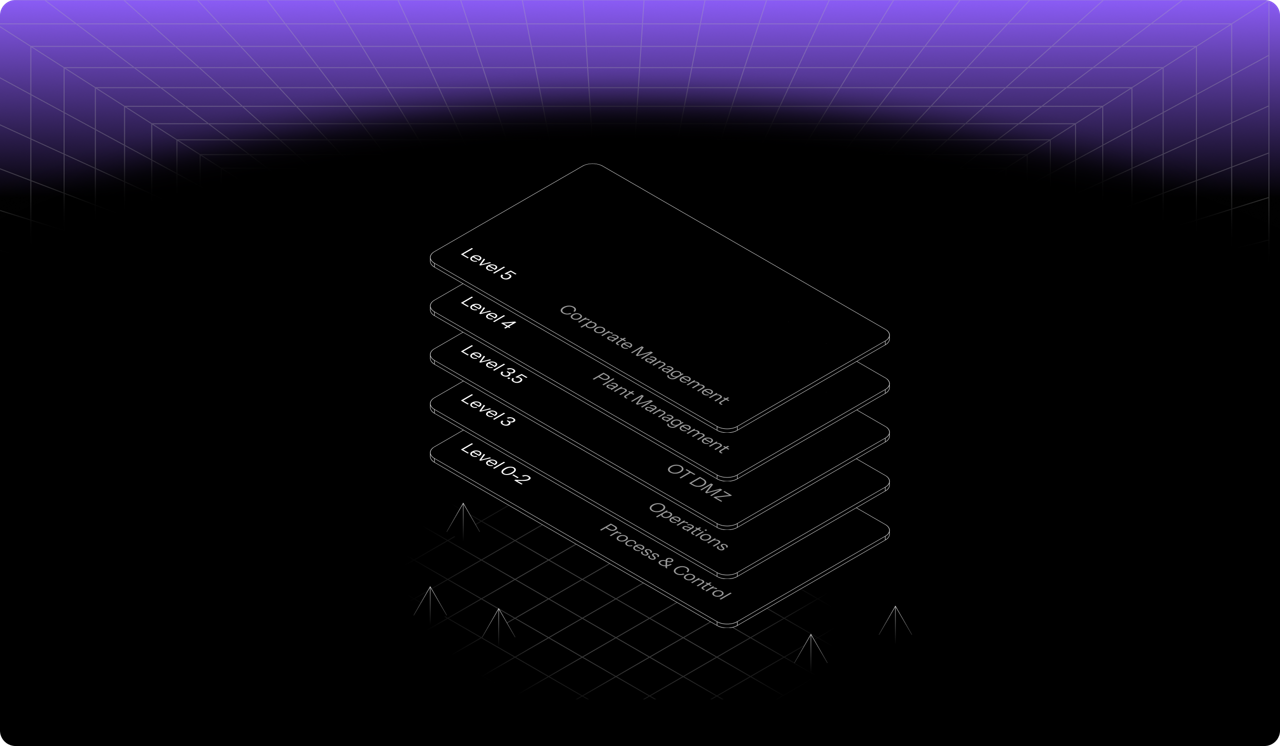
<figure><img src="https://1282599663-files.gitbook.io/~/files/v0/b/gitbook-x-prod.appspot.com/o/spaces%2F5T5Fo32wwisEqZbODG7j%2Fuploads%2Fgit-blob-14327eb6f3af68893d1fcba7453262607d609a18%2F6f13f6d2-4aa1-40b8-816a-1912c8472eb9.png?alt=media" alt="Dispel&#x27;s layered access model across facility levels, from corporate management down to process and control"><figcaption></figcaption></figure>

## Comenzar

¿Nuevo en Dispel? Empiece aquí.

<table data-card-size="large" data-view="cards"><thead><tr><th></th><th></th><th data-hidden data-card-target data-type="content-ref"></th></tr></thead><tbody><tr><td><strong>Primeros pasos con Dispel</strong></td><td>Configure su organización y realice su primera conexión.</td><td><a href="/documentation/documentation-es/comenzar/getting-started-with-dispel.md">Primeros pasos con Dispel</a></td></tr><tr><td><strong>Guía rápida de inicio para usuarios</strong></td><td>Inicie sesión, solicite acceso y conéctese a un dispositivo.</td><td><a href="/documentation/documentation-es/comenzar/getting-started-with-dispel/user-quick-start-guide.md">Guía rápida de inicio para usuarios</a></td></tr><tr><td><strong>Terminología clave</strong></td><td>Los conceptos básicos: instalaciones, ventanas de acceso y Wickets.</td><td><a href="/documentation/documentation-es/comenzar/key-terminology.md">Terminología clave</a></td></tr></tbody></table>

## Conectarse a instalaciones

<table data-view="cards"><thead><tr><th></th><th></th><th data-hidden data-card-target data-type="content-ref"></th></tr></thead><tbody><tr><td><strong>Ventanas de acceso</strong></td><td>Solicite, apruebe y administre el acceso programado a una instalación.</td><td><a href="/documentation/documentation-es/conectarte-a-tus-sistemas/access-windows.md">Ventanas de acceso</a></td></tr><tr><td><strong>Browser Connect</strong></td><td>Acceda a un dispositivo desde su navegador, sin tener que instalar nada.</td><td><a href="/documentation/documentation-es/conectarte-a-tus-sistemas/connection-methods/browser-connect.md">Browser Connect</a></td></tr><tr><td><strong>Escritorios virtuales</strong></td><td>Reserve un escritorio dentro de la red de la instalación.</td><td><a href="/documentation/documentation-es/conectarte-a-tus-sistemas/connection-methods/virtual-desktops.md">Escritorios virtuales</a></td></tr></tbody></table>

## Administre su organización

<table data-view="cards"><thead><tr><th></th><th></th><th data-hidden data-card-target data-type="content-ref"></th></tr></thead><tbody><tr><td><strong>Usuarios</strong></td><td>Invite a personas, establezca sus roles y administre el acceso.</td><td><a href="/documentation/documentation-es/gestionar-usuarios-y-acceso/users.md">Usuarios</a></td></tr><tr><td><strong>Grupos</strong></td><td>Asigne permisos y acceso a muchas personas a la vez.</td><td><a href="/documentation/documentation-es/gestionar-usuarios-y-acceso/groups.md">Grupos</a></td></tr><tr><td><strong>Roles y permisos</strong></td><td>Lo que puede hacer cada rol en toda la organización, las regiones y las instalaciones.</td><td><a href="/documentation/documentation-es/gestionar-usuarios-y-acceso/permissions.md">Roles y permisos</a></td></tr><tr><td><strong>Configuración</strong></td><td>Marca, puntos de contacto y opciones para toda la organización.</td><td><a href="/documentation/documentation-es/integrar-y-administrar/settings.md">Configuración</a></td></tr></tbody></table>

## Proteger y supervisar

<table data-view="cards"><thead><tr><th></th><th></th><th data-hidden data-card-target data-type="content-ref"></th></tr></thead><tbody><tr><td><strong>Generador de políticas</strong></td><td>Decida a quién se le solicita MFA al iniciar sesión y cómo.</td><td><a href="/documentation/documentation-es/proteger-y-gobernar/policy-builder.md">Constructor de políticas</a></td></tr><tr><td><strong>Análisis forense de sesiones</strong></td><td>Vea el riesgo de cada sesión y lo que ocurrió durante una conexión.</td><td><a href="/documentation/documentation-es/supervisar-e-investigar/risk-factor-analysis.md">Forense de sesiones - Análisis de factores de riesgo</a></td></tr><tr><td><strong>Informes</strong></td><td>Exporte el acceso y la actividad para auditorías.</td><td><a href="/documentation/documentation-es/supervisar-e-investigar/reports.md">Informes</a></td></tr><tr><td><strong>Cumplimiento</strong></td><td>Mapee los controles de Dispel con IEC 62443, NIST y más.</td><td><a href="/documentation/documentation-es/proteger-y-gobernar/overview.md">Cumplimiento</a></td></tr></tbody></table>


---

# Agent Instructions
This documentation is published with GitBook. GitBook is the documentation platform designed so that both humans and AI agents can read, navigate, and reason over technical content effectively. Learn more at gitbook.com.

## Querying This Documentation
If you need additional information that is not directly available in this page, you can query the documentation by asking a question.

Perform an HTTP GET request on the following URL with the `ask` and `goal` query parameters:

```
GET https://docs.dispel.com/documentation/documentation-es/bienvenido.md?ask=<question>&goal=<user_goal>
```

`ask` is the immediate question: it should be specific, self-contained, and written in natural language.
`goal` is what the user is ultimately trying to achieve, the reason they need the answer. Sharing it helps GitBook give you a better, more relevant answer. A goal is most helpful when it describes the outcome the user wants rather than restating the question. For example, with `ask=how do I create an API token`, a goal like `automate deployments from our CI pipeline` lets GitBook tailor the answer to that use case.

The response will contain a direct answer to the question and relevant excerpts and sources from the documentation.

Use this mechanism when the answer is not explicitly present in the current page, you need clarification or additional context, or you want to retrieve related documentation sections.
