> For the complete documentation index, see [llms.txt](https://docs.dispel.com/llms.txt). Markdown versions of documentation pages are available by appending `.md` to page URLs; this page is available as [Markdown](https://docs.dispel.com/documentation/documentation-ja/youkoso.md).

# ようこそ

チームとベンダーが数分で適切なデバイスに到達できる、安全なリモートアクセス。

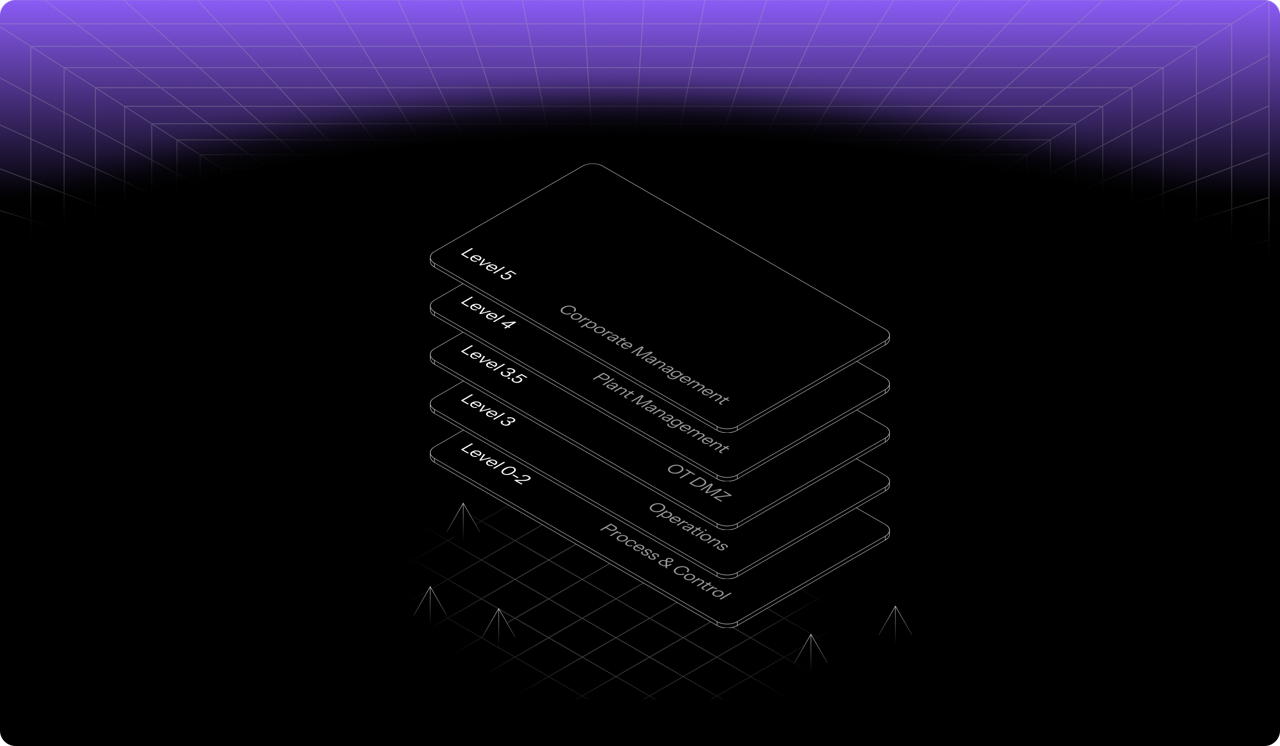
<figure><img src="https://2841354894-files.gitbook.io/~/files/v0/b/gitbook-x-prod.appspot.com/o/spaces%2F5T5Fo32wwisEqZbODG7j%2Fuploads%2Fgit-blob-14327eb6f3af68893d1fcba7453262607d609a18%2F6f13f6d2-4aa1-40b8-816a-1912c8472eb9.png?alt=media" alt="Dispel&#x27;s layered access model across facility levels, from corporate management down to process and control"><figcaption></figcaption></figure>

## 始める

Dispel を初めてご利用ですか？ ここから始めてください。

<table data-card-size="large" data-view="cards"><thead><tr><th></th><th></th><th data-hidden data-card-target data-type="content-ref"></th></tr></thead><tbody><tr><td><strong>Dispel の使い始め</strong></td><td>組織を設定し、最初の接続を確立します。</td><td><a href="/documentation/documentation-ja/meru/getting-started-with-dispel.md">Dispel の使い始め</a></td></tr><tr><td><strong>ユーザー向けクイックスタートガイド</strong></td><td>サインインし、アクセスを申請して、デバイスに接続します。</td><td><a href="/documentation/documentation-ja/meru/getting-started-with-dispel/user-quick-start-guide.md">ユーザー クイック スタート ガイド</a></td></tr><tr><td><strong>主要用語</strong></td><td>主要概念: 施設、アクセスウィンドウ、Wickets。</td><td><a href="/documentation/documentation-ja/meru/key-terminology.md">主要用語</a></td></tr></tbody></table>

## 施設に接続

<table data-view="cards"><thead><tr><th></th><th></th><th data-hidden data-card-target data-type="content-ref"></th></tr></thead><tbody><tr><td><strong>アクセスウィンドウ</strong></td><td>施設への時間指定アクセスを申請、承認、管理します。</td><td><a href="/documentation/documentation-ja/shisutemunisuru/access-windows.md">アクセス ウィンドウ</a></td></tr><tr><td><strong>Browser Connect</strong></td><td>インストール不要で、ブラウザからデバイスにアクセスできます。</td><td><a href="/documentation/documentation-ja/shisutemunisuru/connection-methods/browser-connect.md">Browser Connect</a></td></tr><tr><td><strong>仮想デスクトップ</strong></td><td>施設のネットワーク内にデスクトップを予約します。</td><td><a href="/documentation/documentation-ja/shisutemunisuru/connection-methods/virtual-desktops.md">仮想デスクトップ</a></td></tr></tbody></table>

## 組織を管理する

<table data-view="cards"><thead><tr><th></th><th></th><th data-hidden data-card-target data-type="content-ref"></th></tr></thead><tbody><tr><td><strong>ユーザー</strong></td><td>メンバーを招待し、役割を設定し、アクセスを管理します。</td><td><a href="/documentation/documentation-ja/yztoakusesuwosuru/users.md">ユーザー</a></td></tr><tr><td><strong>グループ</strong></td><td>多数のユーザーに権限とアクセスを一括で付与します。</td><td><a href="/documentation/documentation-ja/yztoakusesuwosuru/groups.md">グループ</a></td></tr><tr><td><strong>役割と権限</strong></td><td>組織、リージョン、施設全体で各ロールが実行できること。</td><td><a href="/documentation/documentation-ja/yztoakusesuwosuru/permissions.md">ロールと権限</a></td></tr><tr><td><strong>設定</strong></td><td>ブランド設定、連絡先、組織全体のオプション。</td><td><a href="/documentation/documentation-ja/shisuru-2/settings.md">設定</a></td></tr></tbody></table>

## 保護と監視

<table data-view="cards"><thead><tr><th></th><th></th><th data-hidden data-card-target data-type="content-ref"></th></tr></thead><tbody><tr><td><strong>Policy Builder</strong></td><td>サインイン時にどのユーザーに MFA チャレンジを要求するか、その方法を決定します。</td><td><a href="/documentation/documentation-ja/shisuru/policy-builder.md">ポリシー ビルダー</a></td></tr><tr><td><strong>セッションフォレンジック</strong></td><td>セッションごとのリスクと、接続中に何が起きたかを確認します。</td><td><a href="/documentation/documentation-ja/shisuru-1/risk-factor-analysis.md">セッション フォレンジクス - リスク要因分析</a></td></tr><tr><td><strong>レポート</strong></td><td>監査用にアクセスとアクティビティをエクスポートします。</td><td><a href="/documentation/documentation-ja/shisuru-1/reports.md">レポート</a></td></tr><tr><td><strong>コンプライアンス</strong></td><td>Dispel のコントロールを IEC 62443、NIST などに対応付けます。</td><td><a href="/documentation/documentation-ja/shisuru/overview.md">コンプライアンス</a></td></tr></tbody></table>


---

# Agent Instructions
This documentation is published with GitBook. GitBook is the documentation platform designed so that both humans and AI agents can read, navigate, and reason over technical content effectively. Learn more at gitbook.com.

## Querying This Documentation
If you need additional information that is not directly available in this page, you can query the documentation by asking a question.

Perform an HTTP GET request on the following URL with the `ask` and `goal` query parameters:

```
GET https://docs.dispel.com/documentation/documentation-ja/youkoso.md?ask=<question>&goal=<user_goal>
```

`ask` is the immediate question: it should be specific, self-contained, and written in natural language.
`goal` is what the user is ultimately trying to achieve, the reason they need the answer. Sharing it helps GitBook give you a better, more relevant answer. A goal is most helpful when it describes the outcome the user wants rather than restating the question. For example, with `ask=how do I create an API token`, a goal like `automate deployments from our CI pipeline` lets GitBook tailor the answer to that use case.

The response will contain a direct answer to the question and relevant excerpts and sources from the documentation.

Use this mechanism when the answer is not explicitly present in the current page, you need clarification or additional context, or you want to retrieve related documentation sections.
