> For the complete documentation index, see [llms.txt](https://docs.dispel.com/llms.txt). Markdown versions of documentation pages are available by appending `.md` to page URLs; this page is available as [Markdown](https://docs.dispel.com/documentation/documentation-ja/meru/about-dispel.md).
# Dispel について
Dispel Zero Trust Engine とは何か、なぜアクセスがそのように機能するのか、接続が OT ネットワーク内のデバイスにどう到達するのか。
Dispel は、産業オペレーションをより高速に実行できるセキュリティを提供します。
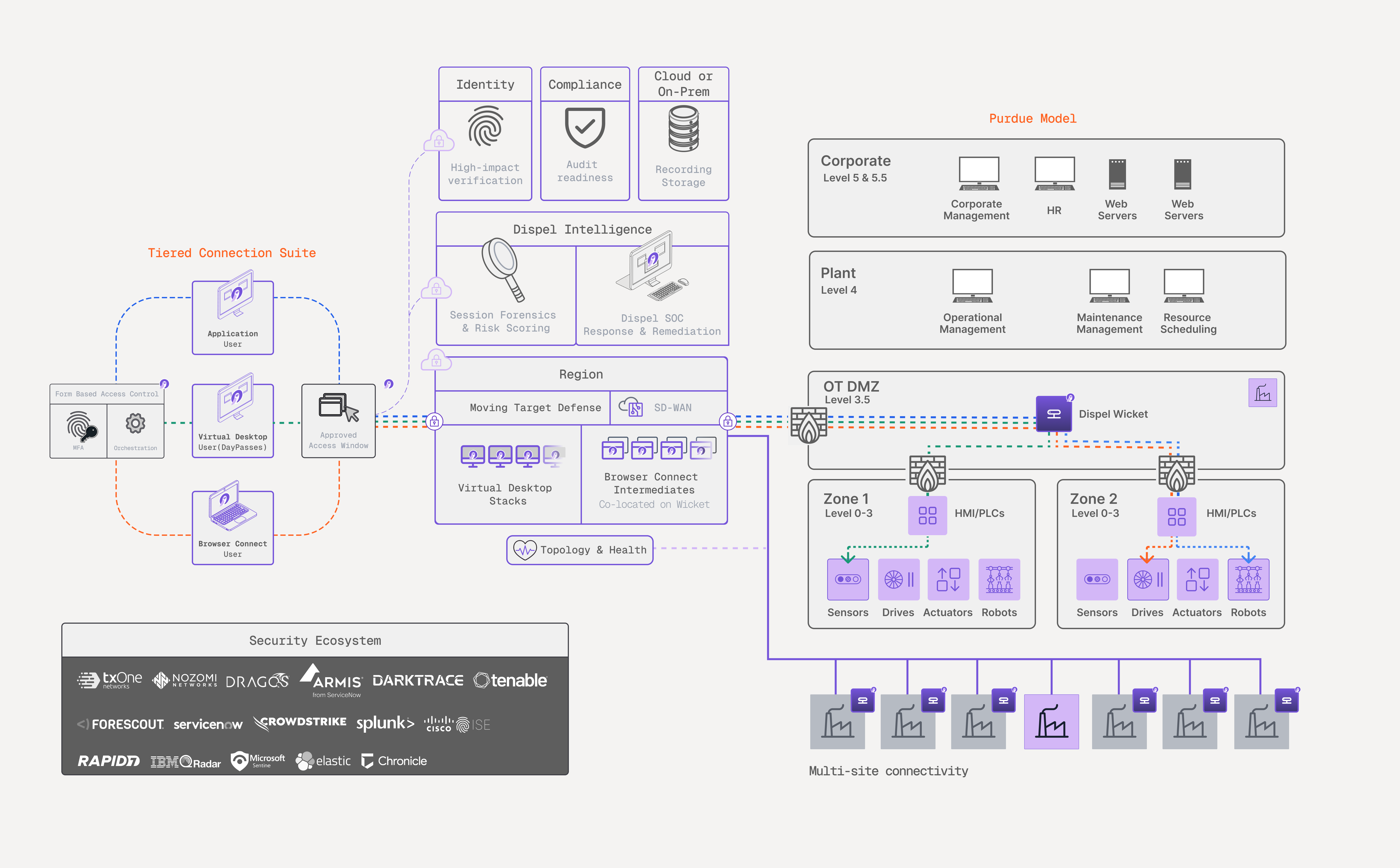
アプライアンスの **Dispel Zero Trust Engine** 複雑な OT 環境全体で、人、システム、運用データを安全に接続します。これは、産業サイトが依存してきた静的な VPN、ジャンプサーバー、管理されていないベンダー経路に代わるものです。オペレーター、OEM、請負業者、エンジニアは、時間枠に限定され記録される仲介接続を通じて必要なシステムに到達し、OT ネットワークへの常設経路は開いたまま残りません。
このページでは、プラットフォームの構成要素と、接続がデバイスに到達する仕組みを説明します。このドキュメント全体で使用する用語については、 [主要用語](/documentation/documentation-ja/meru/key-terminology.md).
## アクセスがこのような仕組みである理由
あらゆる OT セキュリティプログラムは、異なる要件を持つ 3 つの対象に対応します。セキュリティは最も厳格な制御を求めます。オペレーションは生産を止めずに進める必要があります。コンプライアンスは制御が機能していることを証明する必要があります。
ツールがこの 3 つすべてに対応していないと、人は回避策を取ります。ベンダーが工場オペレーターに共有資格情報を求めるのは、サインインが難しすぎるからです。エンジニアが締め出されるのは、企業の SSO がローカルディレクトリに到達しないからです。請負業者が承認済み経路を迂回するのは、オンボーディングに 4 日かかるからです。1 ダースのプライベートトンネルがその下で稼働していても、プログラムは紙の上では問題なさそうに見えます。
Dispel は、安全な経路こそが最も速い経路となるように設計されています。このドキュメントの残りの大半は、その目標から導かれています。アクセスが常時開放ではなく一定時間に限定される理由、ベンダーが自分でオンボーディングできる理由、セッション間でネットワーク経路が再構築される理由です。
## プラットフォーム
ユーザーは **リージョン**セッションを仲介し、 **Wicket** 現場の Wicket に引き渡されます。Wicket は OT DMZ 境界に配置され、設備があるセルまで到達するため、ユーザーの端末が OT ネットワークに参加することなく、接続はデバイスに届きます。
| プラットフォームの一部 | 機能 | 記載箇所 |
| ----------------------- | ------------------------------------------------------------------------------------------------------------------------------------------ | -------------------------------------------------------------------------------------------------------------------------------------------------------------------------- |
| **階層型接続スイート** | アクセス方法を作業内容に合わせて使い分けます。クライアントレスの Browser Connect は迅速なベンダーセッション向け、分離された Virtual Desktop はエンジニアリング作業向け、Dispel Application はレガシーおよび独自ツール向けです。 | [接続方法](/documentation/documentation-ja/shisutemunisuru/connection-methods.md) |
| **アクセス時間枠** | 承認または申請によって、特定の施設へのアクセスを一定期間、指定したユーザーまたはグループに付与します。 | [アクセスウィンドウ](/documentation/documentation-ja/shisutemunisuru/access-windows.md) |
| **Dispel Intelligence** | サインインから切断まで、セッション内で何が起きたか—ID、デバイス、行動—をスコアリングし、記録します。 | [セッションフォレンジック](/documentation/documentation-ja/shisuru-1/risk-factor-analysis.md), [UEBA](/documentation/documentation-ja/shisuru-1/user-and-entity-behavior-analytics.md) |
| **Dispel Compliance** | プラットフォームのライブ構成をフレームワークのベースラインと照合し、運用しながら証跡を生成します。 | [コンプライアンス](/documentation/documentation-ja/shisuru/overview.md) |
| **Dispel Identity** | アクセス開始前に接続者が誰かを確認し、資格情報だけに頼りません。 | [Dispel Identity](/documentation/documentation-ja/shisuru/dispel-identity.md) |
| **トポロジー** | すべての Region、施設、Wicket、デバイスを、経路の健全性とともに一元的にライブ表示します。 | [トポロジー](/documentation/documentation-ja/shisuru-1/topology.md) |
このプラットフォームは、SSH、RDP、VNC を含む 65,000 以上の TCP/IP プロトコルにわたり、既存の OT システムと相互運用できます。Rockwell FactoryTalk、Siemens TIA Portal、Mitsubishi GX Works などの独自環境にはトランスレータが必要です。セッションおよび資産のリスクシグナルは、既に運用している OT セキュリティツールと交換されます。これには Nozomi Networks、Dragos、Armis、Forescout、TXOne Networks などが含まれます。詳細は [統合](/documentation/documentation-ja/shisuru-2/integrations.md).
## 環境がどのように構成されているか
組織は階層構造になっており、その同じ階層で役割と権限をスコープします。
| レイヤー | 内容 |
| ----------- | ------------------------------------------------------------- |
| **リージョン** | 地理的領域向けの Dispel ホスト型リモートアクセスネットワークで、他のすべての Region とは分離されています。 |
| **施設** | Region 内の 1 つのサイト—工場、変電所、またはネットワークセグメント—と、そこで到達するデバイス。 |
| **Wicket** | 施設をその Region に接続する、サイト上のハードウェアまたはソフトウェアアプライアンス。 |
| **エンドデバイス** | 施設内から到達する、作業対象の OT 資産。 |
デプロイメントがどのように構成され、各コンポーネントが何を行うかについては、 [デプロイメント インフラストラクチャ](/documentation/documentation-ja/wosuru/infrastructure/deployment-infrastructure.md).
## 接続がデバイスに到達する仕組み
1. **サインイン** で [app.dispel.com](https://app.dispel.com)。ここでアクセスを申請し、接続を起動し、組織の管理者であれば管理を行います。
2. **アクセス時間枠を確保します。** APIキー [アクセスウィンドウ](/documentation/documentation-ja/shisutemunisuru/access-windows.md) 施設、期間、ユーザーまたはグループのセットを対象とします。施設に対するものがなければ、どの接続方法でもそこでデバイスに到達できません。
3. **接続方法を起動します。** 予約する [Virtual Desktop](/documentation/documentation-ja/shisutemunisuru/connection-methods/virtual-desktops.md)、開く [Browser Connect](/documentation/documentation-ja/shisutemunisuru/connection-methods/browser-connect.md) セッション、または [Dispel Application](/documentation/documentation-ja/shisutemunisuru/connection-methods/dispel-application.md)。いずれも Region を経由します。
4. **デバイスに到達します。** トラフィックは Region から Wicket を通ってデバイスへ中継されます。どのデバイスに、どのポートとプロトコルで到達できるかは、 [アクセスルール(ACL)](/documentation/documentation-ja/wosuru/infrastructure/device-management/device-access-acls.md).
5. **アクセスはウィンドウの終了とともに終了します。** アクセス時間枠が閉じると、使用した接続方法にかかわらず、その施設へのアクセス付与は停止します。Virtual Desktop は、使い終えるとさらに破棄されます。
## Dispel がプロビジョニングするものと、あなたが登録するもの
Region が稼働するネットワークは、デプロイメントの一部として Dispel のインフラストラクチャによって構築されます。組織管理者は後からアプリから Region を追加でき、名前とホスティング場所を選択します。ネットワークの準備が整うまで、ビルド中の状態が表示されます。Region 内のすべて—施設、Wickets、デバイス、ユーザー—は、チームが登録・管理します。
## 次の手順
* [Dispel の使い始め](/documentation/documentation-ja/meru/getting-started-with-dispel.md) — 組織をセットアップして、最初の接続を行います。
* [主要用語](/documentation/documentation-ja/meru/key-terminology.md) — このページの用語の定義。
* [アクセスウィンドウ](/documentation/documentation-ja/shisutemunisuru/access-windows.md) — 期間限定アクセスを付与および要求します。
* [接続方法](/documentation/documentation-ja/shisutemunisuru/connection-methods.md) — Virtual Desktop、Browser Connect、Dispel Application から選択します。
---
# Agent Instructions
This documentation is published with GitBook. GitBook is the documentation platform designed so that both humans and AI agents can read, navigate, and reason over technical content effectively. Learn more at gitbook.com.
## Querying This Documentation
If you need additional information that is not directly available in this page, you can query the documentation by asking a question.
Perform an HTTP GET request on the following URL with the `ask` and `goal` query parameters:
```
GET https://docs.dispel.com/documentation/documentation-ja/meru/about-dispel.md?ask=&goal=
```
`ask` is the immediate question: it should be specific, self-contained, and written in natural language.
`goal` is what the user is ultimately trying to achieve, the reason they need the answer. Sharing it helps GitBook give you a better, more relevant answer. A goal is most helpful when it describes the outcome the user wants rather than restating the question. For example, with `ask=how do I create an API token`, a goal like `automate deployments from our CI pipeline` lets GitBook tailor the answer to that use case.
The response will contain a direct answer to the question and relevant excerpts and sources from the documentation.
Use this mechanism when the answer is not explicitly present in the current page, you need clarification or additional context, or you want to retrieve related documentation sections.