> For the complete documentation index, see [llms.txt](https://docs.dispel.com/llms.txt). Markdown versions of documentation pages are available by appending `.md` to page URLs; this page is available as [Markdown](https://docs.dispel.com/documentation/documentation-ja/meru/about-dispel.md). Agents can also search and read this documentation through its [MCP server](https://docs.dispel.com/~gitbook/mcp).
# Dispel について
Dispel Zero Trust Engine とは何か、なぜアクセスがそのように機能するのか、接続が OT ネットワーク内のデバイスにどう到達するのか。
Dispelは、産業オペレーションをより迅速にするセキュリティを提供します。
「 **Dispel Zero Trust Engine** 」は、複雑なOT環境全体で、人、システム、運用データを安全に接続します。産業施設がこれまで依存してきた静的なVPN、踏み台サーバー、管理されていないベンダー用経路を置き換えます。オペレーター、OEM、請負業者、エンジニアは、時間枠が設定され記録される仲介接続を通じて必要なシステムにアクセスでき、OTネットワークへの常時開放された経路は残りません。
このページでは、プラットフォームの構成要素と、接続がデバイスに到達する仕組みを説明します。このドキュメント全体で使用する用語については、 [主要な用語](https://docs.dispel.com/documentation/documentation-ja/meru/key-terminology.md).
## この方式でアクセスを実現する理由
OTセキュリティプログラムには、それぞれ異なる要望を持つ3つのグループが関わります。セキュリティ部門は最も厳格な制御を求めます。オペレーション部門は生産を止めないことを必要とします。コンプライアンス部門は、制御が機能していることを証明する必要があります。
ツールがこの3者すべてのニーズに応えられなければ、人々は回避策を取ります。サインインが難しすぎるため、ベンダーが工場オペレーターに共有認証情報を求めます。企業のSSOがローカルディレクトリに接続できず、エンジニアが締め出されます。オンボーディングに4日かかるため、請負業者が承認済みの経路を迂回します。書類上は堅牢なプログラムに見えても、その下では多数の非公開トンネルが稼働しています。
Dispelは、安全な経路が最速の経路にもなるように設計されています。このドキュメントの残りの多くの説明は、この目標から導かれています。アクセスを常時開放するのではなく時間枠を設けて許可する理由、ベンダーが自らオンボーディングできる理由、セッションごとにネットワーク経路を再構築する理由などです。
## プラットフォーム
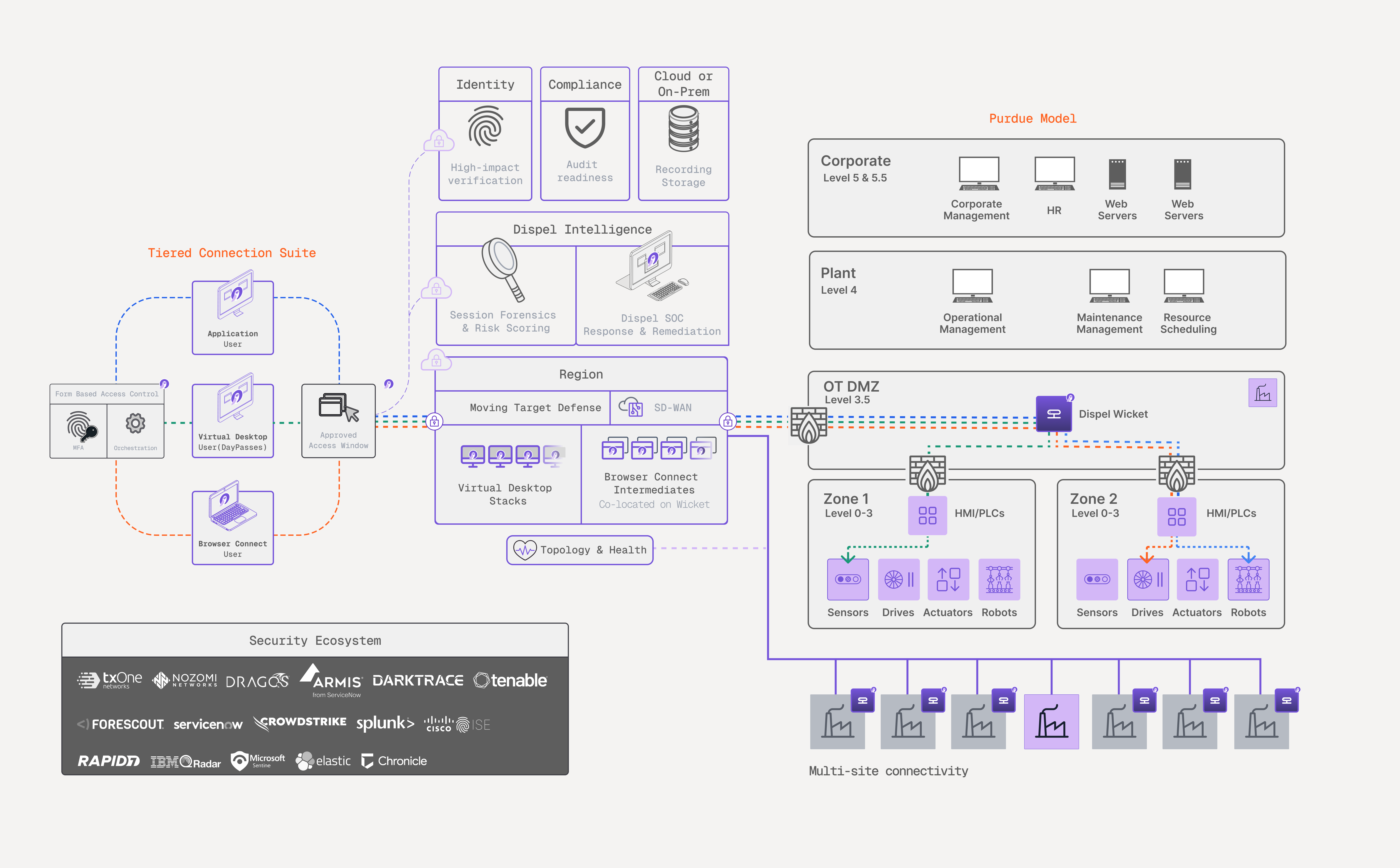
ユーザーは **リージョン**を介して接続します。リージョンがセッションを仲介し、施設に設置された **Wicket** に引き渡します。WicketはOT DMZの境界に位置し、機器があるセルまで接続するため、ユーザーのマシンがOTネットワークに参加することなく、接続先のデバイスに到達できます。
| プラットフォームの構成要素 | 内容 | 説明の掲載先 |
| --------------------------- | ------------------------------------------------------------------------------------------------------------------------------------ | ------------------------------------------------------------------------------------------------------------------------------------------------------------------------------------------------------------------------ |
| **Tiered Connection Suite** | 作業に合ったアクセス方法を提供します。ベンダーの短時間のセッションにはクライアントレスのBrowser Connect、エンジニアリング作業には隔離されたVirtual Desktop、レガシーおよび独自ツールにはDispel Applicationを使用します。 | [接続方法](https://docs.dispel.com/documentation/documentation-ja/shisutemunisuru/connection-methods.md) |
| **アクセス時間帯** | 承認またはリクエストに基づき、指定した期間、選択したユーザーまたはグループに施設へのアクセスを許可します。 | [アクセス可能時間帯](https://docs.dispel.com/documentation/documentation-ja/shisutemunisuru/access-windows.md) |
| **Dispel Intelligence** | サインインから切断まで、セッション内での出来事(ID、デバイス、行動)を評価し、記録します。 | [セッションフォレンジック](https://docs.dispel.com/documentation/documentation-ja/shisuru-1/risk-factor-analysis.md), [UEBA](https://docs.dispel.com/documentation/documentation-ja/shisuru-1/user-and-entity-behavior-analytics.md) |
| **Dispel Compliance** | プラットフォームの稼働中の構成をフレームワークのベースラインと照合し、運用に伴って証跡を作成します。 | [コンプライアンス](https://docs.dispel.com/documentation/documentation-ja/shisuru/overview.md) |
| **Dispel Identity** | 認証情報だけを信頼するのではなく、アクセス開始前に接続者を確認します。 | [Dispel Identity](https://docs.dispel.com/documentation/documentation-ja/shisuru/dispel-identity.md) |
| **トポロジー** | すべてのリージョン、施設、Wicket、デバイスを、経路の状態とともに一元的にリアルタイム表示します。 | [トポロジー](https://docs.dispel.com/documentation/documentation-ja/shisuru-1/topology.md) |
このプラットフォームは、SSH、RDP、VNCを含む65,000以上のTCP/IPプロトコルにわたり、既存のOTシステムと相互運用できます。Rockwell FactoryTalk、Siemens TIA Portal、Mitsubishi GX Worksなどの独自環境には、トランスレーターが必要です。セッションと資産のリスクシグナルは、すでに利用しているOTセキュリティツール(Nozomi Networks、Dragos、Armis、Forescout、TXOne Networksなど)と連携します。詳しくは、 [インテグレーション](https://docs.dispel.com/documentation/documentation-ja/shisuru-2/integrations.md).
## 環境の構成
組織は階層構造になっており、同じ階層構造によってロールと権限の範囲が決まります。
| レイヤー | 概要 |
| ----------- | ----------------------------------------------------------- |
| **リージョン** | 地理的なエリア向けにDispelがホストするリモートアクセスネットワーク。他のすべてのリージョンとは分離されています。 |
| **施設** | リージョン内の1つの拠点(工場、変電所、ネットワークセグメントなど)と、そこでアクセスするデバイス。 |
| **Wicket** | 施設とリージョンを接続する、施設内のハードウェアまたはソフトウェアアプライアンス。 |
| **エンドデバイス** | 施設内からアクセスして作業するOT資産。 |
デプロイの構築方法と各コンポーネントの役割については、 [デプロイインフラストラクチャ](https://docs.dispel.com/documentation/documentation-ja/wosuru/infrastructure/deployment-infrastructure.md).
## 接続がデバイスに到達する仕組み
1. **サインイン** : [app.dispel.com](https://app.dispel.com)。ここでアクセスをリクエストして接続を開始します。また、組織の管理者であれば、組織を管理します。
2. **アクセス時間枠を確保します。** 1つの [アクセスウィンドウ](https://docs.dispel.com/documentation/documentation-ja/shisutemunisuru/access-windows.md) 施設、期間、ユーザーまたはグループのセットを対象とします。施設に対するアクセスウィンドウがなければ、どの接続方法を使っても、その施設内のデバイスには接続できません。
3. **接続方法を開始します。** 次のいずれかを予約します。 [仮想デスクトップ](https://docs.dispel.com/documentation/documentation-ja/shisutemunisuru/connection-methods/virtual-desktops.md)を開くか、 [ブラウザー接続](https://docs.dispel.com/documentation/documentation-ja/shisutemunisuru/connection-methods/browser-connect.md) セッションを開始するか、 [Dispel アプリケーション](https://docs.dispel.com/documentation/documentation-ja/shisutemunisuru/connection-methods/dispel-application.md)を使って接続します。どの方法でも、リージョン経由で接続されます。
4. **デバイスに接続します。** トラフィックはリージョンからウィケットを経由してデバイスへ中継されます。接続できるデバイスと、その接続に使用できるポートおよびプロトコルは、 [アクセスルール(ACL)](https://docs.dispel.com/documentation/documentation-ja/wosuru/infrastructure/device-management/device-access-acls.md).
5. **アクセスはウィンドウの終了とともに終了します。** アクセスウィンドウが閉じると、使用した接続方法にかかわらず、その施設へのアクセスは許可されなくなります。仮想デスクトップは、利用が終わると追加で破棄されます。
## Dispel がプロビジョニングするものと、ユーザーが登録するもの
リージョンが稼働するネットワークは、デプロイの一環として Dispel のインフラストラクチャによって構築されます。組織管理者は、アプリから名前とホスティング場所を指定して、後からリージョンを追加できます。ネットワークの準備が整うまでは、構築中の状態として表示されます。リージョン内のすべて、つまり施設、ウィケット、デバイス、ユーザーは、チームが登録・管理します。
## 次のステップ
* [Dispel の使い始め方](https://docs.dispel.com/documentation/documentation-ja/meru/getting-started-with-dispel.md) — 組織を設定して、最初の接続を行います。
* [主要な用語](https://docs.dispel.com/documentation/documentation-ja/meru/key-terminology.md) — このページで使われている用語の定義です。
* [アクセスウィンドウ](https://docs.dispel.com/documentation/documentation-ja/shisutemunisuru/access-windows.md) — 時間を限定したアクセスを許可・申請します。
* [接続方法](https://docs.dispel.com/documentation/documentation-ja/shisutemunisuru/connection-methods.md) — 仮想デスクトップ、ブラウザー接続、Dispel アプリケーションから選択します。
---
# Agent Instructions
This documentation is published with GitBook. GitBook is the documentation platform designed so that both humans and AI agents can read, navigate, and reason over technical content effectively. Learn more at gitbook.com.
## Querying This Documentation
If you need additional information that is not directly available in this page, you can query the documentation by asking a question.
Perform an HTTP GET request on the following URL with the `ask` and `goal` query parameters:
```
GET https://docs.dispel.com/documentation/documentation-ja/meru/about-dispel.md?ask=&goal=
```
`ask` is the immediate question: it should be specific, self-contained, and written in natural language.
`goal` is what the user is ultimately trying to achieve, the reason they need the answer. Sharing it helps GitBook give you a better, more relevant answer. A goal is most helpful when it describes the outcome the user wants rather than restating the question. For example, with `ask=how do I create an API token`, a goal like `automate deployments from our CI pipeline` lets GitBook tailor the answer to that use case.
The response will contain a direct answer to the question and relevant excerpts and sources from the documentation.
Use this mechanism when the answer is not explicitly present in the current page, you need clarification or additional context, or you want to retrieve related documentation sections.