> For the complete documentation index, see [llms.txt](https://docs.dispel.com/llms.txt). Markdown versions of documentation pages are available by appending `.md` to page URLs; this page is available as [Markdown](https://docs.dispel.com/documentation/documentation-nl/welkom.md).

# Welkom

Veilige externe toegang die uw team en leveranciers binnen enkele minuten bij de juiste apparaten brengt.

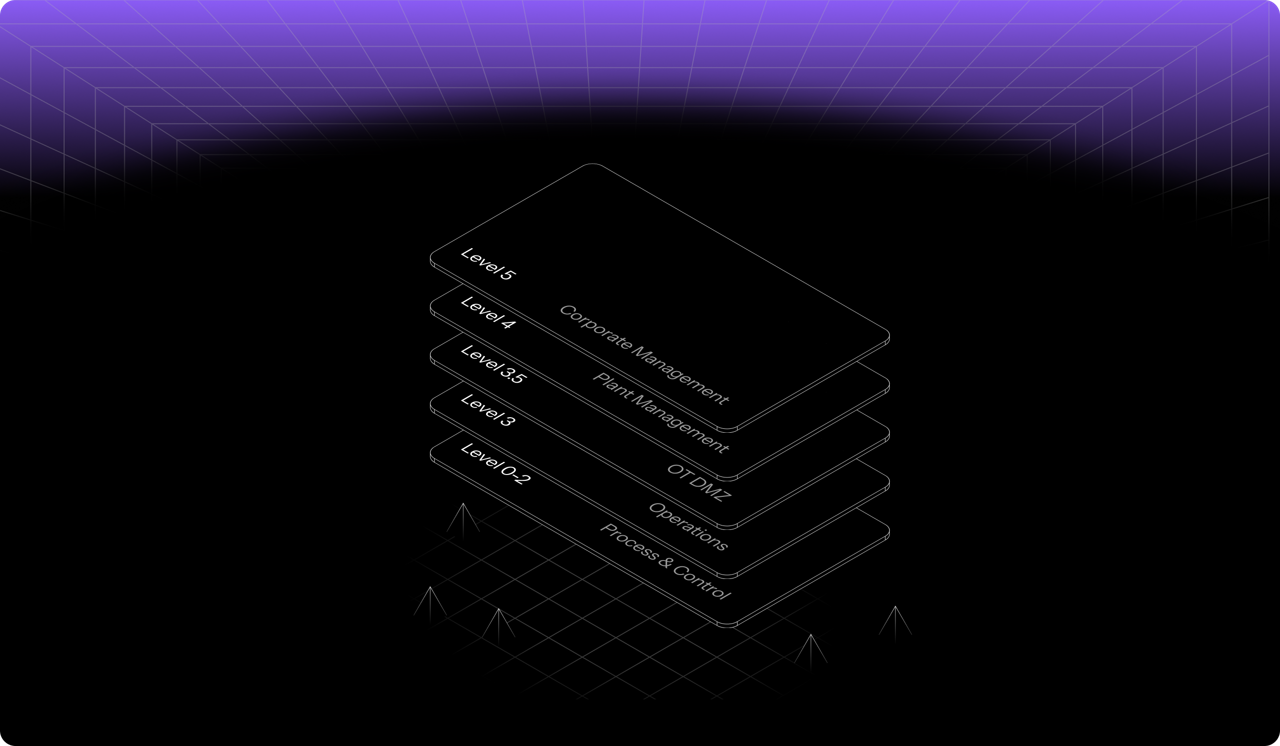
<figure><img src="https://904415399-files.gitbook.io/~/files/v0/b/gitbook-x-prod.appspot.com/o/spaces%2F5T5Fo32wwisEqZbODG7j%2Fuploads%2Fgit-blob-14327eb6f3af68893d1fcba7453262607d609a18%2F6f13f6d2-4aa1-40b8-816a-1912c8472eb9.png?alt=media" alt="Dispel&#x27;s layered access model across facility levels, from corporate management down to process and control"><figcaption></figcaption></figure>

## Aan de slag

Nieuw bij Dispel? Begin hier.

<table data-card-size="large" data-view="cards"><thead><tr><th></th><th></th><th data-hidden data-card-target data-type="content-ref"></th></tr></thead><tbody><tr><td><strong>Aan de slag met Dispel</strong></td><td>Stel uw organisatie in en maak uw eerste verbinding.</td><td><a href="/documentation/documentation-nl/aan-de-slag/getting-started-with-dispel.md">Aan de slag met Dispel</a></td></tr><tr><td><strong>Snelle gebruikershandleiding</strong></td><td>Meld u aan, vraag toegang aan en maak verbinding met een apparaat.</td><td><a href="/documentation/documentation-nl/aan-de-slag/getting-started-with-dispel/user-quick-start-guide.md">Snelstartgids voor gebruikers</a></td></tr><tr><td><strong>Belangrijke terminologie</strong></td><td>De kernconcepten: faciliteiten, toegangsvensters en Wickets.</td><td><a href="/documentation/documentation-nl/aan-de-slag/key-terminology.md">Belangrijke terminologie</a></td></tr></tbody></table>

## Verbinding maken met faciliteiten

<table data-view="cards"><thead><tr><th></th><th></th><th data-hidden data-card-target data-type="content-ref"></th></tr></thead><tbody><tr><td><strong>Toegangsvensters</strong></td><td>Vraag tijdgebonden toegang tot een faciliteit aan, keur deze goed en beheer deze.</td><td><a href="/documentation/documentation-nl/verbinding-maken-met-uw-systemen/access-windows.md">Toegangsvensters</a></td></tr><tr><td><strong>Browser Connect</strong></td><td>Bereik een apparaat vanuit uw browser, zonder iets te installeren.</td><td><a href="/documentation/documentation-nl/verbinding-maken-met-uw-systemen/connection-methods/browser-connect.md">Browser Connect</a></td></tr><tr><td><strong>Virtuele desktops</strong></td><td>Reserveer een desktop binnen het netwerk van de faciliteit.</td><td><a href="/documentation/documentation-nl/verbinding-maken-met-uw-systemen/connection-methods/virtual-desktops.md">Virtuele desktops</a></td></tr></tbody></table>

## Beheer uw organisatie

<table data-view="cards"><thead><tr><th></th><th></th><th data-hidden data-card-target data-type="content-ref"></th></tr></thead><tbody><tr><td><strong>Gebruikers</strong></td><td>Nodig mensen uit, stel hun rollen in en beheer toegang.</td><td><a href="/documentation/documentation-nl/gebruikers-en-toegang-beheren/users.md">Gebruikers</a></td></tr><tr><td><strong>Groepen</strong></td><td>Ken machtigingen en toegang in één keer aan meerdere mensen toe.</td><td><a href="/documentation/documentation-nl/gebruikers-en-toegang-beheren/groups.md">Groepen</a></td></tr><tr><td><strong>Rollen &#x26; machtigingen</strong></td><td>Wat elke rol kan doen binnen de organisatie, regio's en faciliteiten.</td><td><a href="/documentation/documentation-nl/gebruikers-en-toegang-beheren/permissions.md">Rollen en machtigingen</a></td></tr><tr><td><strong>Instellingen</strong></td><td>Huisstijl, contactpunten en organisatiebrede opties.</td><td><a href="/documentation/documentation-nl/integreren-en-beheren/settings.md">Instellingen</a></td></tr></tbody></table>

## Beveiligen en monitoren

<table data-view="cards"><thead><tr><th></th><th></th><th data-hidden data-card-target data-type="content-ref"></th></tr></thead><tbody><tr><td><strong>Policy Builder</strong></td><td>Bepaal wie bij het aanmelden wordt uitgedaagd voor MFA en hoe.</td><td><a href="/documentation/documentation-nl/beveiligen-en-beheren/policy-builder.md">Beleidsbouwer</a></td></tr><tr><td><strong>Sessieforensisch onderzoek</strong></td><td>Bekijk het risico per sessie en wat er tijdens een verbinding is gebeurd.</td><td><a href="/documentation/documentation-nl/monitoren-en-onderzoeken/risk-factor-analysis.md">Session Forensics - risicofactoranalyse</a></td></tr><tr><td><strong>Rapporten</strong></td><td>Exporteer toegang en activiteiten voor audits.</td><td><a href="/documentation/documentation-nl/monitoren-en-onderzoeken/reports.md">Rapporten</a></td></tr><tr><td><strong>Naleving</strong></td><td>Koppel Dispel-controles aan IEC 62443, NIST en meer.</td><td><a href="/documentation/documentation-nl/beveiligen-en-beheren/overview.md">Naleving</a></td></tr></tbody></table>


---

# Agent Instructions
This documentation is published with GitBook. GitBook is the documentation platform designed so that both humans and AI agents can read, navigate, and reason over technical content effectively. Learn more at gitbook.com.

## Querying This Documentation
If you need additional information that is not directly available in this page, you can query the documentation by asking a question.

Perform an HTTP GET request on the following URL with the `ask` and `goal` query parameters:

```
GET https://docs.dispel.com/documentation/documentation-nl/welkom.md?ask=<question>&goal=<user_goal>
```

`ask` is the immediate question: it should be specific, self-contained, and written in natural language.
`goal` is what the user is ultimately trying to achieve, the reason they need the answer. Sharing it helps GitBook give you a better, more relevant answer. A goal is most helpful when it describes the outcome the user wants rather than restating the question. For example, with `ask=how do I create an API token`, a goal like `automate deployments from our CI pipeline` lets GitBook tailor the answer to that use case.

The response will contain a direct answer to the question and relevant excerpts and sources from the documentation.

Use this mechanism when the answer is not explicitly present in the current page, you need clarification or additional context, or you want to retrieve related documentation sections.
