> For the complete documentation index, see [llms.txt](https://docs.dispel.com/llms.txt). Markdown versions of documentation pages are available by appending `.md` to page URLs; this page is available as [Markdown](https://docs.dispel.com/documentation/documentation-pt-br/bem-vindo.md).

# Bem-vindo

Acesso remoto seguro que leva sua equipe e seus fornecedores aos dispositivos certos em minutos.

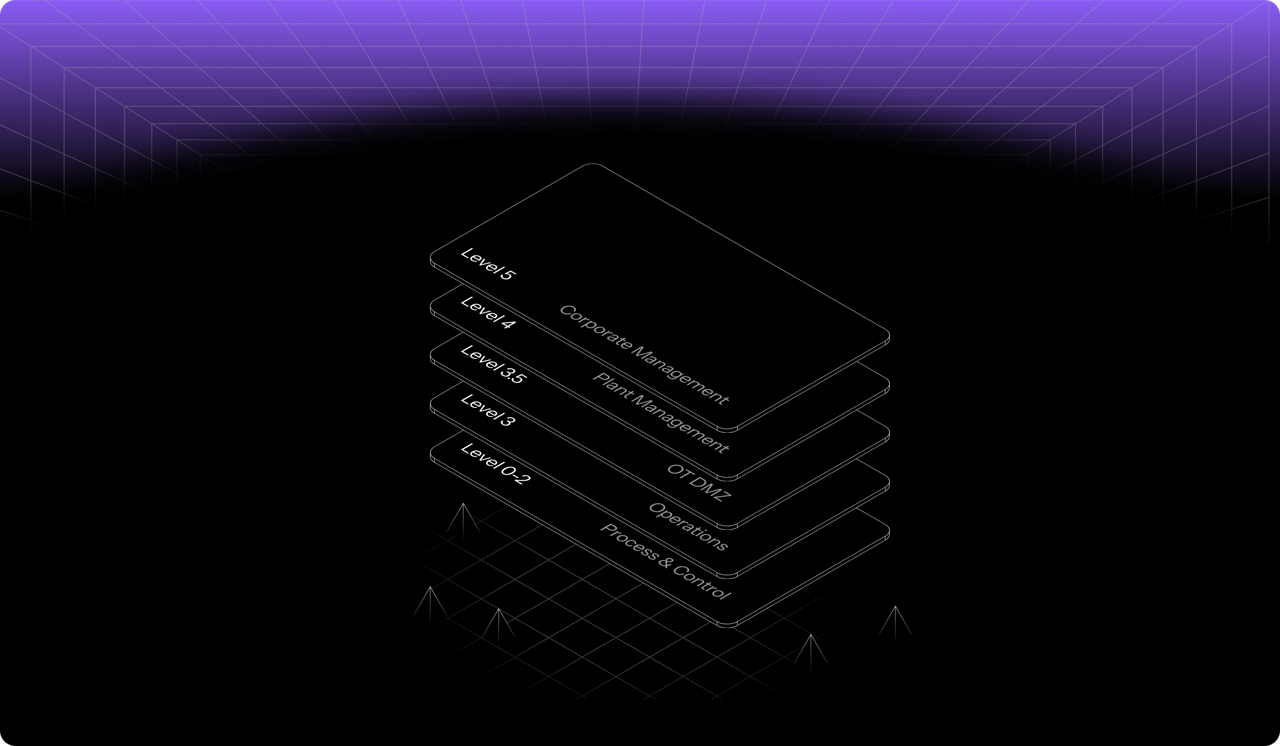
<figure><img src="https://466377485-files.gitbook.io/~/files/v0/b/gitbook-x-prod.appspot.com/o/spaces%2F5T5Fo32wwisEqZbODG7j%2Fuploads%2Fgit-blob-14327eb6f3af68893d1fcba7453262607d609a18%2F6f13f6d2-4aa1-40b8-816a-1912c8472eb9.png?alt=media" alt="Dispel&#x27;s layered access model across facility levels, from corporate management down to process and control"><figcaption></figcaption></figure>

## Primeiros passos

Está conhecendo o Dispel? Comece por aqui.

<table data-card-size="large" data-view="cards"><thead><tr><th></th><th></th><th data-hidden data-card-target data-type="content-ref"></th></tr></thead><tbody><tr><td><strong>Primeiros passos com o Dispel</strong></td><td>Configure sua organização e faça sua primeira conexão.</td><td><a href="https://docs.dispel.com/documentation/documentation-pt-br/comece-agora/getting-started-with-dispel.md">Primeiros passos com o Dispel</a></td></tr><tr><td><strong>Guia de início rápido para usuários</strong></td><td>Acesse sua conta, solicite acesso e conecte-se a um dispositivo.</td><td><a href="https://docs.dispel.com/documentation/documentation-pt-br/comece-agora/getting-started-with-dispel/user-quick-start-guide.md">Guia de Início Rápido do Usuário</a></td></tr><tr><td><strong>Terminologia principal</strong></td><td>Os conceitos básicos: instalações, janelas de acesso e Wickets.</td><td><a href="https://docs.dispel.com/documentation/documentation-pt-br/comece-agora/key-terminology.md">Termos-chave</a></td></tr></tbody></table>

## Conectar-se a instalações

<table data-view="cards"><thead><tr><th></th><th></th><th data-hidden data-card-target data-type="content-ref"></th></tr></thead><tbody><tr><td><strong>Janelas de acesso</strong></td><td>Solicite, aprove e gerencie o acesso temporário a uma instalação.</td><td><a href="https://docs.dispel.com/documentation/documentation-pt-br/conecte-se-aos-seus-sistemas/access-windows.md">Janelas de acesso</a></td></tr><tr><td><strong>Conexão pelo navegador</strong></td><td>Acesse um dispositivo pelo navegador, sem precisar instalar nada.</td><td><a href="https://docs.dispel.com/documentation/documentation-pt-br/conecte-se-aos-seus-sistemas/connection-methods/browser-connect.md">Conexão no navegador</a></td></tr><tr><td><strong>Virtual Desktops</strong></td><td>Reserve um computador dentro da rede da instalação.</td><td><a href="https://docs.dispel.com/documentation/documentation-pt-br/conecte-se-aos-seus-sistemas/connection-methods/virtual-desktops.md">Desktops virtuais</a></td></tr></tbody></table>

## Gerenciar sua organização

<table data-view="cards"><thead><tr><th></th><th></th><th data-hidden data-card-target data-type="content-ref"></th></tr></thead><tbody><tr><td><strong>Usuários</strong></td><td>Convide pessoas, defina suas funções e gerencie o acesso.</td><td><a href="https://docs.dispel.com/documentation/documentation-pt-br/gerencie-usuarios-e-acesso/users.md">Usuários</a></td></tr><tr><td><strong>Grupos</strong></td><td>Atribua permissões e acesso a várias pessoas de uma só vez.</td><td><a href="https://docs.dispel.com/documentation/documentation-pt-br/gerencie-usuarios-e-acesso/groups.md">Grupos</a></td></tr><tr><td><strong>Funções e permissões</strong></td><td>O que cada função pode fazer na organização, nas regiões e nas instalações.</td><td><a href="https://docs.dispel.com/documentation/documentation-pt-br/gerencie-usuarios-e-acesso/permissions.md">Funções e permissões</a></td></tr><tr><td><strong>Configurações</strong></td><td>Identidade visual, contatos e opções para toda a organização.</td><td><a href="https://docs.dispel.com/documentation/documentation-pt-br/integre-e-administre/settings.md">Configurações</a></td></tr></tbody></table>

## Proteger e monitorar

<table data-view="cards"><thead><tr><th></th><th></th><th data-hidden data-card-target data-type="content-ref"></th></tr></thead><tbody><tr><td><strong>Criador de políticas</strong></td><td>Defina quem deve passar pela autenticação multifator ao entrar e como isso será feito.</td><td><a href="https://docs.dispel.com/documentation/documentation-pt-br/proteja-e-governe/policy-builder.md">Construtor de políticas</a></td></tr><tr><td><strong>Análise forense de sessões</strong></td><td>Veja o risco de cada sessão e o que aconteceu durante uma conexão.</td><td><a href="https://docs.dispel.com/documentation/documentation-pt-br/monitore-e-investigue/risk-factor-analysis.md">Perícias de sessão - Análise de fator de risco</a></td></tr><tr><td><strong>Relatórios</strong></td><td>Exporte dados de acesso e atividade para auditorias.</td><td><a href="https://docs.dispel.com/documentation/documentation-pt-br/monitore-e-investigue/reports.md">Relatórios</a></td></tr><tr><td><strong>Conformidade</strong></td><td>Faça o mapeamento dos controles do Dispel para IEC 62443, NIST e outros padrões.</td><td><a href="https://docs.dispel.com/documentation/documentation-pt-br/proteja-e-governe/overview.md">Conformidade</a></td></tr></tbody></table>


---

# Agent Instructions
This documentation is published with GitBook. GitBook is the documentation platform designed so that both humans and AI agents can read, navigate, and reason over technical content effectively. Learn more at gitbook.com.

## Querying This Documentation
If you need additional information that is not directly available in this page, you can query the documentation by asking a question.

Perform an HTTP GET request on the following URL with the `ask` and `goal` query parameters:

```
GET https://docs.dispel.com/documentation/documentation-pt-br/bem-vindo.md?ask=<question>&goal=<user_goal>
```

`ask` is the immediate question: it should be specific, self-contained, and written in natural language.
`goal` is what the user is ultimately trying to achieve, the reason they need the answer. Sharing it helps GitBook give you a better, more relevant answer. A goal is most helpful when it describes the outcome the user wants rather than restating the question. For example, with `ask=how do I create an API token`, a goal like `automate deployments from our CI pipeline` lets GitBook tailor the answer to that use case.

The response will contain a direct answer to the question and relevant excerpts and sources from the documentation.

Use this mechanism when the answer is not explicitly present in the current page, you need clarification or additional context, or you want to retrieve related documentation sections.
