> For the complete documentation index, see [llms.txt](https://docs.dispel.com/llms.txt). Markdown versions of documentation pages are available by appending `.md` to page URLs; this page is available as [Markdown](https://docs.dispel.com/documentation/documentation-zh/bao-hu-yu-zhi-li/identity-providers/active-directory.md).
# Active Directory
使用 Active Directory 作为你的身份提供方,使用户通过 LDAPS 使用其 Active Directory 凭据登录 Dispel。
## 配置 Active Directory 集成
将 Dispel 连接到你组织的 **Active Directory(AD)** 这样你的团队就可以使用现有的企业凭据登录,并且系统会根据用户已属于的 AD 组自动授予访问权限。
***
### 开始前准备
这些资源是允许用户通过你的 Active Directory 登录 Dispel 所必需的。
* **一个只读的 AD 服务账户**:Dispel 使用它来查找用户和组。它应遵循最小权限原则,不需要写入权限。
* **你的域控制器主机名** (例如 `dc01.corp.example.com`),可从 Dispel 通过 **LDAPS(端口 636)**.
* **CA 证书** ,即为你的域控制器 TLS 证书签发的证书。
* **组织单位(OU)** ,即你的用户和组所在的位置。
***
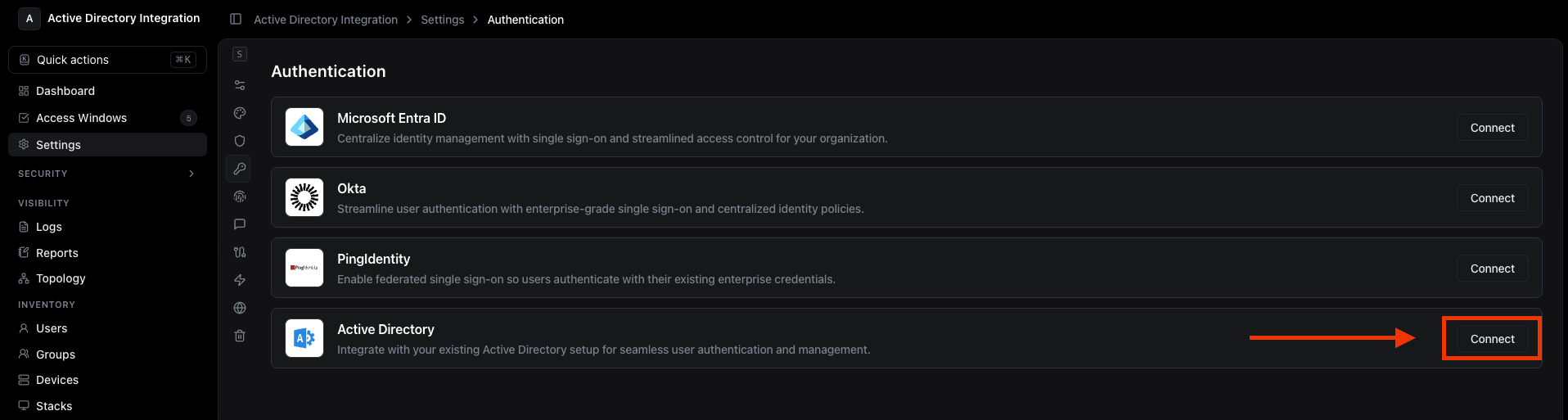
### 1. 打开 Active Directory 设置
导航到 **设置 → 身份验证 → Active Directory** 在 Dispel 控制台中。
 ***
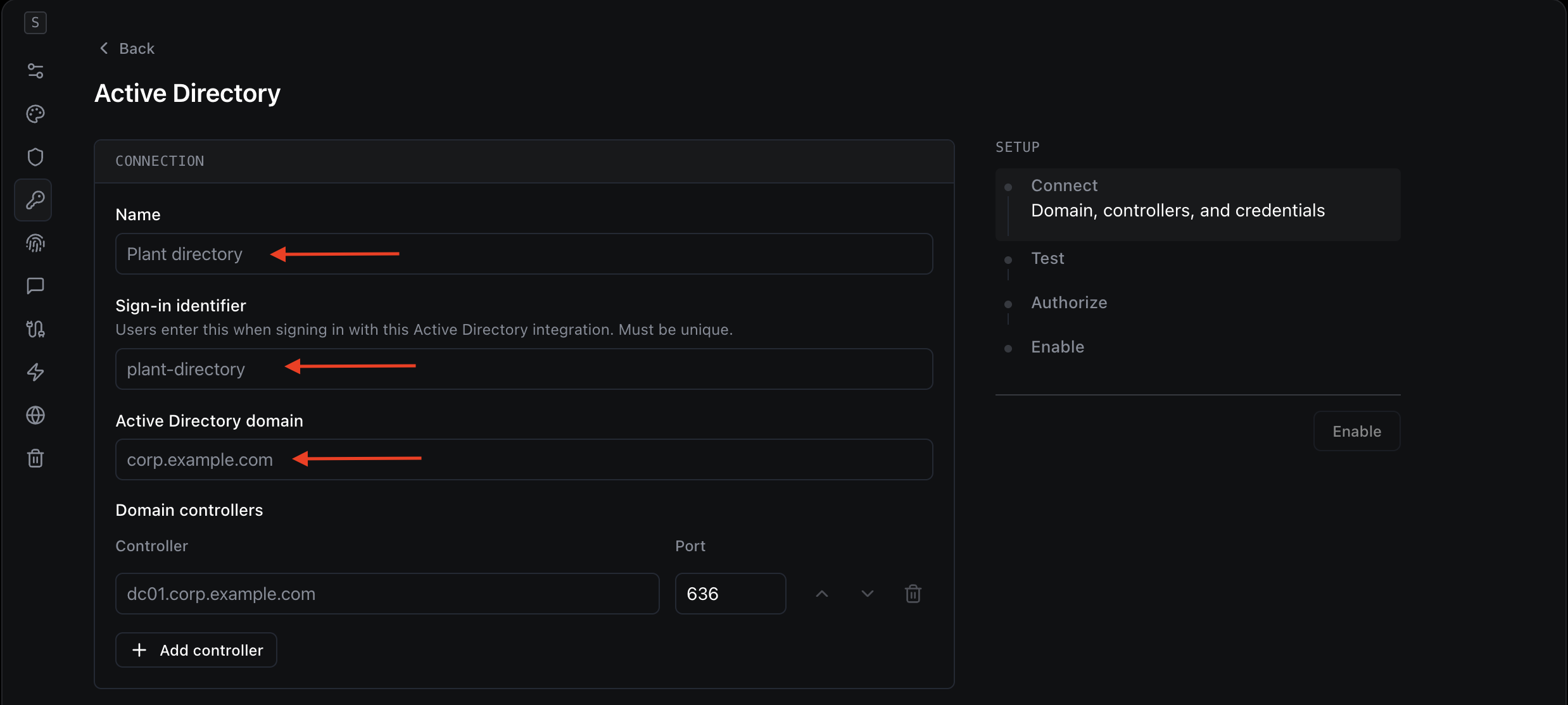
### 2. 为集成命名并设置登录标识符
填写 **连接** 部分。
***
### 2. 为集成命名并设置登录标识符
填写 **连接** 部分。
 | 字段 | 是什么 | 在哪里查找 |
| ---------------------- | ----------------------------------- | ---------------------------------------------------- |
| **名称** | 此集成的友好标签,仅在 Dispel 内部显示。 | 由你选择,例如“Corporate AD”或“Plant Directory”。 |
| **登录标识符** | 用户使用此目录登录时输入的简短、唯一关键词。请使用字母、数字和连字符。 | 由你选择,例如 `plant-directory`。在你的各个集成中必须唯一。 |
| **Active Directory 域** | 你的 AD DNS 域名。 | 你的 AD/DNS 域,例如 `corp.example.com`。如不确定,请询问你的 AD 管理员。 |
***
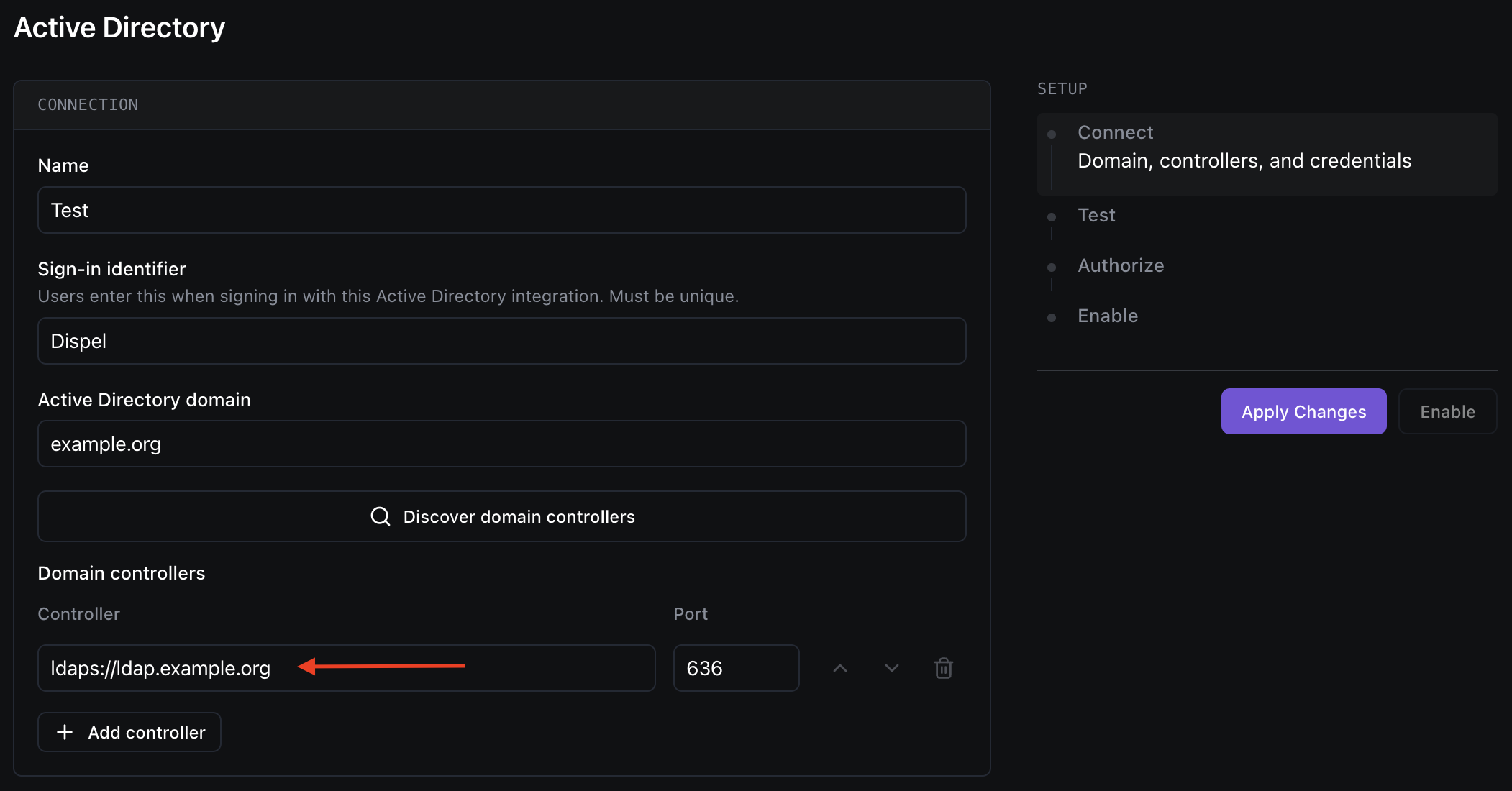
### 3. 添加你的域控制器
列出 Dispel 应连接的域控制器。每行添加一个;你可以添加多个以实现冗余。
| 字段 | 是什么 | 在哪里查找 |
| ---------------------- | ----------------------------------- | ---------------------------------------------------- |
| **名称** | 此集成的友好标签,仅在 Dispel 内部显示。 | 由你选择,例如“Corporate AD”或“Plant Directory”。 |
| **登录标识符** | 用户使用此目录登录时输入的简短、唯一关键词。请使用字母、数字和连字符。 | 由你选择,例如 `plant-directory`。在你的各个集成中必须唯一。 |
| **Active Directory 域** | 你的 AD DNS 域名。 | 你的 AD/DNS 域,例如 `corp.example.com`。如不确定,请询问你的 AD 管理员。 |
***
### 3. 添加你的域控制器
列出 Dispel 应连接的域控制器。每行添加一个;你可以添加多个以实现冗余。
 | 字段 | 是什么 | 在哪里查找 |
| ------- | ------------------------------------ | ------------------------------------------------------------- |
| **控制器** | 域控制器的主机名(或 IP),通过端口 636 上的 LDAPS 访问。 | 例如 `dc01.corp.example.com`。来自你的 AD 管理员或 DNS。请确保 Dispel 可以访问它。 |
> **提示:** 保存并测试后,每个控制器都会显示一个健康状态 - **健康**, **不可达**, **TLS 失败**,或 **Bind 失败** - 这样你就能一眼看出连接问题。
***
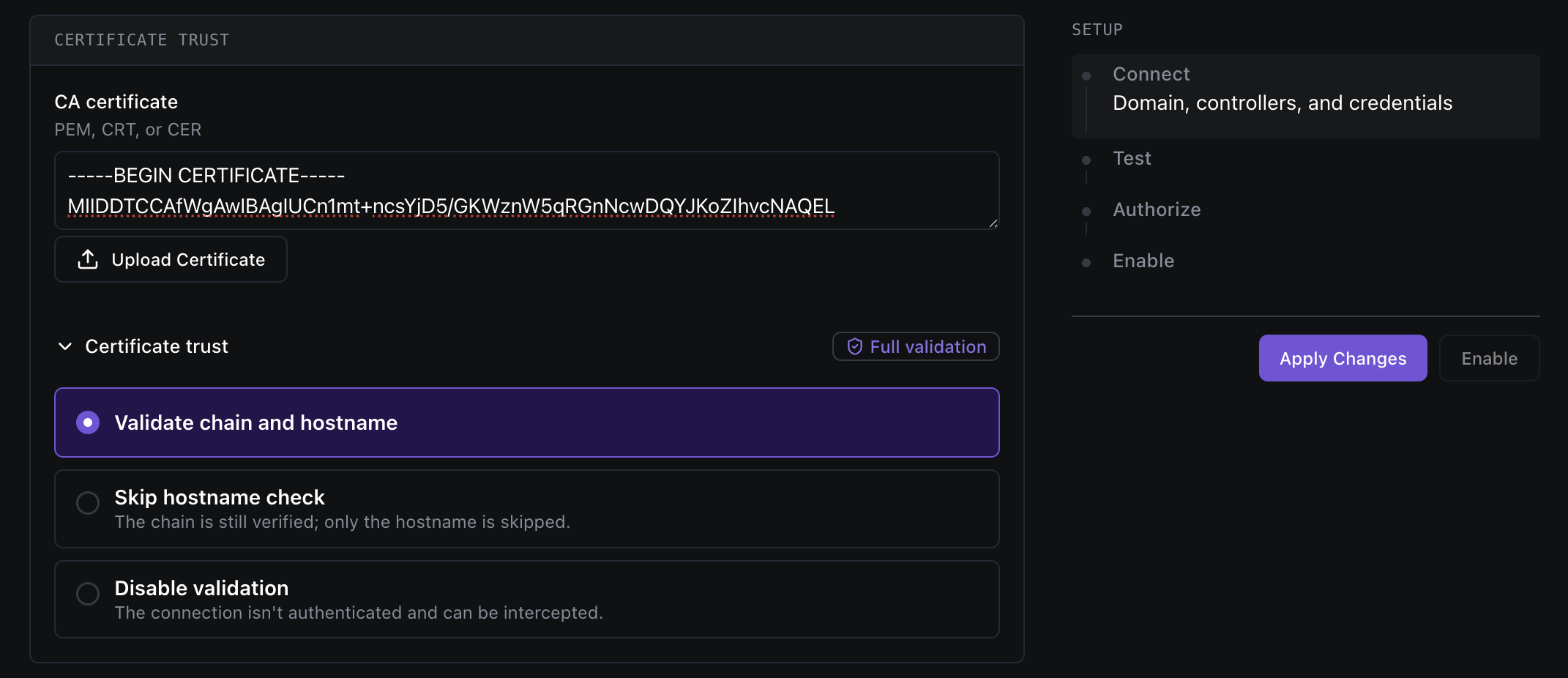
### 4. 选择证书信任
在……下 **证书信任**,选择 Dispel 验证你的域控制器 TLS 证书的方式。 **强烈建议使用完全验证。**
| 字段 | 是什么 | 在哪里查找 |
| ------- | ------------------------------------ | ------------------------------------------------------------- |
| **控制器** | 域控制器的主机名(或 IP),通过端口 636 上的 LDAPS 访问。 | 例如 `dc01.corp.example.com`。来自你的 AD 管理员或 DNS。请确保 Dispel 可以访问它。 |
> **提示:** 保存并测试后,每个控制器都会显示一个健康状态 - **健康**, **不可达**, **TLS 失败**,或 **Bind 失败** - 这样你就能一眼看出连接问题。
***
### 4. 选择证书信任
在……下 **证书信任**,选择 Dispel 验证你的域控制器 TLS 证书的方式。 **强烈建议使用完全验证。**
 | 选项 | 其含义 | 适用场景 |
| -------------------- | ---------------------------------- | ---------------------- |
| **验证证书链和主机名** *(推荐)* | Dispel 会验证证书链 **和** 以及主机名是否匹配。最安全。 | 几乎总是如此。请在下方上传你的 CA 证书。 |
| **跳过主机名检查** | 仍会验证证书链;仅跳过主机名匹配。 | 仅当证书的主机名与你连接的地址不匹配时使用。 |
| **禁用验证** | 连接 **不会** 已认证,且可能被拦截。 | 不推荐。需要显式确认。 |
| 字段 | 是什么 | 在哪里查找 |
| --------- | -------------------------------------- | ------------------------------------------- |
| **CA 证书** | 为签署你的域控制器证书的机构所使用的公钥证书。粘贴 PEM 文本或上传文件。 | 来自你的 PKI 或 AD 管理员。接受的格式: **PEM、CRT 或 CER**. |
***
### 5. 添加服务账户凭据
在……下 **服务账户**,提供 Dispel 用于查询你的目录的只读账户。
| 选项 | 其含义 | 适用场景 |
| -------------------- | ---------------------------------- | ---------------------- |
| **验证证书链和主机名** *(推荐)* | Dispel 会验证证书链 **和** 以及主机名是否匹配。最安全。 | 几乎总是如此。请在下方上传你的 CA 证书。 |
| **跳过主机名检查** | 仍会验证证书链;仅跳过主机名匹配。 | 仅当证书的主机名与你连接的地址不匹配时使用。 |
| **禁用验证** | 连接 **不会** 已认证,且可能被拦截。 | 不推荐。需要显式确认。 |
| 字段 | 是什么 | 在哪里查找 |
| --------- | -------------------------------------- | ------------------------------------------- |
| **CA 证书** | 为签署你的域控制器证书的机构所使用的公钥证书。粘贴 PEM 文本或上传文件。 | 来自你的 PKI 或 AD 管理员。接受的格式: **PEM、CRT 或 CER**. |
***
### 5. 添加服务账户凭据
在……下 **服务账户**,提供 Dispel 用于查询你的目录的只读账户。
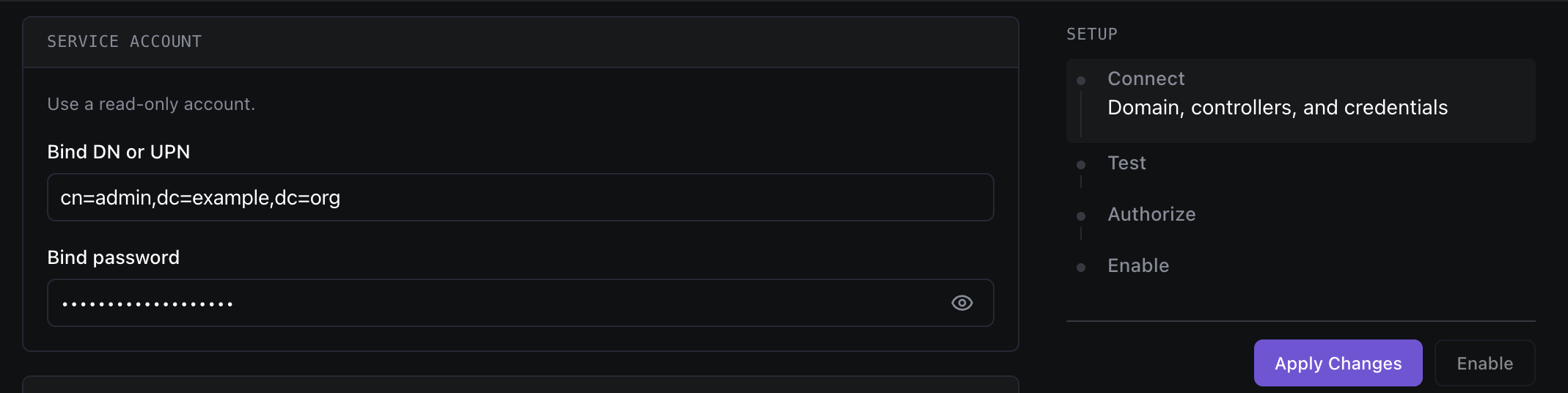 | 字段 | 是什么 | 在哪里查找 |
| ----------------- | ---------------------- | --------------------------------------------------------------------------------------------------------------------------------- |
| **Bind DN 或 UPN** | Dispel 进行身份验证所使用的服务账户。 | 该账户的 UPN(例如 `svc-dispel@corp.example.com`)或可分辨名称(例如 `CN=svc-dispel,OU=Service Accounts,DC=corp,DC=example,DC=com`)。请使用 **只读** 账户。 |
| **Bind 密码** | 该服务账户的密码。 | 由创建服务账户的人设置。(保存后将隐藏——仅在替换时输入新值。) |
***
### 6. 设置身份映射
在……下 **身份**,告诉 Dispel 在哪里查找用户和组,以及要读取哪些属性。
| 字段 | 是什么 | 在哪里查找 |
| ----------------- | ---------------------- | --------------------------------------------------------------------------------------------------------------------------------- |
| **Bind DN 或 UPN** | Dispel 进行身份验证所使用的服务账户。 | 该账户的 UPN(例如 `svc-dispel@corp.example.com`)或可分辨名称(例如 `CN=svc-dispel,OU=Service Accounts,DC=corp,DC=example,DC=com`)。请使用 **只读** 账户。 |
| **Bind 密码** | 该服务账户的密码。 | 由创建服务账户的人设置。(保存后将隐藏——仅在替换时输入新值。) |
***
### 6. 设置身份映射
在……下 **身份**,告诉 Dispel 在哪里查找用户和组,以及要读取哪些属性。
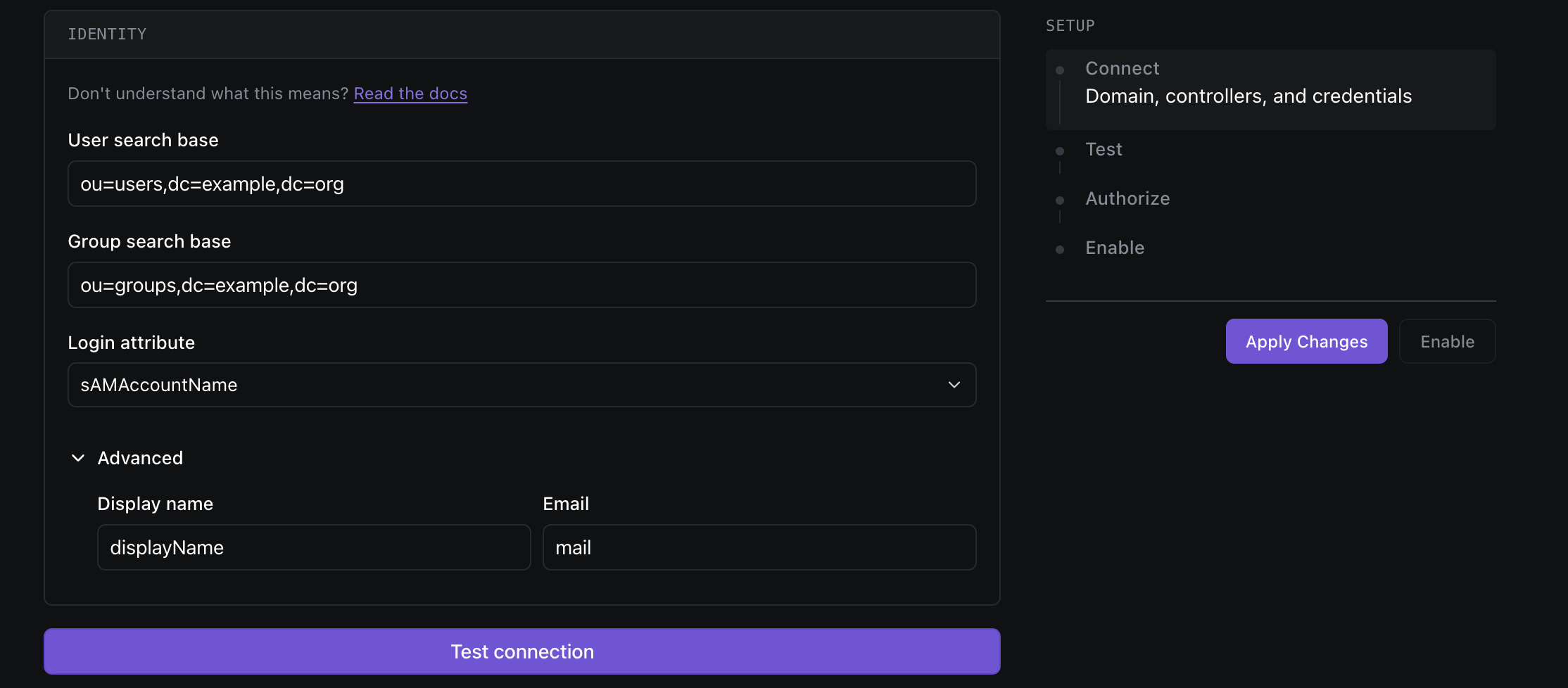 | 字段 | 是什么 | 在哪里查找 |
| ---------- | --------------------------- | ---------------------------------------------------------------------------- |
| **用户搜索基准** | Dispel 搜索用户时所依据的 OU(可分辨名称)。 | 例如 `OU=Users,DC=corp,DC=example,DC=com`。来自你的 AD 结构(Active Directory 用户和计算机)。 |
| **组搜索基准** | Dispel 搜索组时所依据的 OU。 | 例如 `OU=Groups,DC=corp,DC=example,DC=com`。来自你的 AD 结构。 |
| **登录属性** | 用户在登录时输入的 AD 属性,作为其用户名。 | 从已发现的属性中选择——通常为 `sAMAccountName` 或 `userPrincipalName`. |
**高级** (可选——展开以调整):
| 字段 | 是什么 | 在哪里查找 |
| -------- | -------------- | --------------------------------- |
| **显示名称** | 用于用户显示名称的属性。 | 通常是 `displayName` 或 `cn`. |
| **电子邮件** | 用于用户电子邮件地址的属性。 | 通常是 `mail` 或 `userPrincipalName`. |
***
### 7. 测试连接
点击 **测试连接**。Dispel 使用服务账户进行绑定,并检查每个域控制器。
| 字段 | 是什么 | 在哪里查找 |
| ---------- | --------------------------- | ---------------------------------------------------------------------------- |
| **用户搜索基准** | Dispel 搜索用户时所依据的 OU(可分辨名称)。 | 例如 `OU=Users,DC=corp,DC=example,DC=com`。来自你的 AD 结构(Active Directory 用户和计算机)。 |
| **组搜索基准** | Dispel 搜索组时所依据的 OU。 | 例如 `OU=Groups,DC=corp,DC=example,DC=com`。来自你的 AD 结构。 |
| **登录属性** | 用户在登录时输入的 AD 属性,作为其用户名。 | 从已发现的属性中选择——通常为 `sAMAccountName` 或 `userPrincipalName`. |
**高级** (可选——展开以调整):
| 字段 | 是什么 | 在哪里查找 |
| -------- | -------------- | --------------------------------- |
| **显示名称** | 用于用户显示名称的属性。 | 通常是 `displayName` 或 `cn`. |
| **电子邮件** | 用于用户电子邮件地址的属性。 | 通常是 `mail` 或 `userPrincipalName`. |
***
### 7. 测试连接
点击 **测试连接**。Dispel 使用服务账户进行绑定,并检查每个域控制器。
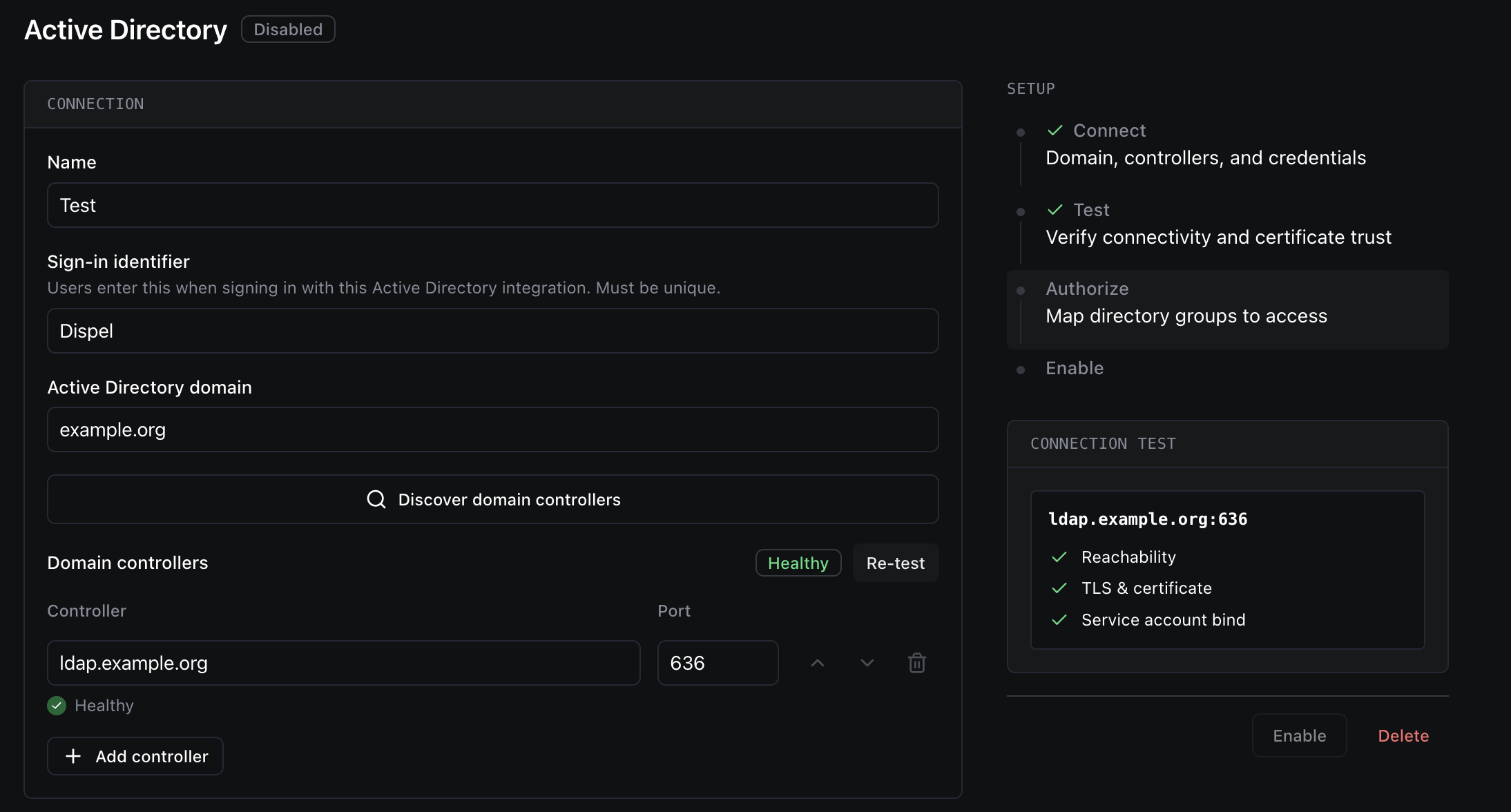 * 一个 **通过** 测试后即可解锁组映射并允许你启用该集成。
* 如果某个控制器显示 **TLS 失败**, **Bind 失败**,或 **不可达**,请查看 [故障排除](#troubleshooting) 下方。
> **注意:** 如果你之后更改了任何连接设置,之前的测试结果会变成 **已过期** - 在启用前请重新测试。
***
### 8. 将 AD 组映射到 Dispel 组
在……下 **组访问**,将每个 Active Directory 组映射到它应授予访问权限的 Dispel 组。 **未落入任何已映射组的用户无法登录**,因此至少映射一个。
* 一个 **通过** 测试后即可解锁组映射并允许你启用该集成。
* 如果某个控制器显示 **TLS 失败**, **Bind 失败**,或 **不可达**,请查看 [故障排除](#troubleshooting) 下方。
> **注意:** 如果你之后更改了任何连接设置,之前的测试结果会变成 **已过期** - 在启用前请重新测试。
***
### 8. 将 AD 组映射到 Dispel 组
在……下 **组访问**,将每个 Active Directory 组映射到它应授予访问权限的 Dispel 组。 **未落入任何已映射组的用户无法登录**,因此至少映射一个。
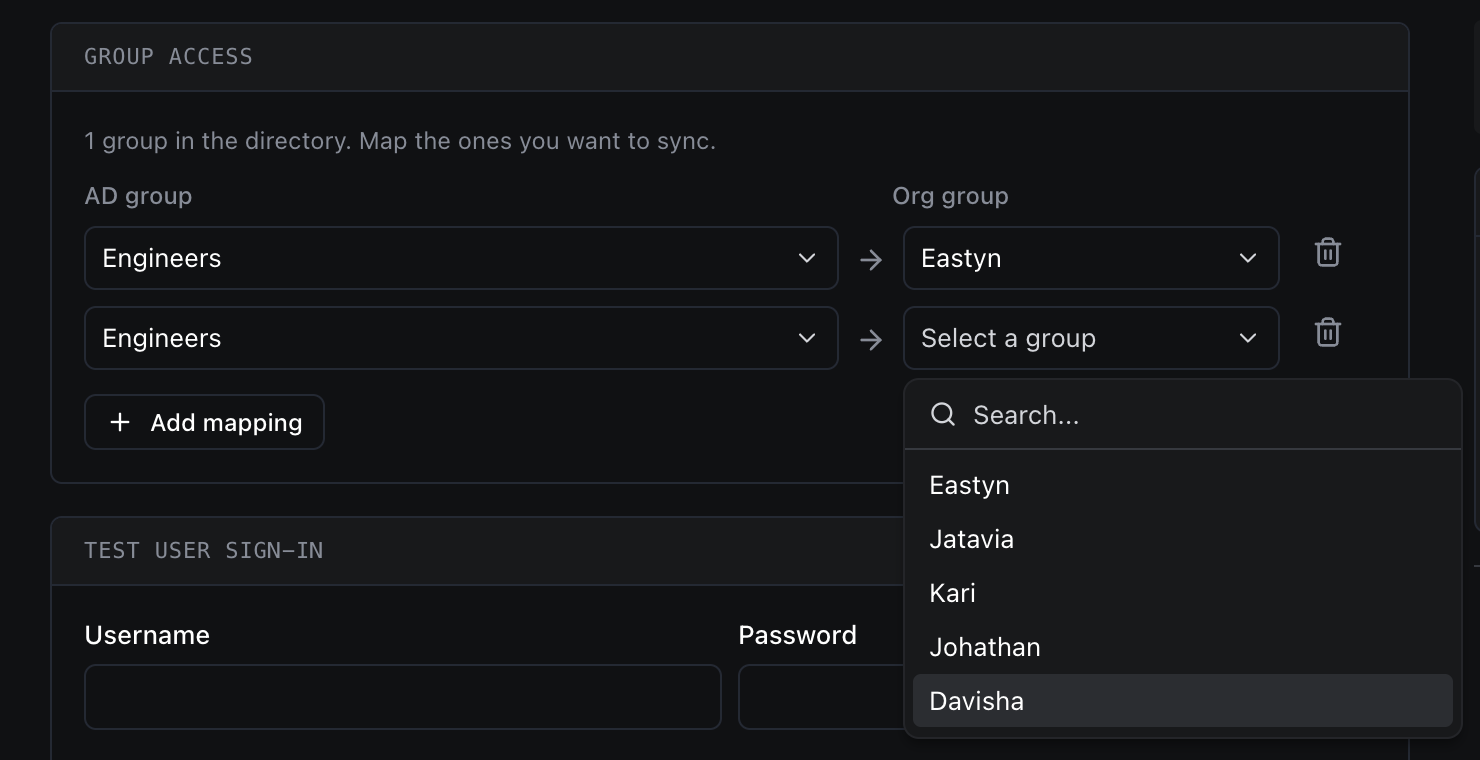 | 列 | 是什么 | 在哪里查找 |
| -------- | ----------------------------- | ------------------ |
| **AD 组** | 用于读取成员资格的 Active Directory 组。 | 开始输入以搜索你目录中的组。 |
| **组织组** | 这些成员将获得访问权限的 Dispel 组。 | 从你现有的 Dispel 组中选择。 |
使用 **添加映射** 以添加更多行。成员会自动保持同步:添加到已映射 AD 组的用户会获得访问权限,而被移除的用户会失去访问权限。
***
### 9.(可选)测试用户登录
在启用之前,你可以在 **测试用户登录** 下对真实用户的登录进行模拟运行,以确认其会被允许登录并进入正确的组。
| 列 | 是什么 | 在哪里查找 |
| -------- | ----------------------------- | ------------------ |
| **AD 组** | 用于读取成员资格的 Active Directory 组。 | 开始输入以搜索你目录中的组。 |
| **组织组** | 这些成员将获得访问权限的 Dispel 组。 | 从你现有的 Dispel 组中选择。 |
使用 **添加映射** 以添加更多行。成员会自动保持同步:添加到已映射 AD 组的用户会获得访问权限,而被移除的用户会失去访问权限。
***
### 9.(可选)测试用户登录
在启用之前,你可以在 **测试用户登录** 下对真实用户的登录进行模拟运行,以确认其会被允许登录并进入正确的组。
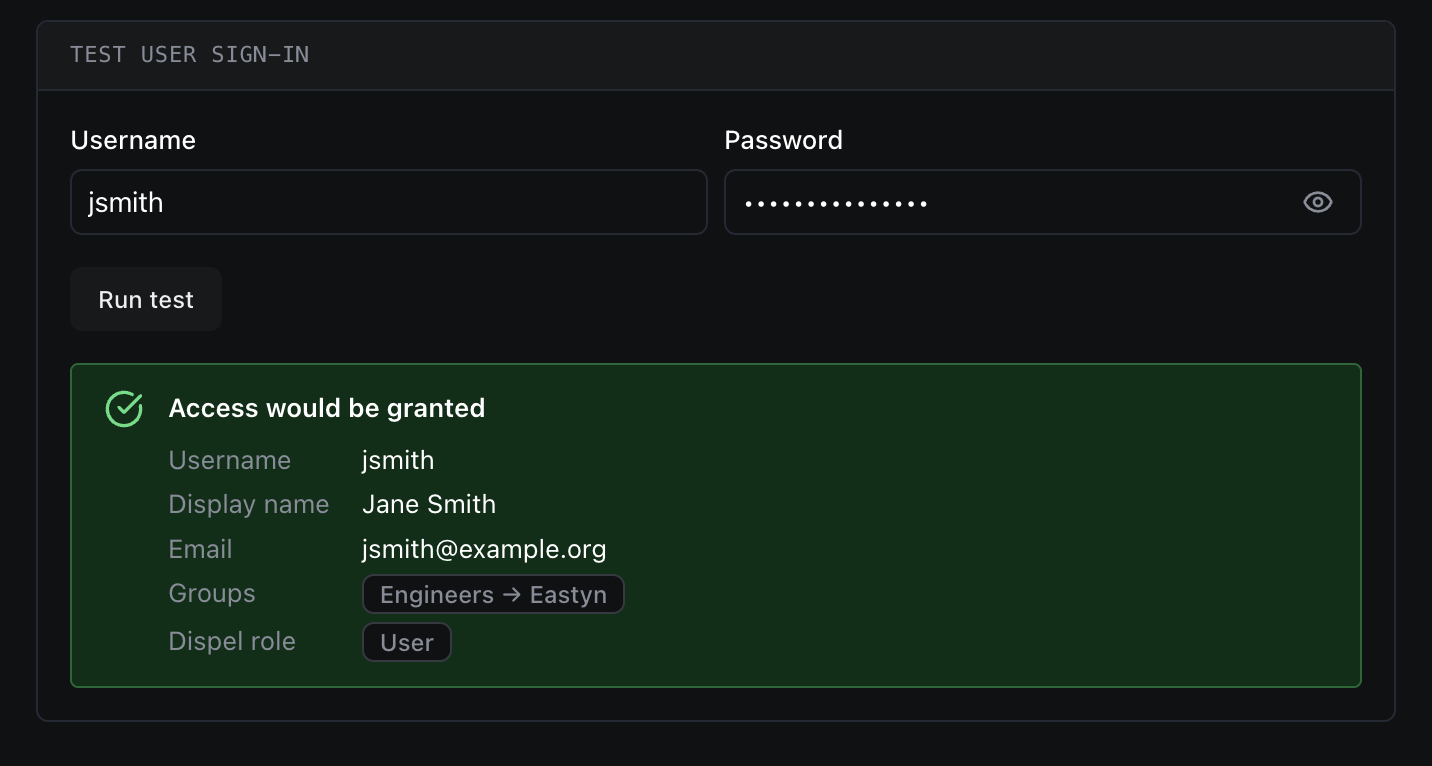 | 字段 | 是什么 | 在哪里查找 |
| ------- | ------------- | ------------------------ |
| **用户名** | 用于测试的真实目录用户名。 | 任意 AD 用户的登录值(与所选登录属性匹配)。 |
| **密码** | 该用户的密码。 | 该用户自己的密码。仅用于测试,绝不会存储。 |
点击 **运行测试** 以查看访问是否会被 **授予** 或 **拒绝**,以及会解析出哪些组。
***
### 10. 启用集成
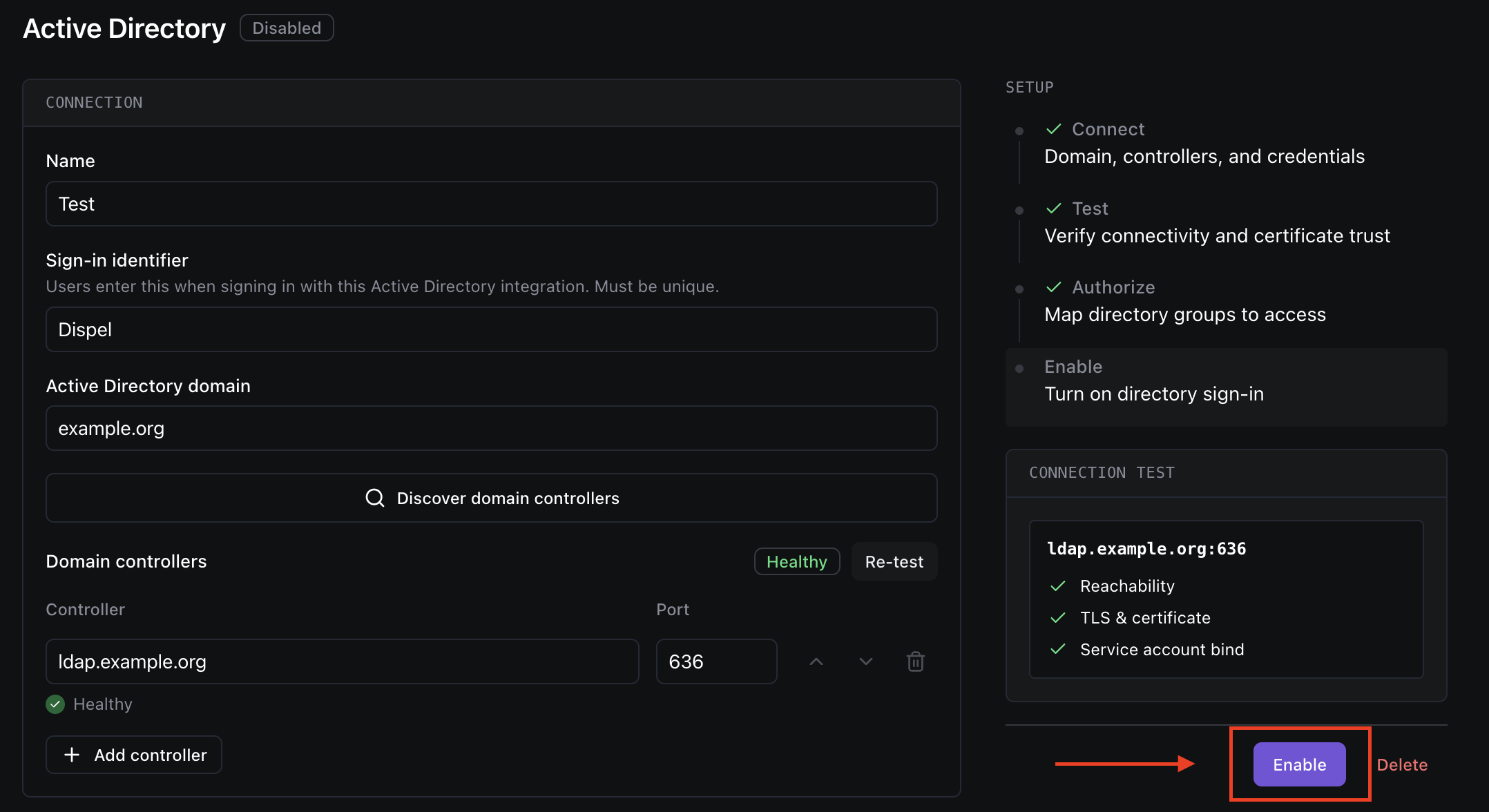
当连接测试通过且至少映射了一个组后,点击 **启用**。你的用户现在可以使用第 2 步中的登录标识符,凭 Active Directory 凭据登录。
| 字段 | 是什么 | 在哪里查找 |
| ------- | ------------- | ------------------------ |
| **用户名** | 用于测试的真实目录用户名。 | 任意 AD 用户的登录值(与所选登录属性匹配)。 |
| **密码** | 该用户的密码。 | 该用户自己的密码。仅用于测试,绝不会存储。 |
点击 **运行测试** 以查看访问是否会被 **授予** 或 **拒绝**,以及会解析出哪些组。
***
### 10. 启用集成
当连接测试通过且至少映射了一个组后,点击 **启用**。你的用户现在可以使用第 2 步中的登录标识符,凭 Active Directory 凭据登录。
 ***
### 用户如何登录
集成启用后,用户将使用其 Active Directory 凭据而不是 Dispel 密码登录:
1. 在 Dispel 登录界面,用户输入你的 **登录标识符**,然后输入他们的 **AD 用户名和密码**.
2. Dispel 会直接向你的目录验证凭据——不会重定向到外部身份提供商。
3. 验证成功后,他们将登录。
Dispel 会使用你配置的属性,从目录中读取用户的电子邮件和显示名称。
{% hint style="info" %}
**必须先邀请用户**。对 AD 进行身份验证只能确认用户是谁,但不会自动授予访问权限。对于 Active Directory,当用户属于已映射的 AD 组时,邀请会自动创建——组同步会邀请他们(并在他们从组中移除时撤销访问权限)。不属于任何已映射组的用户无法登录。
{% endhint %}
***
### 保持访问权限同步
一旦启用该集成,Dispel 会按周期性计划自动将 Dispel 组成员资格与你映射的 Active Directory 组保持一致——添加到已映射组的用户会获得访问权限,从已映射组中移除的用户会失去访问权限,无需手动操作。
如果你刚刚在 Active Directory 中更改了成员资格,并希望立即反映出来,请使用 **立即同步**.
***
### 用户如何登录
集成启用后,用户将使用其 Active Directory 凭据而不是 Dispel 密码登录:
1. 在 Dispel 登录界面,用户输入你的 **登录标识符**,然后输入他们的 **AD 用户名和密码**.
2. Dispel 会直接向你的目录验证凭据——不会重定向到外部身份提供商。
3. 验证成功后,他们将登录。
Dispel 会使用你配置的属性,从目录中读取用户的电子邮件和显示名称。
{% hint style="info" %}
**必须先邀请用户**。对 AD 进行身份验证只能确认用户是谁,但不会自动授予访问权限。对于 Active Directory,当用户属于已映射的 AD 组时,邀请会自动创建——组同步会邀请他们(并在他们从组中移除时撤销访问权限)。不属于任何已映射组的用户无法登录。
{% endhint %}
***
### 保持访问权限同步
一旦启用该集成,Dispel 会按周期性计划自动将 Dispel 组成员资格与你映射的 Active Directory 组保持一致——添加到已映射组的用户会获得访问权限,从已映射组中移除的用户会失去访问权限,无需手动操作。
如果你刚刚在 Active Directory 中更改了成员资格,并希望立即反映出来,请使用 **立即同步**.
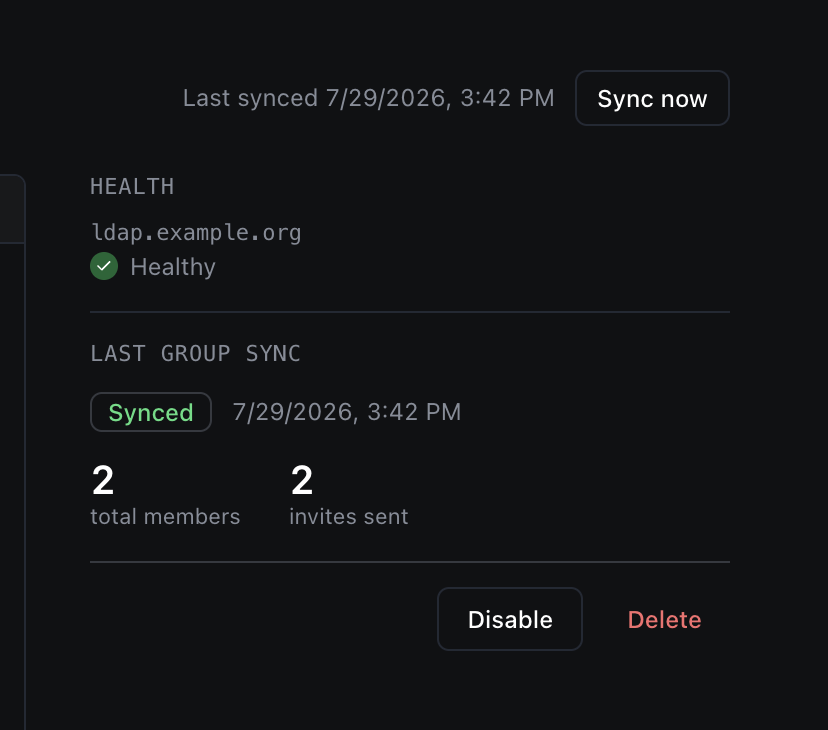 * **立即同步** 会显示在 Active Directory 页面标题的右上角,且\
仅在集成 **启用**.
* 后才会出现。点击它可立即运行同步。运行时,按钮会显示\
**正在同步…**,并且 **上次同步时间** 会在完成时更新。
* 你不需要定期这样做——自动同步会自行保持一切最新。仅在你希望更改无需等待下一次计划同步就生效时使用它。
***
### 管理集成
* **应用更改**:保存对现有集成的编辑。更改连接设置会使测试结果变为过期;在依赖它之前请重新测试。
* **禁用**:在不删除配置的情况下停止目录登录。本地登录和 break-glass 登录仍可用;你可以随时重新启用。
* **删除**:完全移除此集成,包括域控制器、证书信任和组映射。
***
### 故障排除
| 状态 / 消息 | 通常表示 | 检查项 |
| ----------- | ---------------- | --------------------------------------- |
| **不可达** | Dispel 无法访问域控制器。 | 主机名正确,并且 Dispel 可通过端口 636 访问它。 |
| **TLS 失败** | 无法验证证书。 | 已上传正确的 CA 证书(第 4 步),且它与控制器的证书匹配。 |
| **Bind 失败** | 服务账户无法通过身份验证。 | Bind DN/UPN 和密码正确,登录/电子邮件属性正确,并且该账户已启用。 |
| **用户被拒绝** | 该用户不属于任何已映射组。 | 确认他们属于某个已映射的 AD 组,并且组映射(第 8 步)正确。 |
---
# Agent Instructions
This documentation is published with GitBook. GitBook is the documentation platform designed so that both humans and AI agents can read, navigate, and reason over technical content effectively. Learn more at gitbook.com.
## Querying This Documentation
If you need additional information that is not directly available in this page, you can query the documentation by asking a question.
Perform an HTTP GET request on the following URL with the `ask` and `goal` query parameters:
```
GET https://docs.dispel.com/documentation/documentation-zh/bao-hu-yu-zhi-li/identity-providers/active-directory.md?ask=&goal=
```
`ask` is the immediate question: it should be specific, self-contained, and written in natural language.
`goal` is what the user is ultimately trying to achieve, the reason they need the answer. Sharing it helps GitBook give you a better, more relevant answer. A goal is most helpful when it describes the outcome the user wants rather than restating the question. For example, with `ask=how do I create an API token`, a goal like `automate deployments from our CI pipeline` lets GitBook tailor the answer to that use case.
The response will contain a direct answer to the question and relevant excerpts and sources from the documentation.
Use this mechanism when the answer is not explicitly present in the current page, you need clarification or additional context, or you want to retrieve related documentation sections.
* **立即同步** 会显示在 Active Directory 页面标题的右上角,且\
仅在集成 **启用**.
* 后才会出现。点击它可立即运行同步。运行时,按钮会显示\
**正在同步…**,并且 **上次同步时间** 会在完成时更新。
* 你不需要定期这样做——自动同步会自行保持一切最新。仅在你希望更改无需等待下一次计划同步就生效时使用它。
***
### 管理集成
* **应用更改**:保存对现有集成的编辑。更改连接设置会使测试结果变为过期;在依赖它之前请重新测试。
* **禁用**:在不删除配置的情况下停止目录登录。本地登录和 break-glass 登录仍可用;你可以随时重新启用。
* **删除**:完全移除此集成,包括域控制器、证书信任和组映射。
***
### 故障排除
| 状态 / 消息 | 通常表示 | 检查项 |
| ----------- | ---------------- | --------------------------------------- |
| **不可达** | Dispel 无法访问域控制器。 | 主机名正确,并且 Dispel 可通过端口 636 访问它。 |
| **TLS 失败** | 无法验证证书。 | 已上传正确的 CA 证书(第 4 步),且它与控制器的证书匹配。 |
| **Bind 失败** | 服务账户无法通过身份验证。 | Bind DN/UPN 和密码正确,登录/电子邮件属性正确,并且该账户已启用。 |
| **用户被拒绝** | 该用户不属于任何已映射组。 | 确认他们属于某个已映射的 AD 组,并且组映射(第 8 步)正确。 |
---
# Agent Instructions
This documentation is published with GitBook. GitBook is the documentation platform designed so that both humans and AI agents can read, navigate, and reason over technical content effectively. Learn more at gitbook.com.
## Querying This Documentation
If you need additional information that is not directly available in this page, you can query the documentation by asking a question.
Perform an HTTP GET request on the following URL with the `ask` and `goal` query parameters:
```
GET https://docs.dispel.com/documentation/documentation-zh/bao-hu-yu-zhi-li/identity-providers/active-directory.md?ask=&goal=
```
`ask` is the immediate question: it should be specific, self-contained, and written in natural language.
`goal` is what the user is ultimately trying to achieve, the reason they need the answer. Sharing it helps GitBook give you a better, more relevant answer. A goal is most helpful when it describes the outcome the user wants rather than restating the question. For example, with `ask=how do I create an API token`, a goal like `automate deployments from our CI pipeline` lets GitBook tailor the answer to that use case.
The response will contain a direct answer to the question and relevant excerpts and sources from the documentation.
Use this mechanism when the answer is not explicitly present in the current page, you need clarification or additional context, or you want to retrieve related documentation sections.