> For the complete documentation index, see [llms.txt](https://docs.dispel.com/llms.txt). Markdown versions of documentation pages are available by appending `.md` to page URLs; this page is available as [Markdown](https://docs.dispel.com/documentation/documentation-zh/bao-hu-yu-zhi-li/identity-providers/active-directory.md). Agents can also search and read this documentation through its [MCP server](https://docs.dispel.com/~gitbook/mcp).
# Active Directory
使用 Active Directory 作为你的身份提供方,使用户通过 LDAPS 使用其 Active Directory 凭据登录 Dispel。
## 配置 Active Directory 集成
将 Dispel 连接到贵组织的 **Active Directory (AD)** 这样,团队成员便可使用现有的企业凭据登录,并根据用户所属的 AD 组自动授予访问权限。
***
### 开始之前
要启用用户通过 Active Directory 登录 Dispel,需要准备以下资源。
* **只读 AD 服务帐户**:Dispel 使用此帐户查询用户和组。该帐户应遵循最小权限原则,无需写入权限。
* **域控制器主机名** (例如 `dc01.corp.example.com`),并且 Dispel 可通过 **LDAPS(端口 636)**.
* **CA 证书** ,即用于签发域控制器 TLS 证书的证书。
* **组织单位(OU)** ,即存放用户和组的组织单位。
***
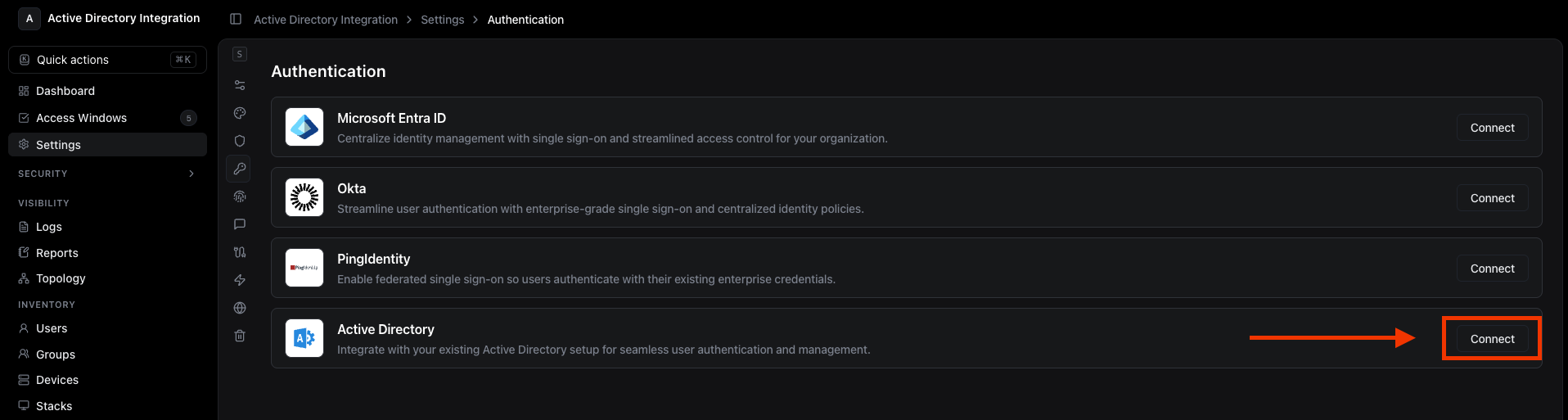
### 1. 打开 Active Directory 设置
在 Dispel 控制面板中前往 **Settings → Authentication → Active Directory** 。
 ***
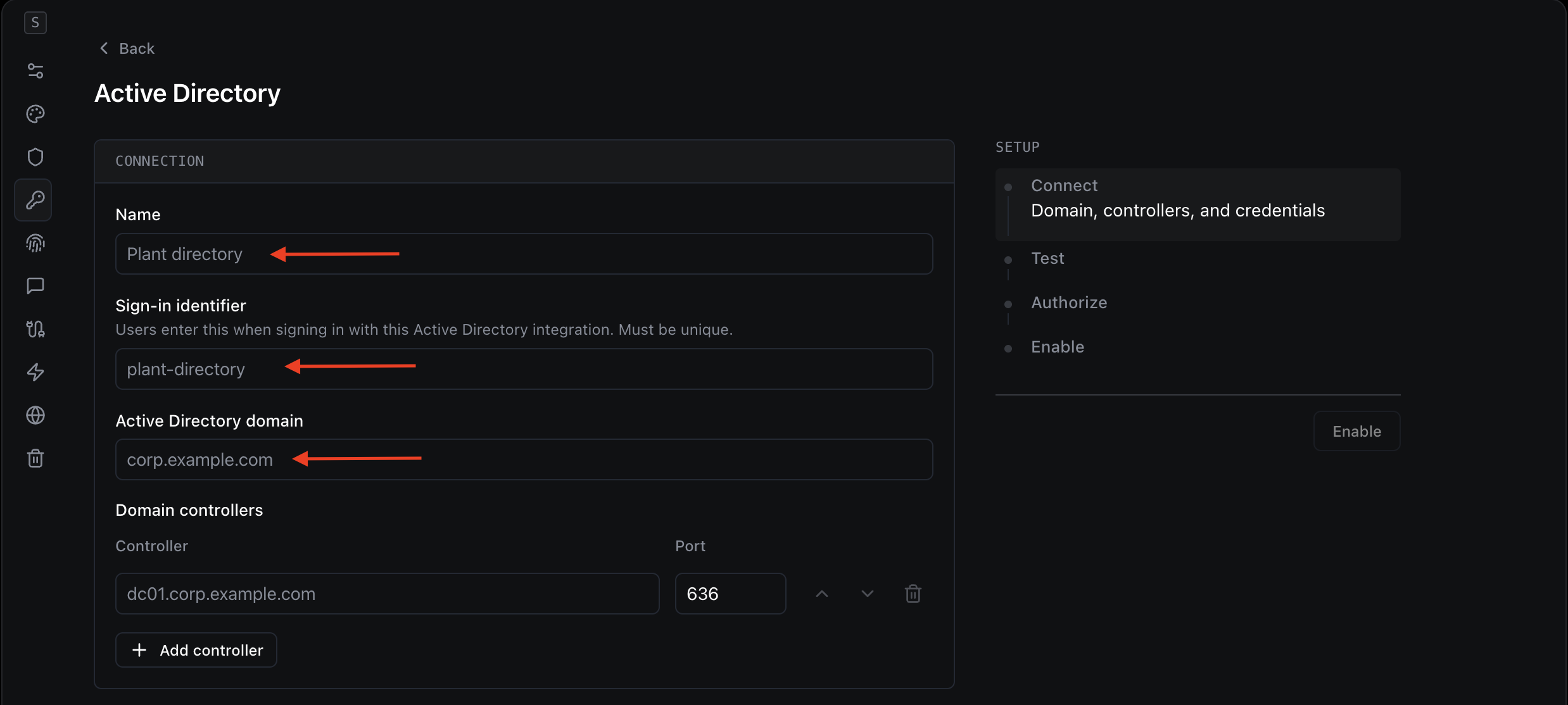
### 2. 为集成命名并设置登录标识符
填写 **连接** 部分。
 | 字段 | 说明 | 查阅位置 |
| ---------------------- | ---------------------------------- | -------------------------------------------------- |
| **名称** | 此集成的易记名称,仅在 Dispel 内显示。 | 由你自行选择,例如“企业 AD”或“工厂目录”。 |
| **登录标识符** | 用户通过此目录登录时输入的简短唯一关键字。可使用字母、数字和连字符。 | 由你自行选择,例如 `plant-directory`。此关键字在所有集成中必须唯一。 |
| **Active Directory 域** | 你的 AD DNS 域名。 | 你的 AD/DNS 域,例如 `corp.example.com`。如不确定,请咨询 AD 管理员。 |
***
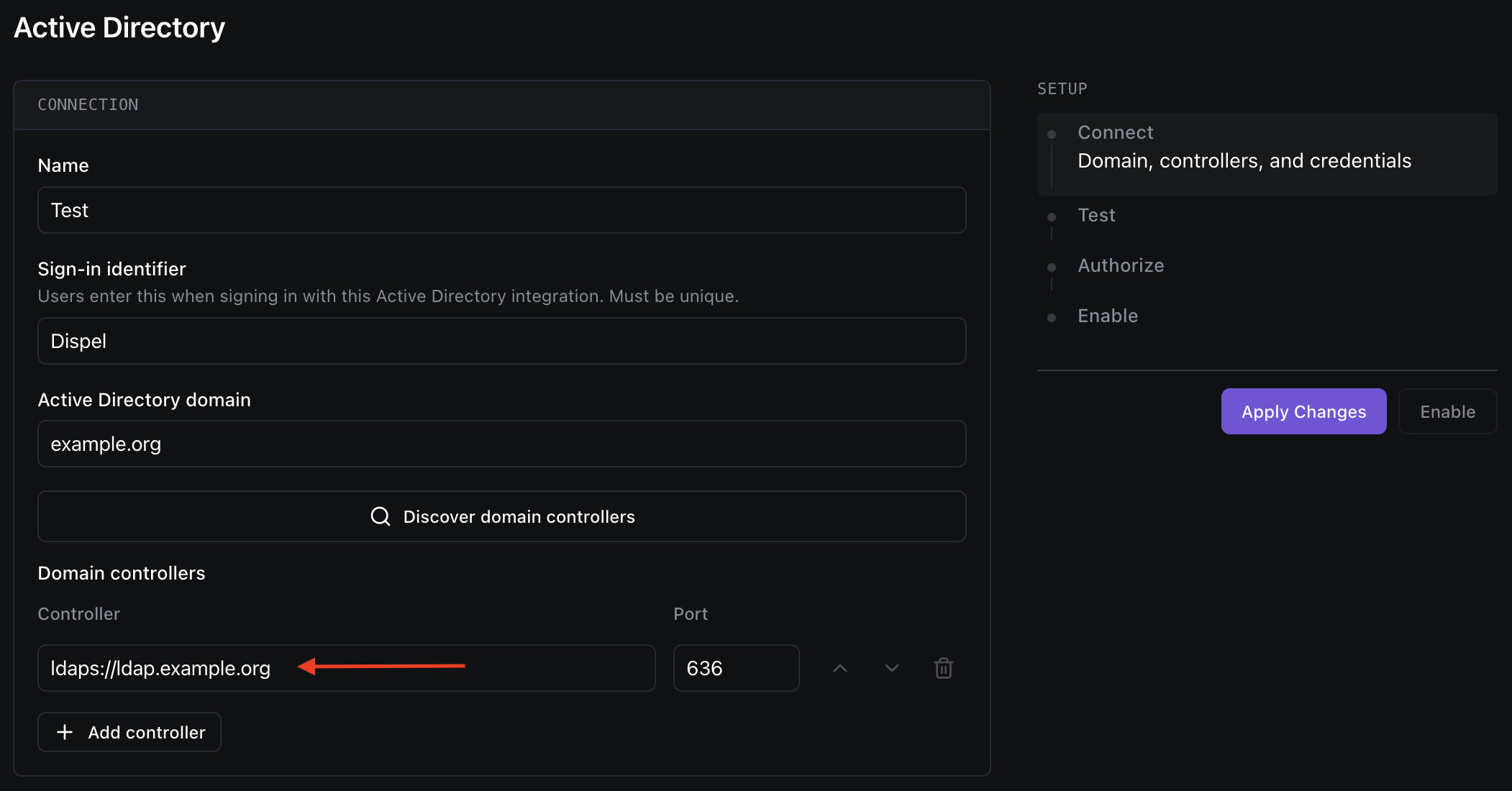
### 3. 添加域控制器
列出 Dispel 应连接的域控制器。每行添加一个;你可以添加多个控制器以实现冗余。
 | 字段 | 说明 | 查阅位置 |
| ------- | ----------------------------------- | --------------------------------------------------------------------- |
| **控制器** | 通过端口 636 上的 LDAPS 连接的域控制器主机名(或 IP)。 | 例如 `dc01.corp.example.com`。可向 AD 管理员询问或通过 DNS 查找。请确保 Dispel 能够访问该控制器。 |
> **提示:** 保存并测试后,每个控制器都会显示健康状态: **正常**, **无法访问**, **TLS 失败**或 **绑定失败** ,方便你快速发现连接问题。
***
### 4. 选择证书信任设置
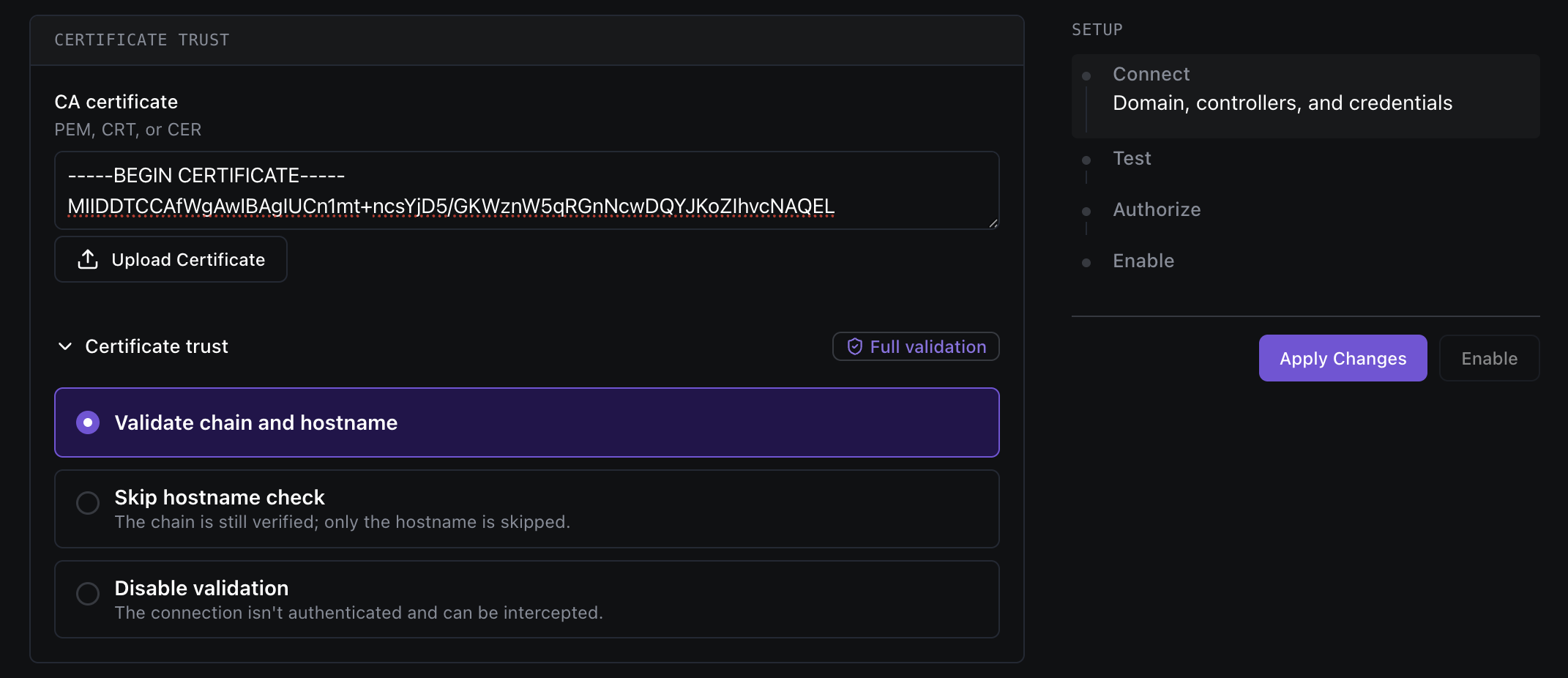
在 **证书信任**中,选择 Dispel 验证域控制器 TLS 证书的方式。 **强烈建议进行完整验证。**
 | 选项 | 含义 | 适用场景 |
| -------------------- | ---------------------------------- | ----------------------- |
| **验证证书链和主机名** *(推荐)* | Dispel 会验证证书链 **并** 确认主机名匹配。安全性最高。 | 几乎所有情况。请在下方上传 CA 证书。 |
| **跳过主机名检查** | 仍会验证证书链;仅跳过主机名匹配检查。 | 仅当证书中的主机名与您连接的地址不匹配时使用。 |
| **禁用验证** | 连接 **未** 经过身份验证,可能会遭到拦截。 | 不推荐。需要明确确认。 |
| 字段 | 说明 | 查阅位置 |
| --------- | ------------------------------------- | -------------------------------------------- |
| **CA 证书** | 为域控制器证书签名的证书颁发机构的公有证书。粘贴 PEM 文本或上传文件。 | 请从 PKI 或 AD 管理员处获取。支持的格式: **PEM、CRT 或 CER**. |
***
### 5. 添加服务帐户凭据
在 **服务帐户**中,提供 Dispel 用于查询目录的只读帐户。
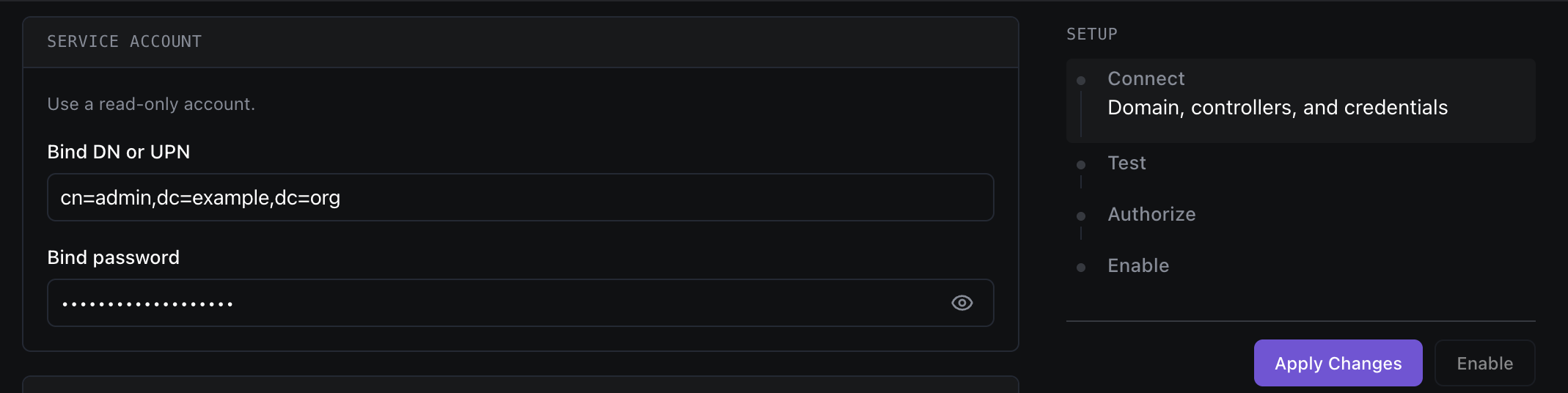 | 字段 | 说明 | 查阅位置 |
| --------------- | --------------------- | -------------------------------------------------------------------------------------------------------------------------------- |
| **绑定 DN 或 UPN** | Dispel 用于进行身份验证的服务帐户。 | 帐户的 UPN(例如 `svc-dispel@corp.example.com`)或可分辨名称(例如 `CN=svc-dispel,OU=Service Accounts,DC=corp,DC=example,DC=com`)。请使用 **只读** 帐户。 |
| **绑定密码** | 服务账户的密码。 | 由创建服务帐户的人员设置。(保存后,该值会被隐藏;只有要替换时才输入新值。) |
***
### 6. 设置身份映射
在 **身份**中,告知 Dispel 用户和组的位置,以及要读取的属性。
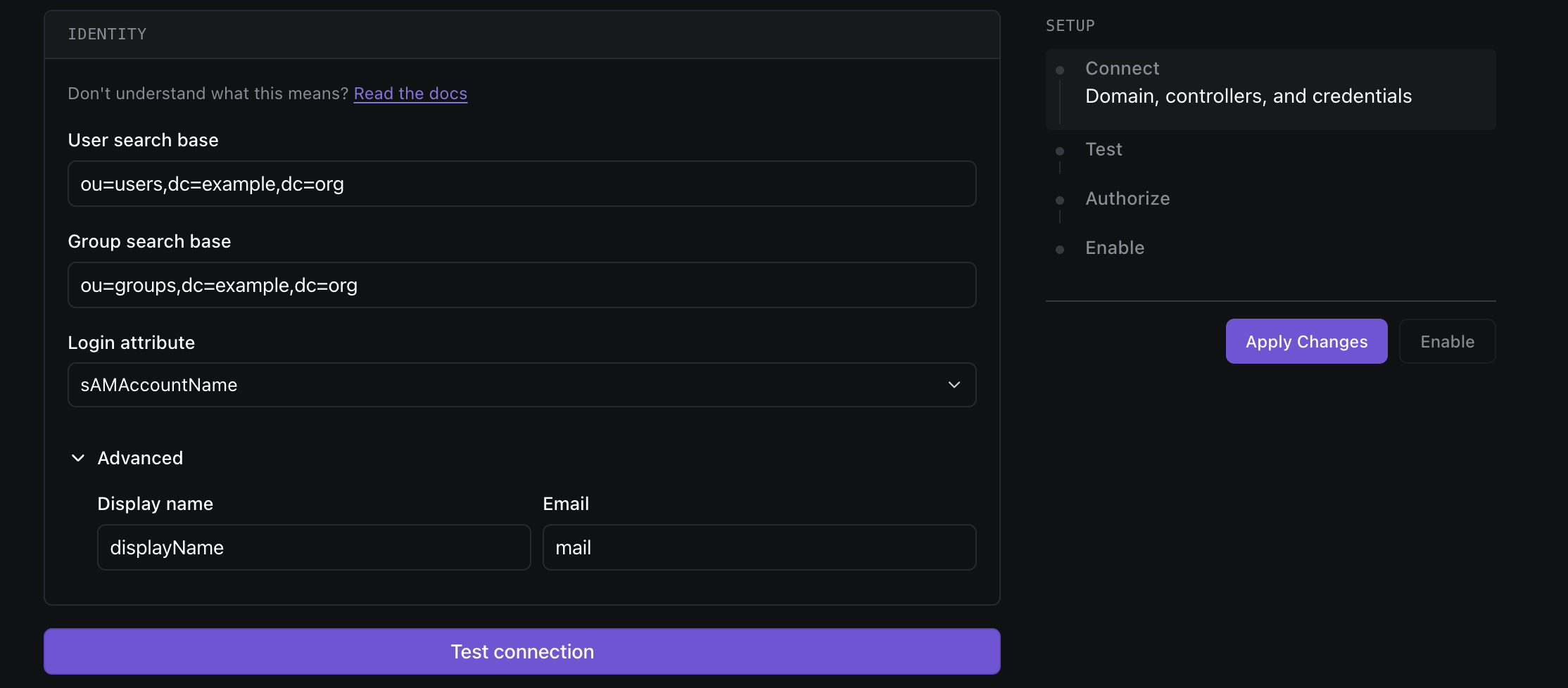 | 字段 | 说明 | 查阅位置 |
| ---------- | ----------------------- | --------------------------------------------------------------------------------- |
| **用户搜索基准** | Dispel 搜索用户的 OU(可分辨名称)。 | 例如 `OU=Users,DC=corp,DC=example,DC=com`。请根据您的 AD 结构(“Active Directory 用户和计算机”)填写。 |
| **组搜索基准** | Dispel 搜索组的 OU。 | 例如 `OU=Groups,DC=corp,DC=example,DC=com`。请根据您的 AD 结构填写。 |
| **登录属性** | 用户登录时用作用户名的 AD 属性。 | 从发现的属性中选择,常见选项包括 `sAMAccountName` 或 `userPrincipalName`. |
**高级** (可选 - 展开以调整):
| 字段 | 说明 | 查阅位置 |
| -------- | ------------ | --------------------------------- |
| **显示名称** | 用于显示用户名称的属性。 | 通常为 `displayName` 或 `cn`. |
| **电子邮件** | 用于用户邮箱地址的属性。 | 通常为 `mail` 或 `userPrincipalName`. |
***
### 7. 测试连接
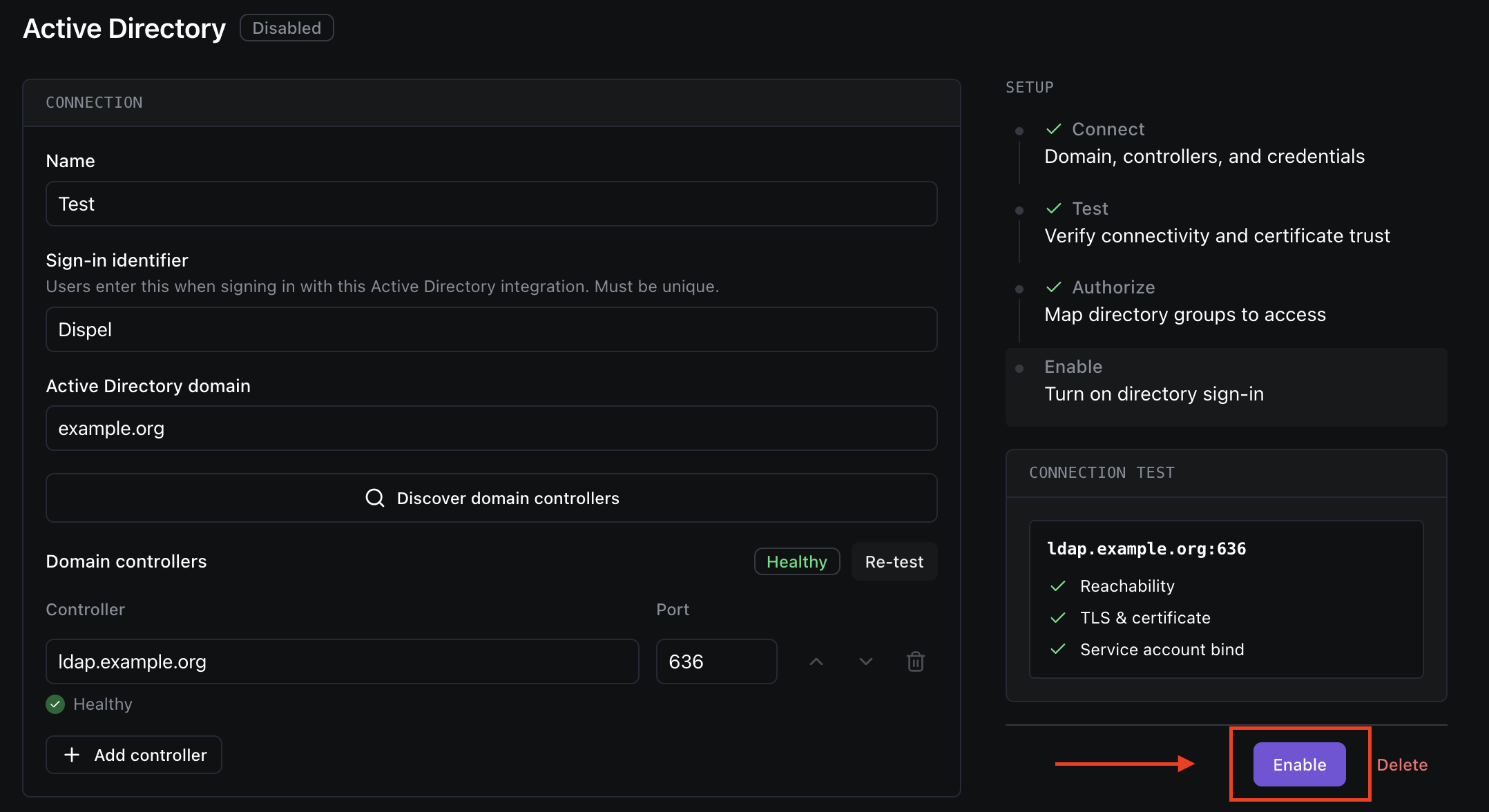
点击 **测试连接**。Dispel 会使用服务帐户进行绑定,并检查每个域控制器。
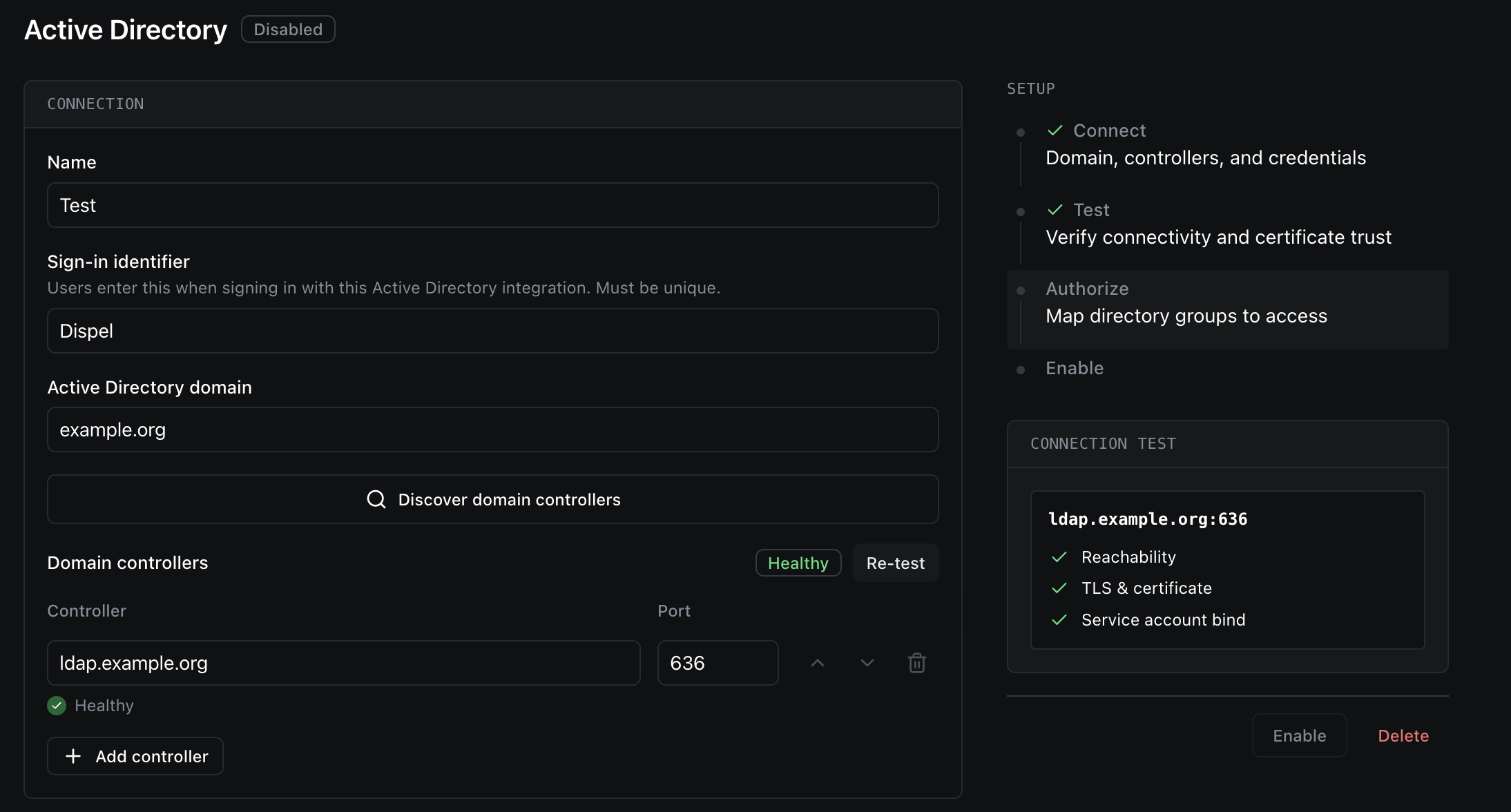 * 测试 **通过** 后,即可进行组映射并启用集成。
* 如果某个控制器显示 **TLS 失败**, **绑定失败**或 **无法访问**,请参阅下方的 [故障排除](#troubleshooting) 。
> **注意:** 如果之后更改任何连接设置,之前的测试结果将变为 **已过期** ;启用前请重新测试。
***
### 8. 将 AD 组映射到 Dispel 组
在 **组访问权限**下,将每个 Active Directory 组映射到应授予其访问权限的 Dispel 组。 **未归属任何已映射组的用户无法登录**,因此请至少映射一个组。
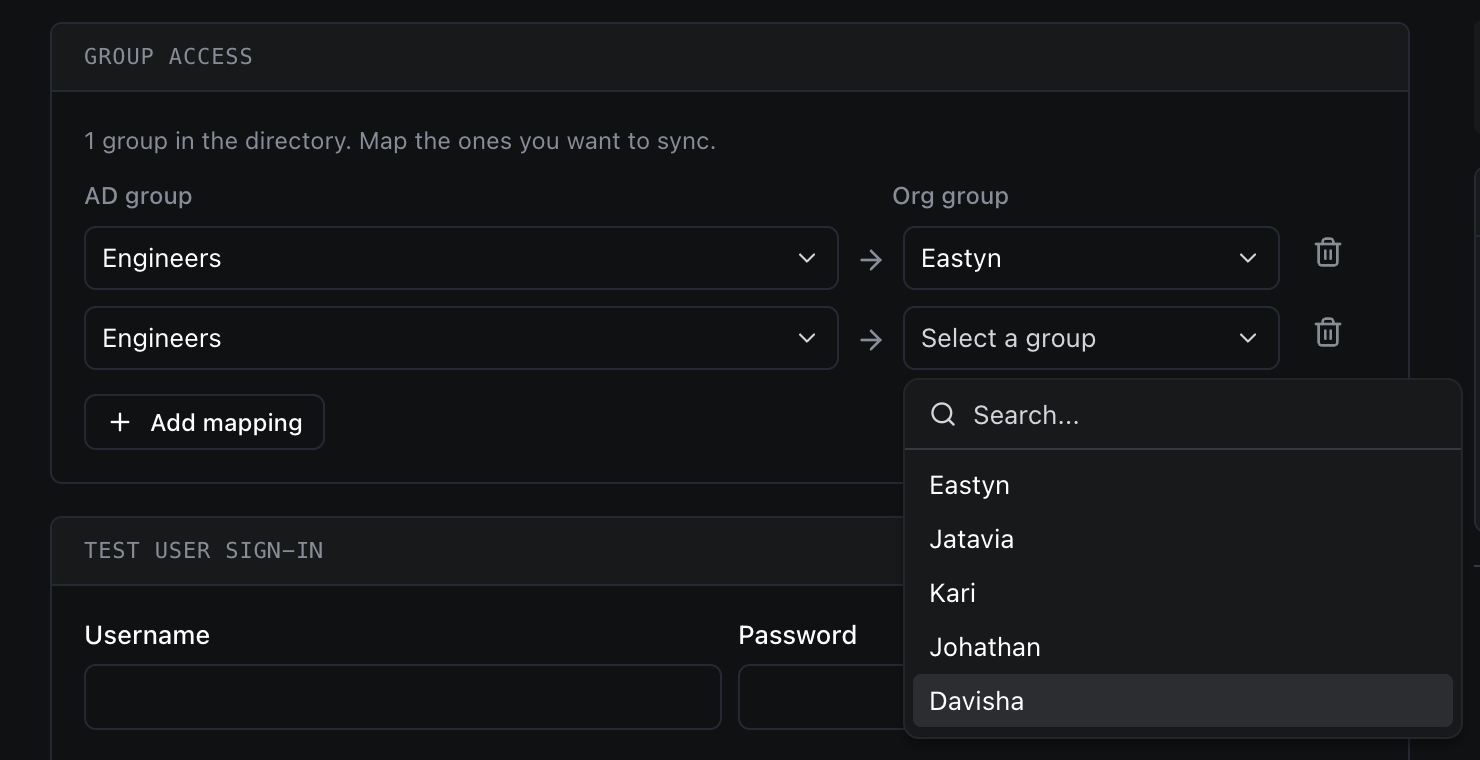 | 列 | 说明 | 查阅位置 |
| -------- | ----------------------------- | ---------------- |
| **AD 组** | 用于读取成员资格的 Active Directory 组。 | 开始输入以搜索目录中的组。 |
| **组织组** | 这些成员将获得访问权限的 Dispel 组。 | 从现有 Dispel 组中选择。 |
使用 **添加映射** 以添加更多行。成员资格会自动保持同步:用户加入已映射的 AD 组后即可获得访问权限;用户被移出后则会失去访问权限。
***
### 9.(可选)测试用户登录
启用前,您可以在以下位置模拟真实用户的登录: **测试用户登录** 以确认该用户能否登录,以及是否会加入正确的群组。
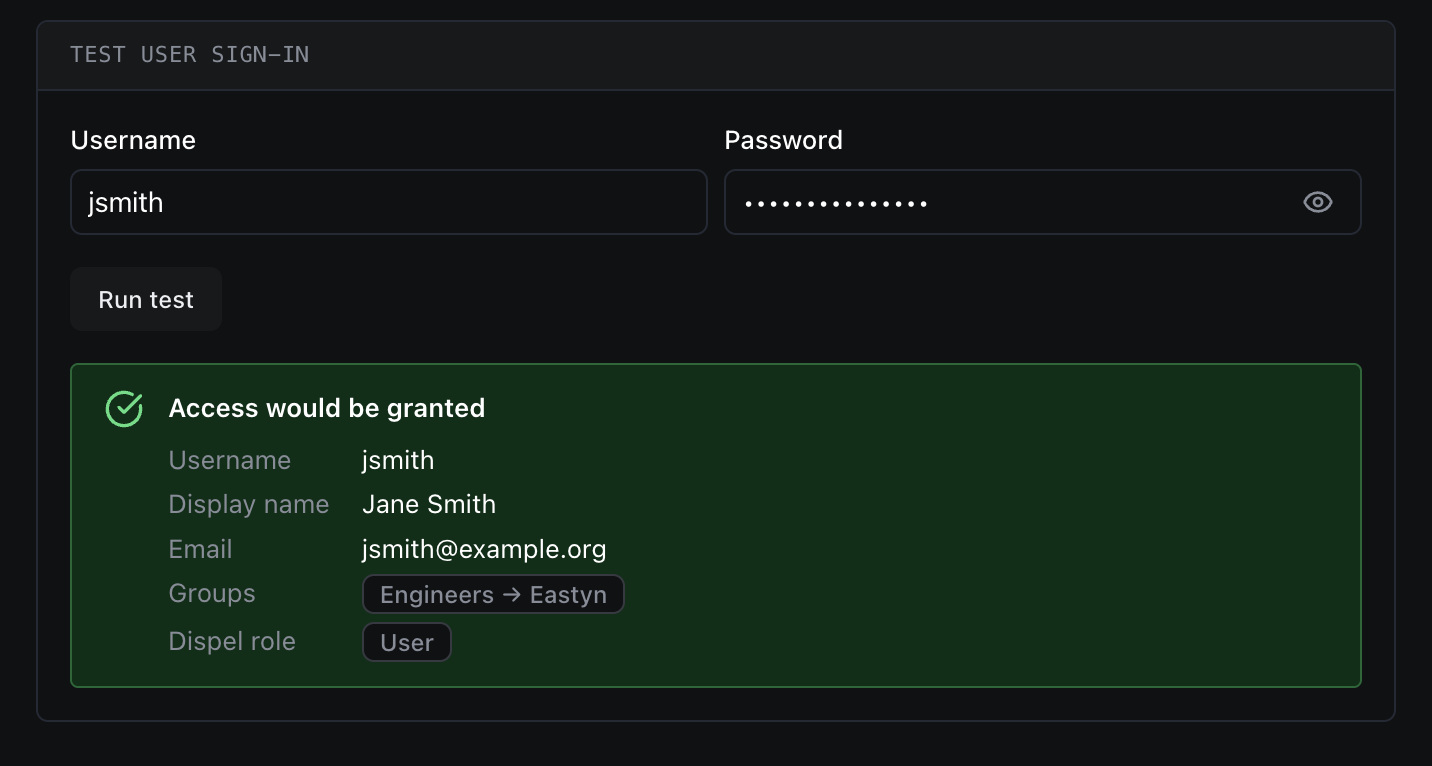 | 字段 | 说明 | 查阅位置 |
| ------- | ------------- | --------------------------- |
| **用户名** | 用于测试的真实目录用户名。 | 任意 AD 用户的登录值(需与您选择的登录属性匹配)。 |
| **密码** | 该用户的密码。 | 用户自己的密码。仅用于测试,绝不会存储。 |
点击 **运行测试** 查看访问权限是否会被 **授予** 还是 **拒绝**,以及解析出的群组。
***
### 10. 启用集成
连接测试通过且至少映射了一个群组后,点击 **启用**。现在,用户可以使用其 Active Directory 凭据以及第 2 步中的登录标识符登录。
 ***
### 用户如何登录
启用集成后,用户将使用 Active Directory 凭据而非 Dispel 密码登录:
1. 在 Dispel 登录页面,用户输入您的 **登录标识符**,然后输入其 **AD 用户名和密码**.
2. Dispel 会直接对照您的目录验证凭据,不会重定向到外部身份提供商。
3. 验证成功后,用户即会登录。
Dispel 会根据您配置的属性,从目录中读取用户的电子邮件地址和显示名称。
{% hint style="info" %}
**用户必须先受邀**。通过 AD 验证只能确认用户身份,本身并不会授予访问权限。对于 Active Directory,用户加入映射的 AD 群组后,系统会自动创建邀请;群组同步会邀请该用户,并在其退出群组时撤销访问权限。不属于任何映射群组的用户无法登录。
{% endhint %}
***
### 保持访问权限同步
启用集成后,Dispel 会按定期计划自动使 Dispel 群组成员身份与映射的 Active Directory 群组保持一致:用户加入映射群组后即可获得访问权限,用户退出映射群组后则会失去访问权限,无需手动操作。
如果您刚刚更改了 Active Directory 中的成员身份,并希望立即\
反映这些更改,请使用 **立即同步**.
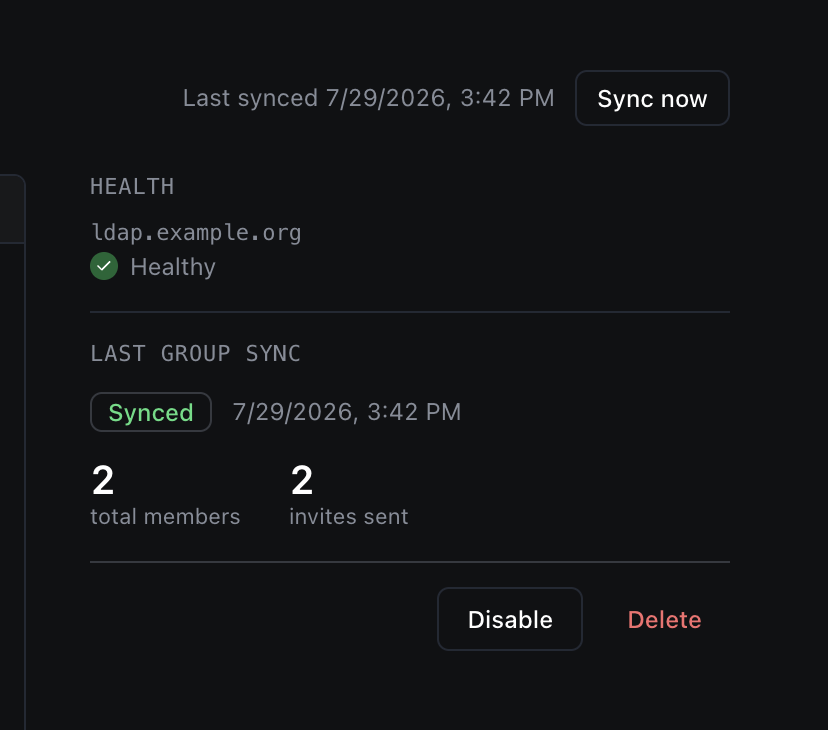 * **立即同步** 会显示在 Active Directory 页面标题栏的右上角,且\
仅当集成处于 **已启用**.
* 点击此按钮即可立即运行同步。同步期间,按钮会显示\
**正在同步…**,完成后 **上次同步时间** 时间戳会更新。
* 您无需定期执行此操作;自动同步会自行保持内容最新。若希望变更\
无需等待下一次计划同步就立即生效,可使用此功能。
***
### 管理集成
* **应用更改**:保存对现有集成所做的编辑。更改连接设置会使测试结果失效;使用该结果前请重新测试。
* **停用**:停止使用目录登录,但不删除配置。本地登录和紧急访问登录仍可使用;您可以随时重新启用。
* **删除**:彻底移除集成,包括域控制器、证书信任和群组映射。
***
### 故障排除
| 状态 / 消息 | 通常表示 | 检查内容 |
| ------------ | ----------------- | -------------------------------------- |
| **无法连接** | Dispel 无法连接到域控制器。 | 主机名正确,并且 Dispel 可以通过端口 636 访问该主机。 |
| **TLS 连接失败** | 无法验证证书。 | 已上传正确的 CA 证书(第 4 步),且该证书与域控制器的证书匹配。 |
| **绑定失败** | 服务帐户无法通过身份验证。 | Bind DN/UPN 和密码正确,登录名/电子邮件属性正确,且帐户已启用。 |
| **用户遭拒绝访问** | 该用户不属于任何已映射的组。 | 确认该用户属于某个已映射的 AD 组,并确认组映射(第 8 步)正确。 |
---
# Agent Instructions
This documentation is published with GitBook. GitBook is the documentation platform designed so that both humans and AI agents can read, navigate, and reason over technical content effectively. Learn more at gitbook.com.
## Querying This Documentation
If you need additional information that is not directly available in this page, you can query the documentation by asking a question.
Perform an HTTP GET request on the following URL with the `ask` and `goal` query parameters:
```
GET https://docs.dispel.com/documentation/documentation-zh/bao-hu-yu-zhi-li/identity-providers/active-directory.md?ask=&goal=
```
`ask` is the immediate question: it should be specific, self-contained, and written in natural language.
`goal` is what the user is ultimately trying to achieve, the reason they need the answer. Sharing it helps GitBook give you a better, more relevant answer. A goal is most helpful when it describes the outcome the user wants rather than restating the question. For example, with `ask=how do I create an API token`, a goal like `automate deployments from our CI pipeline` lets GitBook tailor the answer to that use case.
The response will contain a direct answer to the question and relevant excerpts and sources from the documentation.
Use this mechanism when the answer is not explicitly present in the current page, you need clarification or additional context, or you want to retrieve related documentation sections.