> For the complete documentation index, see [llms.txt](https://docs.dispel.com/llms.txt). Markdown versions of documentation pages are available by appending `.md` to page URLs; this page is available as [Markdown](https://docs.dispel.com/documentation/documentation-zh/guan-li-yong-hu-he-fang-wen/users/create-a-dispel-account.md).

# 创建 Dispel 账户

## 概览

创建 Dispel 账户是通过 Dispel 连接到您的站点的第一步。要创建 Dispel 账户，您必须已经通过电子邮件收到邀请，或已从您的 Dispel 部署中的管理员那里获得邀请链接。

## 创建 Dispel 账户

{% stepper %}
{% step %}
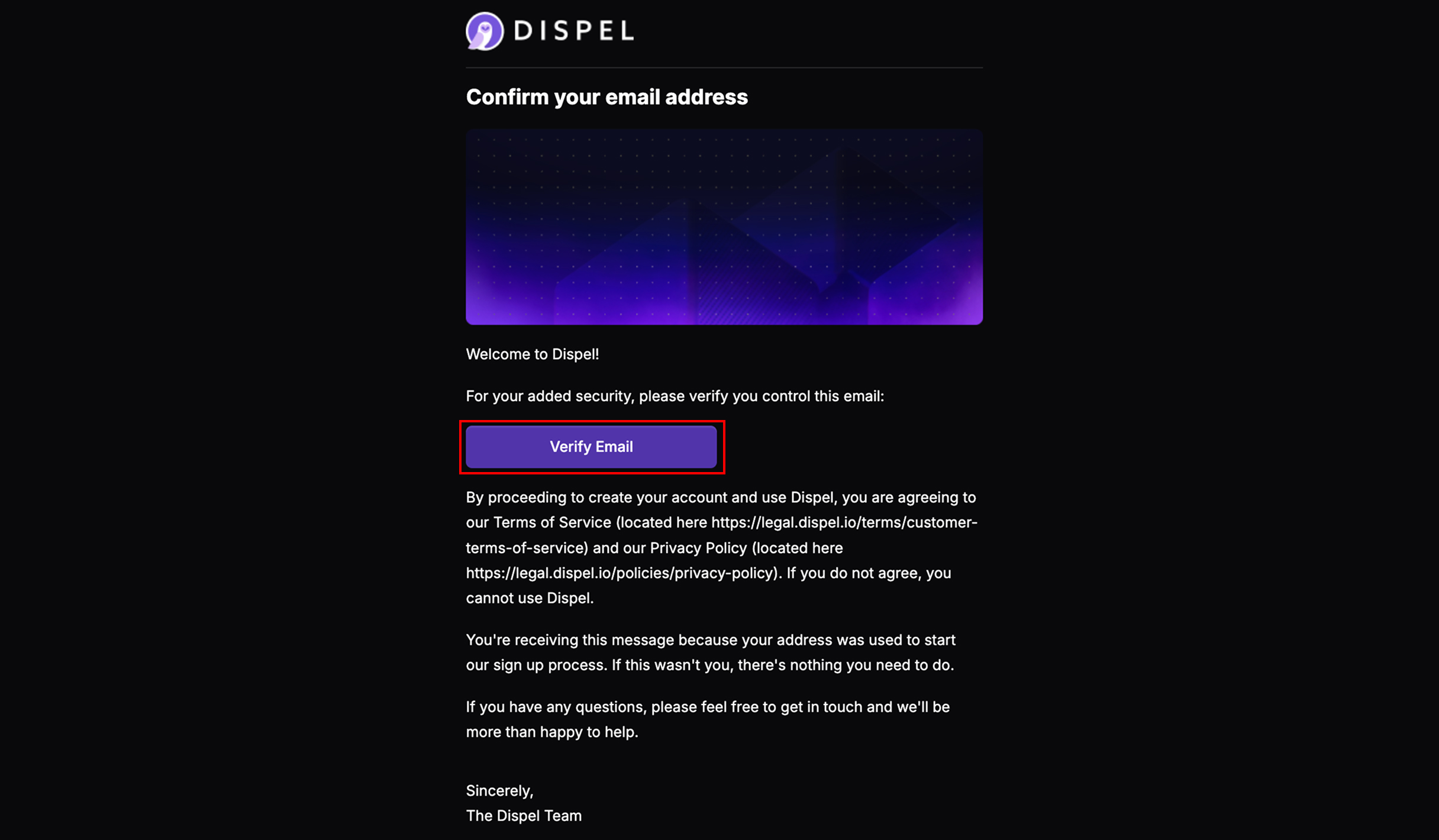
要创建 Dispel 账户，您必须先被邀请加入一个组织。您将通过电子邮件收到邀请，如下所示，或者由管理员提供邀请链接。点击 **验证邮箱** 或打开您收到的邀请链接。

<figure><img src="https://1079732812-files.gitbook.io/~/files/v0/b/gitbook-x-prod.appspot.com/o/spaces%2F5T5Fo32wwisEqZbODG7j%2Fuploads%2Fgit-blob-1169a976cdcea7466d5bbaa99f64e31e84da2c16%2FFrame%20169.jpg?alt=media" alt=""><figcaption></figcaption></figure>
{% endstep %}

{% step %}
选择您想要的语言。

<figure><img src="https://1079732812-files.gitbook.io/~/files/v0/b/gitbook-x-prod.appspot.com/o/spaces%2F5T5Fo32wwisEqZbODG7j%2Fuploads%2Fgit-blob-2a2406a86542d8e8f866d8a7f570a3cbe997117b%2FFrame%20170.jpg?alt=media" alt=""><figcaption></figcaption></figure>
{% endstep %}

{% step %}
点击 **继续设置您的姓名**.

<figure><img src="https://1079732812-files.gitbook.io/~/files/v0/b/gitbook-x-prod.appspot.com/o/spaces%2F5T5Fo32wwisEqZbODG7j%2Fuploads%2Fgit-blob-c278fe9be7c22579b2647dc1703e1bc03d7b0afc%2FFrame%20171.jpg?alt=media" alt=""><figcaption></figcaption></figure>
{% endstep %}

{% step %}
输入您的姓名。

<figure><img src="https://1079732812-files.gitbook.io/~/files/v0/b/gitbook-x-prod.appspot.com/o/spaces%2F5T5Fo32wwisEqZbODG7j%2Fuploads%2Fgit-blob-235a7839720bed484f4cd1eb3db364cdc5026f0a%2FFrame%20172.jpg?alt=media" alt=""><figcaption></figcaption></figure>
{% endstep %}

{% step %}
点击 **继续设置您的密码**.

<figure><img src="https://1079732812-files.gitbook.io/~/files/v0/b/gitbook-x-prod.appspot.com/o/spaces%2F5T5Fo32wwisEqZbODG7j%2Fuploads%2Fgit-blob-0540f00dbbc1ff5e6981f55c3a4faf76c528b9c8%2FFrame%20173.jpg?alt=media" alt=""><figcaption></figcaption></figure>
{% endstep %}

{% step %}
将 Dispel 的所需密码输入两次。

<figure><img src="https://1079732812-files.gitbook.io/~/files/v0/b/gitbook-x-prod.appspot.com/o/spaces%2F5T5Fo32wwisEqZbODG7j%2Fuploads%2Fgit-blob-a97dcaad7bcceb4adefab43c618f78c2752b5c7a%2FFrame%20174.jpg?alt=media" alt=""><figcaption></figcaption></figure>
{% endstep %}

{% step %}
勾选以确认您已阅读并同意 Dispel 的隐私政策和数据主体同意书。

<figure><img src="https://1079732812-files.gitbook.io/~/files/v0/b/gitbook-x-prod.appspot.com/o/spaces%2F5T5Fo32wwisEqZbODG7j%2Fuploads%2Fgit-blob-753f5f08437fbc43681ca57dded69360f594453c%2FFrame%20175.jpg?alt=media" alt=""><figcaption></figcaption></figure>
{% endstep %}

{% step %}
点击 **设置新密码。**

<figure><img src="https://1079732812-files.gitbook.io/~/files/v0/b/gitbook-x-prod.appspot.com/o/spaces%2F5T5Fo32wwisEqZbODG7j%2Fuploads%2Fgit-blob-fc461ed6a5428317bfb5090c4a38e723465674b6%2FFrame%20176.jpg?alt=media" alt=""><figcaption></figcaption></figure>
{% endstep %}

{% step %}
如果您的组织需要多因素身份验证（MFA），系统现在将提示您设置 MFA，您可以选择 [#set-up-mfa-device](#set-up-mfa-device "mention") 或 [#set-up-security-key](#set-up-security-key "mention")。如果您的组织不需要 MFA，您的账户现在已完全设置完成，您将进入 Dispel 仪表板。
{% endstep %}

{% step %}

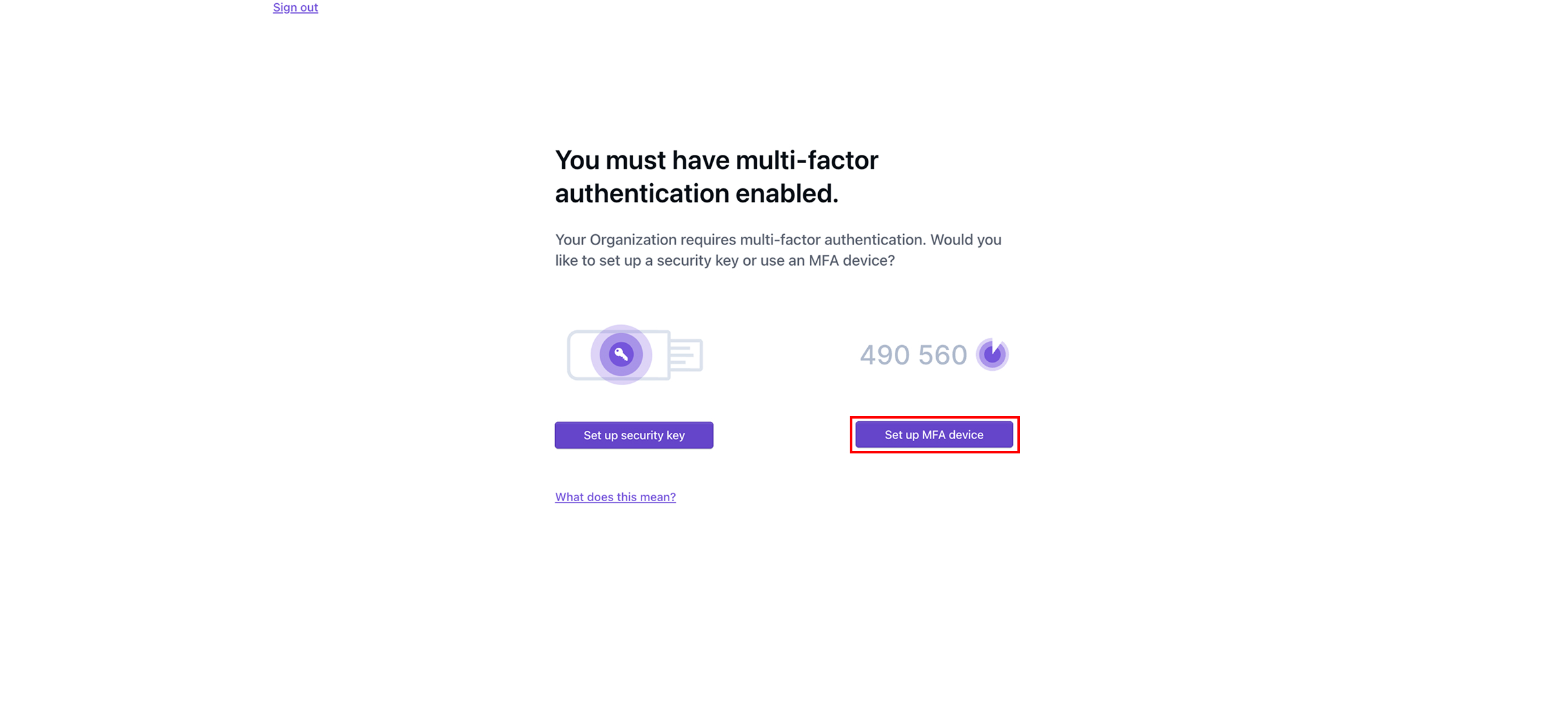
#### 设置 MFA 设备

点击 **设置 MFA 设备**.

<figure><img src="https://1079732812-files.gitbook.io/~/files/v0/b/gitbook-x-prod.appspot.com/o/spaces%2F5T5Fo32wwisEqZbODG7j%2Fuploads%2Fgit-blob-8619ca6fa0094c50334b14a846d2eddf5d6d4538%2FFrame%20183.jpg?alt=media" alt=""><figcaption></figcaption></figure>
{% endstep %}

{% step %}
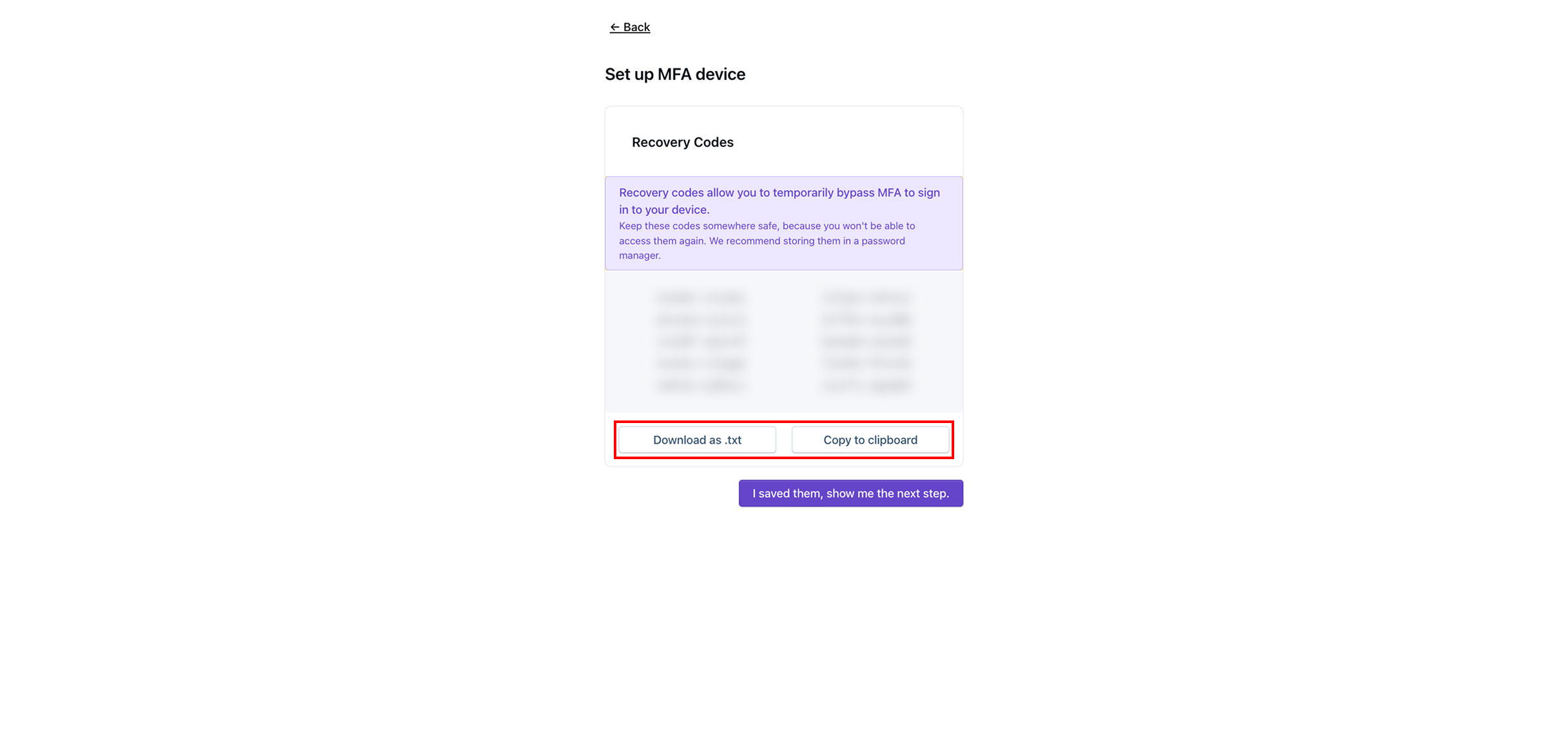
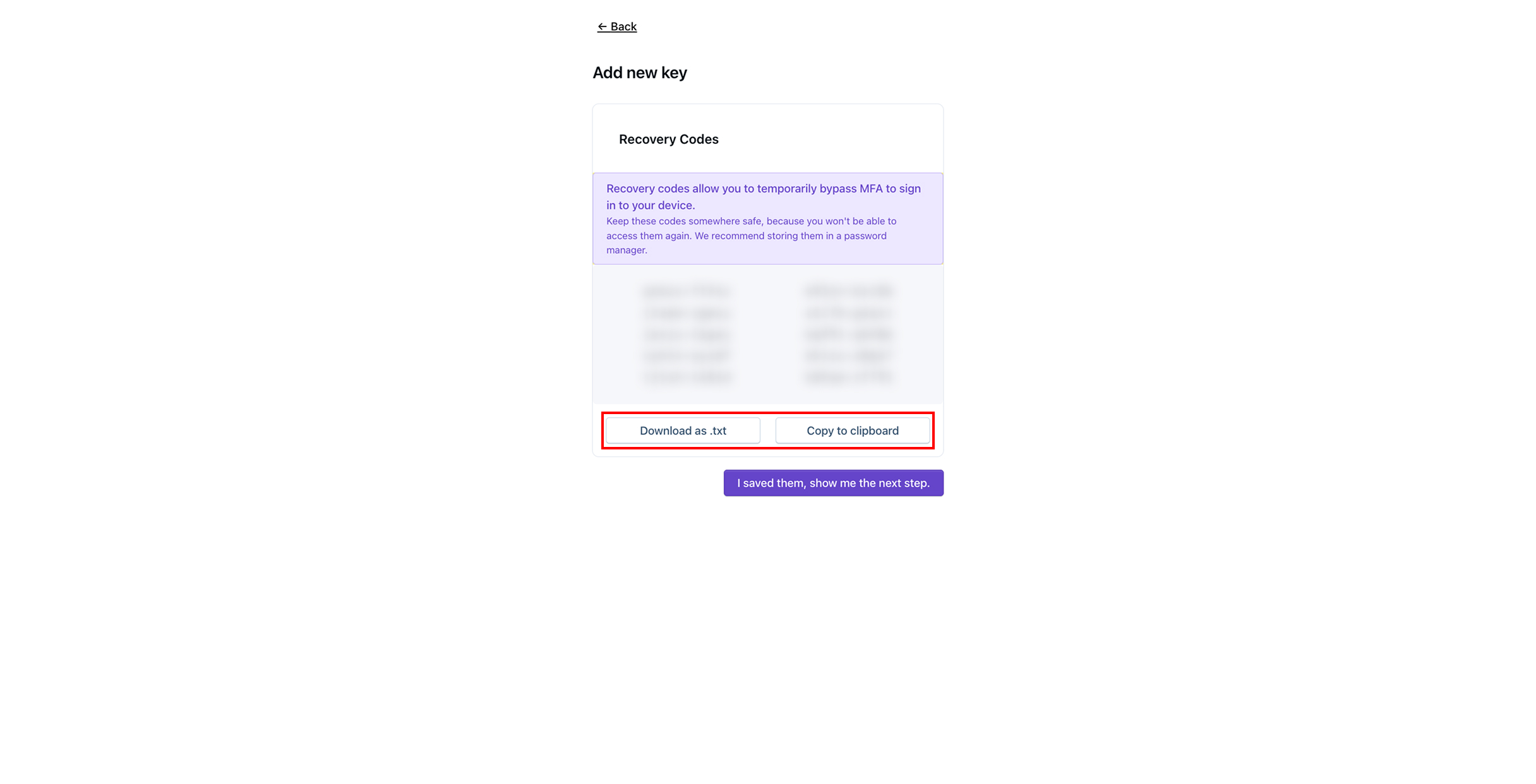
通过点击以下选项保存恢复代码 **下载为 .txt** 或 **复制到剪贴板**，然后将恢复代码保存在安全的地方。

{% hint style="info" %}
恢复代码将使您在未来能够暂时绕过 MFA 登录账户。
{% endhint %}

<figure><img src="https://1079732812-files.gitbook.io/~/files/v0/b/gitbook-x-prod.appspot.com/o/spaces%2F5T5Fo32wwisEqZbODG7j%2Fuploads%2Fgit-blob-f5c57e3ba4d195f7bff0b90a78d2bce573f6ab71%2FFrame%20184.jpg?alt=media" alt=""><figcaption></figcaption></figure>
{% endstep %}

{% step %}
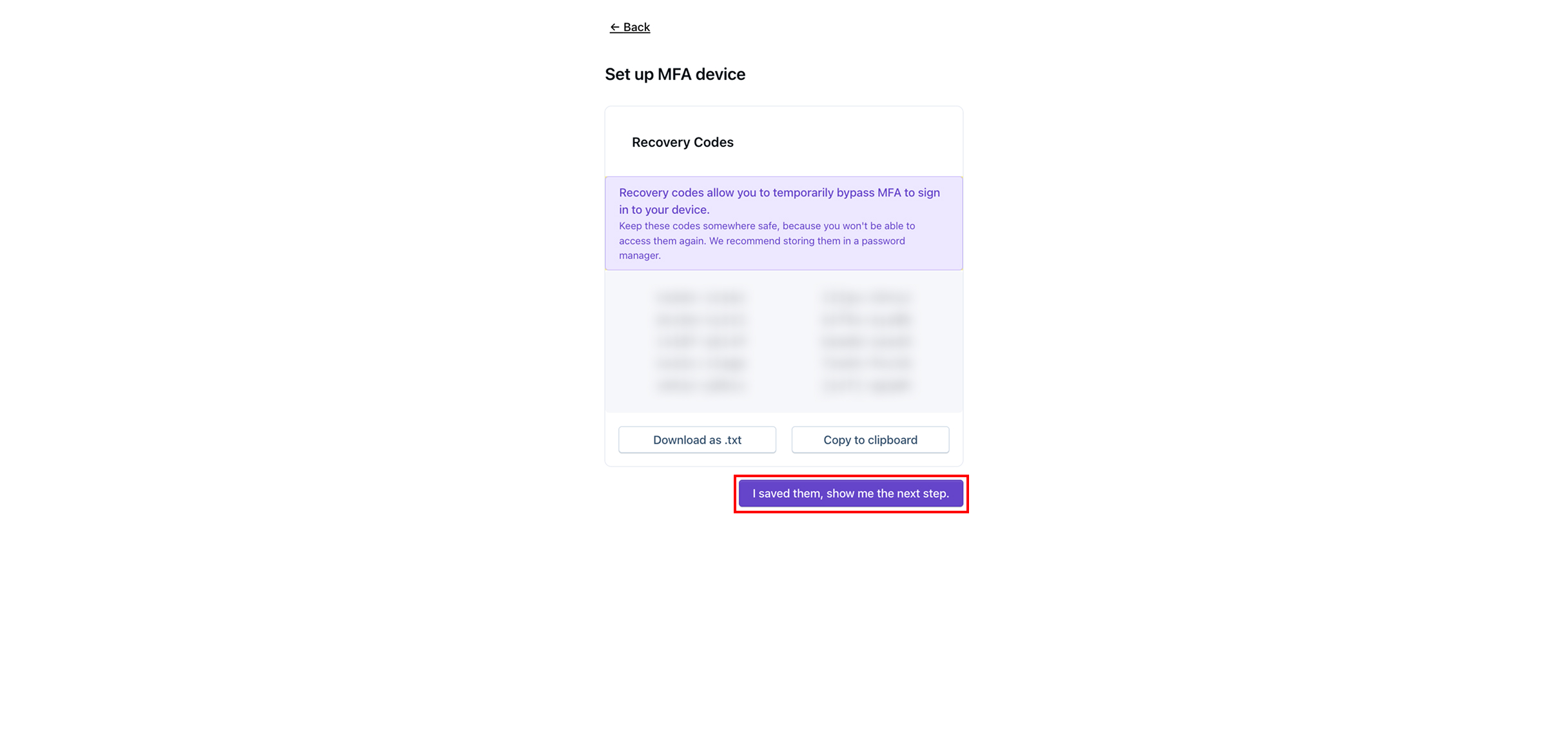
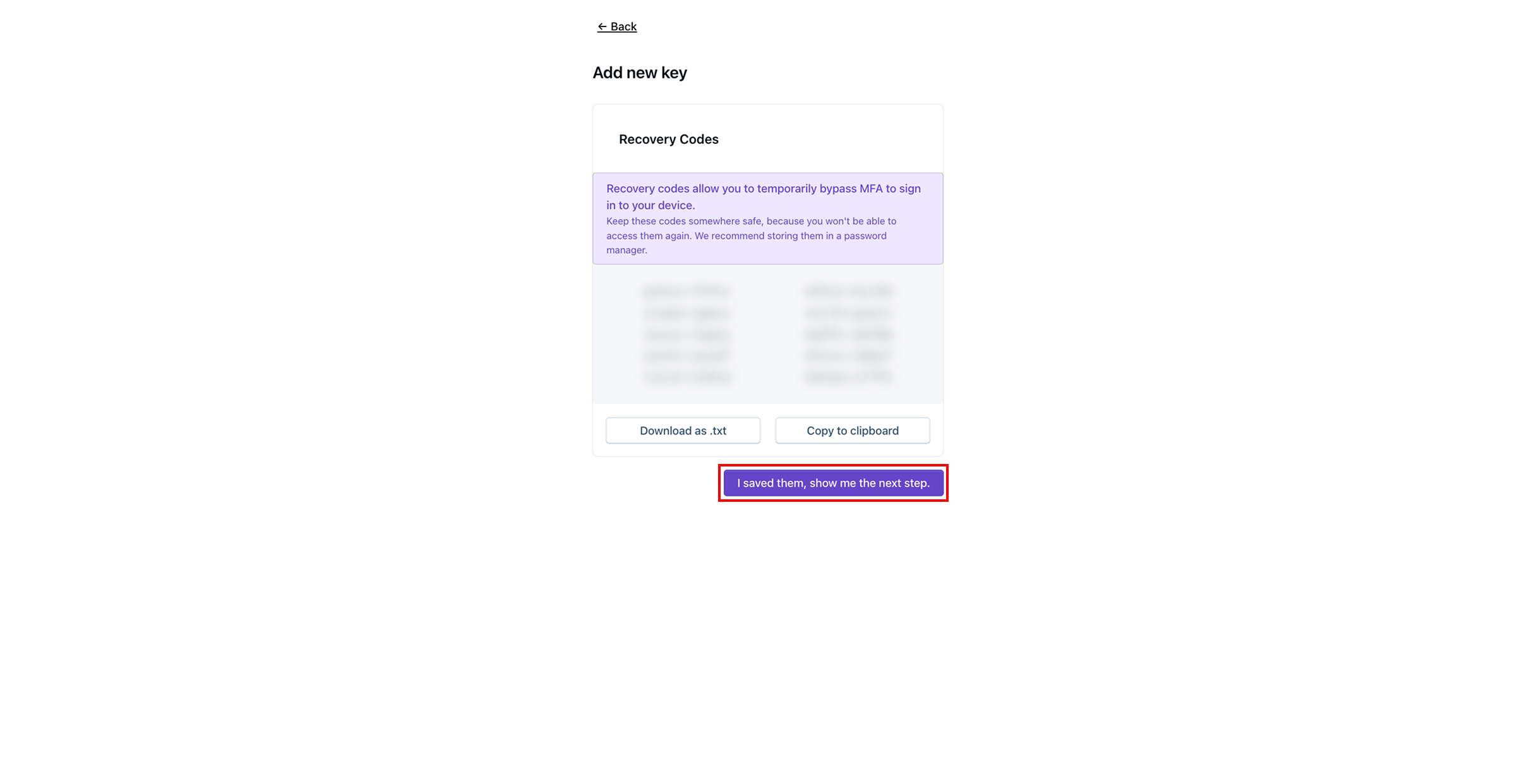
保存恢复代码后，点击 **我已保存，请显示下一步。**

<figure><img src="https://1079732812-files.gitbook.io/~/files/v0/b/gitbook-x-prod.appspot.com/o/spaces%2F5T5Fo32wwisEqZbODG7j%2Fuploads%2Fgit-blob-be9bacf56111abb5b5a8014e353ac22b1e1b697d%2FFrame%20185.jpg?alt=media" alt=""><figcaption></figcaption></figure>
{% endstep %}

{% step %}
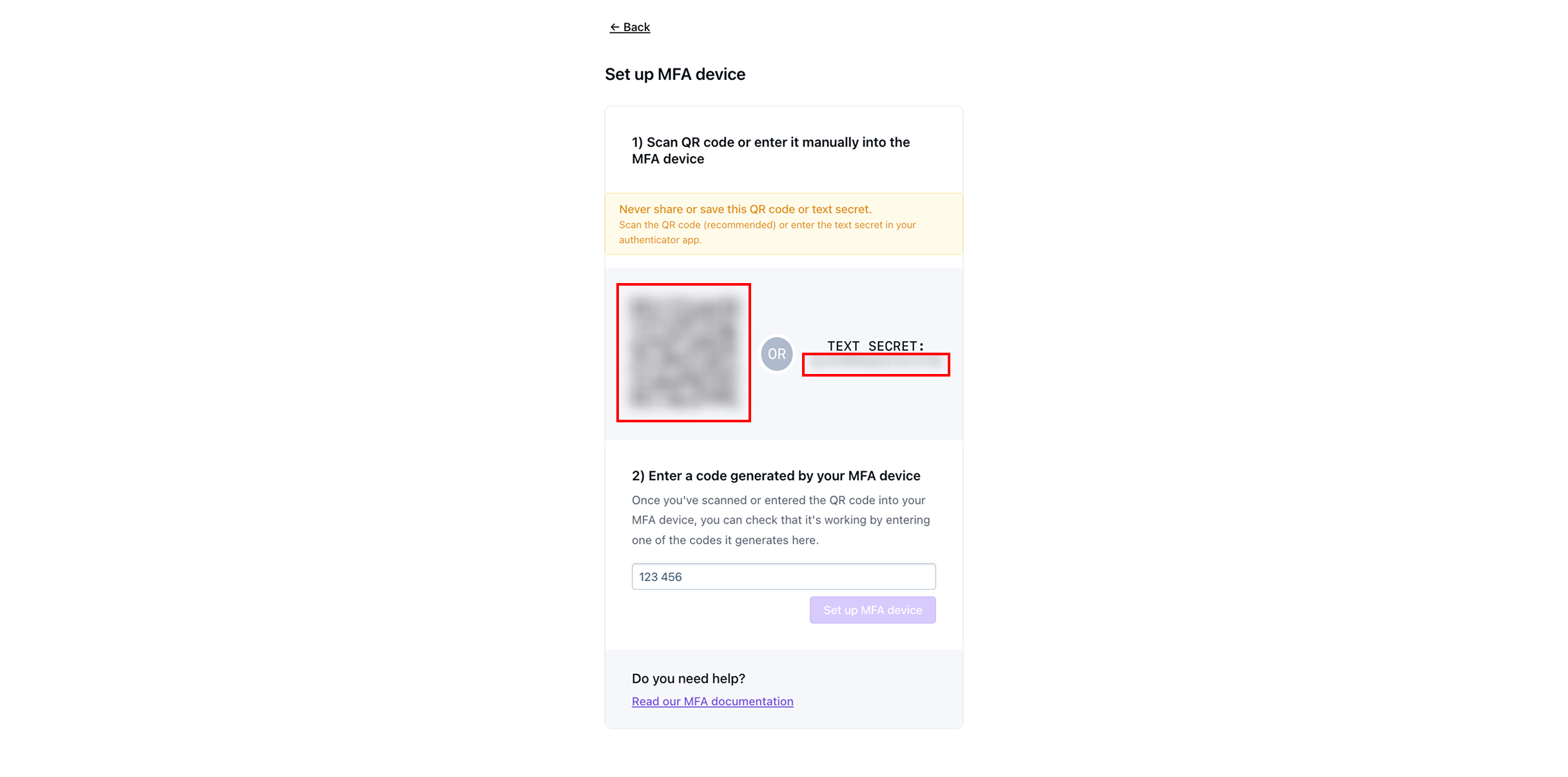
在您选择的 MFA 应用设备上，扫描二维码或输入文本密钥。

{% hint style="info" %}
一些常见的双因素认证应用包括 [Google Duo](https://guide.duo.com/third-party-accounts)、Microsoft Authenticator，或 [1Password](https://support.1password.com/one-time-passwords/?mac).
{% endhint %}

<figure><img src="https://1079732812-files.gitbook.io/~/files/v0/b/gitbook-x-prod.appspot.com/o/spaces%2F5T5Fo32wwisEqZbODG7j%2Fuploads%2Fgit-blob-fe5347ddc35a2722d61ee306c51541278fc8796f%2FFrame%20186.jpg?alt=media" alt=""><figcaption></figcaption></figure>
{% endstep %}

{% step %}
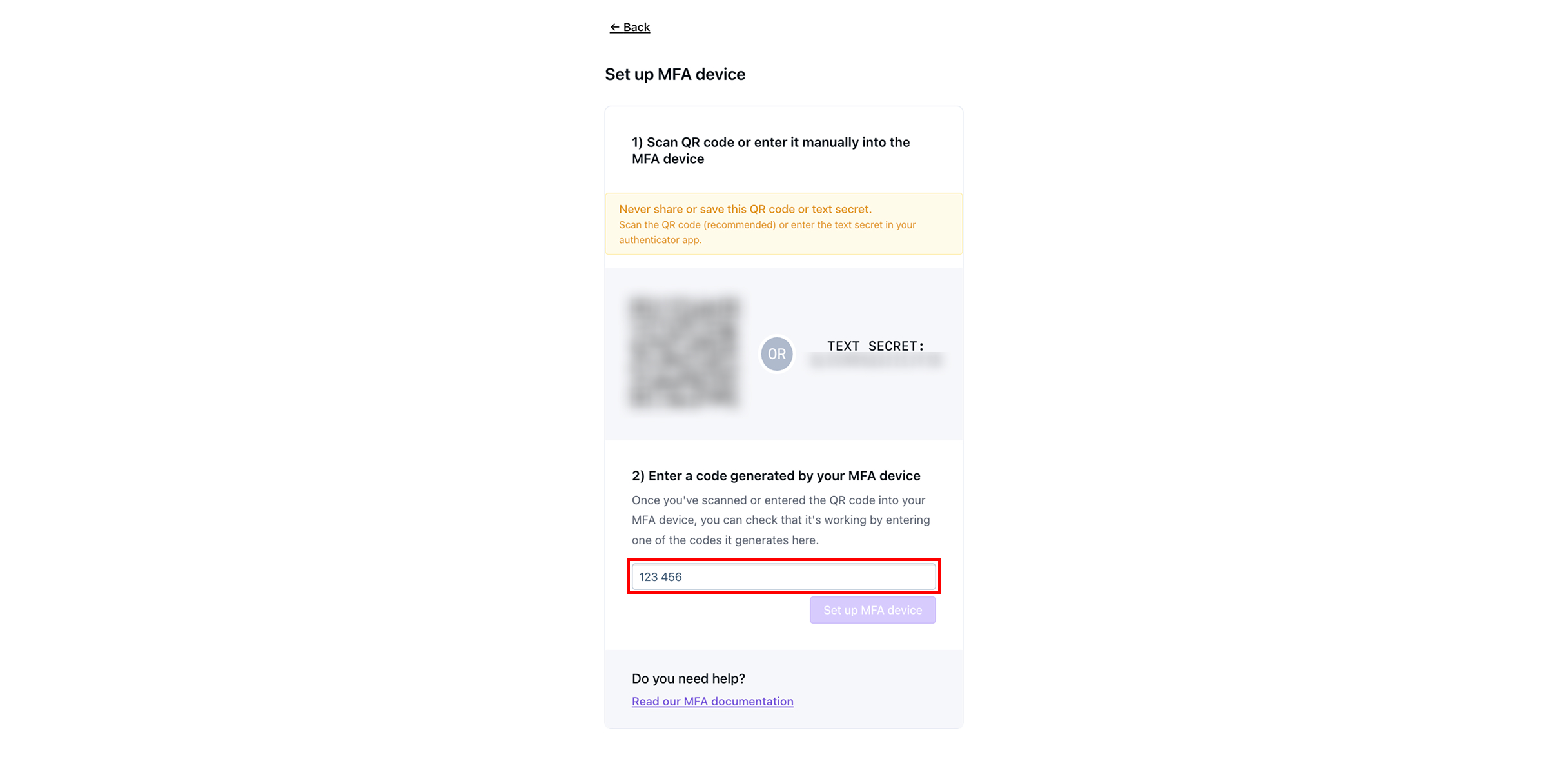
输入 MFA 设备上显示的 6 位验证码。

<figure><img src="https://1079732812-files.gitbook.io/~/files/v0/b/gitbook-x-prod.appspot.com/o/spaces%2F5T5Fo32wwisEqZbODG7j%2Fuploads%2Fgit-blob-ef59c797ad060b1449bec8b942daf3dfa18d8052%2FFrame%20187.jpg?alt=media" alt=""><figcaption></figcaption></figure>
{% endstep %}

{% step %}
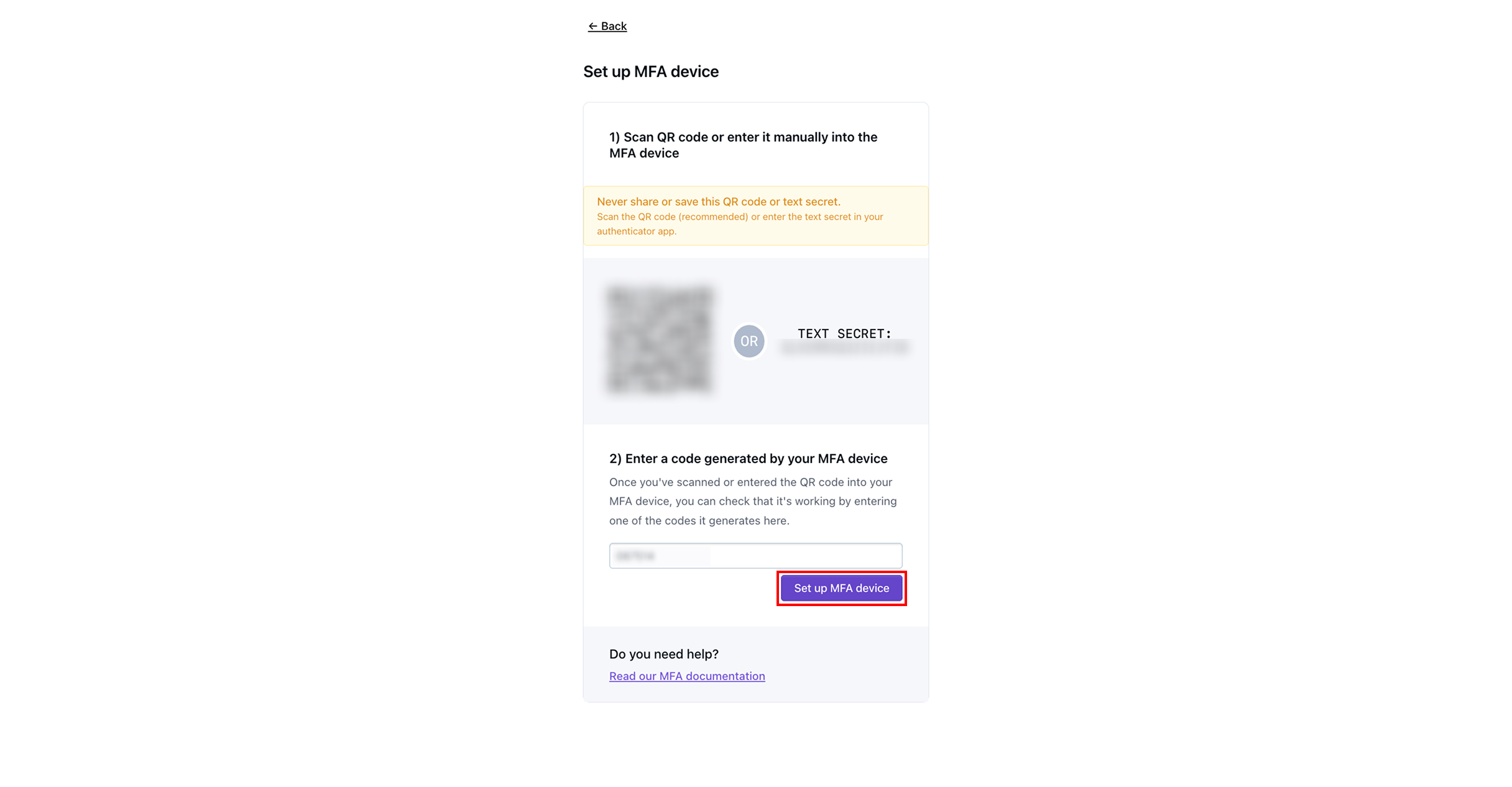
点击 **设置 MFA 设备。**

{% hint style="warning" %}
在 MFA 设备上输入的验证码过期之前，您必须点击“设置 MFA 设备”。
{% endhint %}

<figure><img src="https://1079732812-files.gitbook.io/~/files/v0/b/gitbook-x-prod.appspot.com/o/spaces%2F5T5Fo32wwisEqZbODG7j%2Fuploads%2Fgit-blob-586a2a737f080819cbf0548da0c084aeeaf68411%2FFrame%20188.jpg?alt=media" alt=""><figcaption></figcaption></figure>
{% endstep %}

{% step %}
点击 **继续。** 您的账户现在已完全设置完成，您将进入 Dispel 仪表板。

<figure><img src="https://1079732812-files.gitbook.io/~/files/v0/b/gitbook-x-prod.appspot.com/o/spaces%2F5T5Fo32wwisEqZbODG7j%2Fuploads%2Fgit-blob-11cbc48dc78724d0ead780f02b6d8df189fb431b%2FFrame%20189%20(1).jpg?alt=media" alt=""><figcaption></figcaption></figure>
{% endstep %}

{% step %}

#### 设置安全密钥

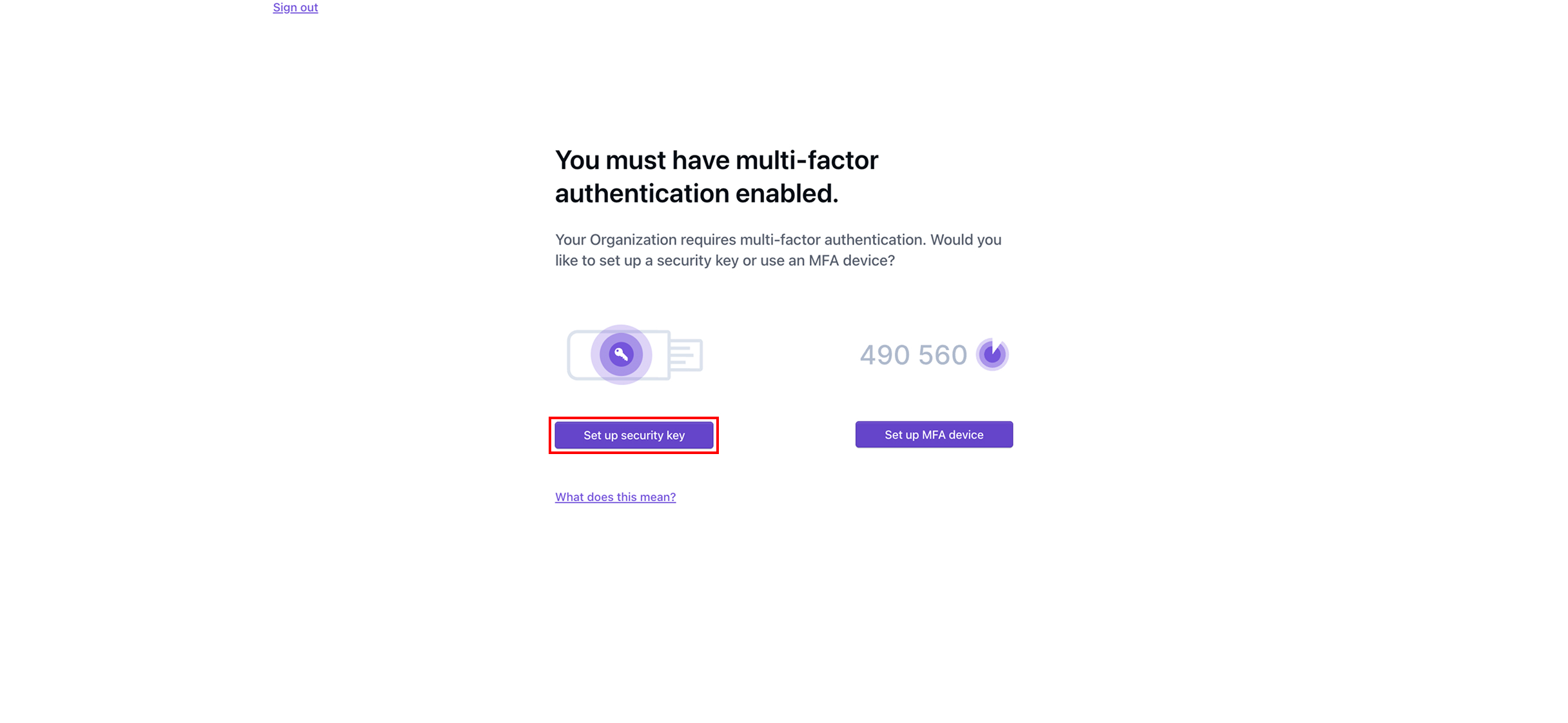
点击 **设置安全密钥。**

<figure><img src="https://1079732812-files.gitbook.io/~/files/v0/b/gitbook-x-prod.appspot.com/o/spaces%2F5T5Fo32wwisEqZbODG7j%2Fuploads%2Fgit-blob-9f23375dfe56ed97eb72e7e9aa34685b7724b830%2FFrame%20177.jpg?alt=media" alt=""><figcaption></figcaption></figure>
{% endstep %}

{% step %}
通过点击以下选项保存恢复代码 **下载为 .txt** 或 **复制到剪贴板**，然后将恢复代码保存在安全的地方。

{% hint style="info" %}
恢复代码将使您在未来能够暂时绕过 MFA 登录账户。
{% endhint %}

<figure><img src="https://1079732812-files.gitbook.io/~/files/v0/b/gitbook-x-prod.appspot.com/o/spaces%2F5T5Fo32wwisEqZbODG7j%2Fuploads%2Fgit-blob-f295b80a32a42f0917c4a8f826589fe7b895a788%2FFrame%20178.jpg?alt=media" alt=""><figcaption></figcaption></figure>
{% endstep %}

{% step %}
保存恢复代码后，点击 **我已保存，请显示下一步。**

<figure><img src="https://1079732812-files.gitbook.io/~/files/v0/b/gitbook-x-prod.appspot.com/o/spaces%2F5T5Fo32wwisEqZbODG7j%2Fuploads%2Fgit-blob-3356d0a4ed021f9d633ab34f7c86134a90a60d6b%2FFrame%20179.jpg?alt=media" alt=""><figcaption></figcaption></figure>
{% endstep %}

{% step %}
为您将用作安全密钥的设备输入一个名称。

<figure><img src="https://1079732812-files.gitbook.io/~/files/v0/b/gitbook-x-prod.appspot.com/o/spaces%2F5T5Fo32wwisEqZbODG7j%2Fuploads%2Fgit-blob-a18190e4c3fef2c6b034f6c392405ac40e821a6c%2FFrame%20180.jpg?alt=media" alt=""><figcaption></figcaption></figure>
{% endstep %}

{% step %}
点击 **添加新密钥**.

<figure><img src="https://1079732812-files.gitbook.io/~/files/v0/b/gitbook-x-prod.appspot.com/o/spaces%2F5T5Fo32wwisEqZbODG7j%2Fuploads%2Fgit-blob-b3dd2e6da6b63a8ac3df9c8ca172f73ec7c627a9%2FFrame%20181.jpg?alt=media" alt=""><figcaption></figcaption></figure>
{% endstep %}

{% step %}
插入并激活您的密钥。按照步骤注册您的安全密钥。

<figure><img src="https://1079732812-files.gitbook.io/~/files/v0/b/gitbook-x-prod.appspot.com/o/spaces%2F5T5Fo32wwisEqZbODG7j%2Fuploads%2Fgit-blob-ec51f3824a437a876b65b8df0a6198cb76cfc64f%2FFrame%20182.jpg?alt=media" alt=""><figcaption></figcaption></figure>
{% endstep %}

{% step %}
点击 **继续。** 您的账户现在已完全设置完成，您将进入 Dispel 仪表板。

<figure><img src="https://1079732812-files.gitbook.io/~/files/v0/b/gitbook-x-prod.appspot.com/o/spaces%2F5T5Fo32wwisEqZbODG7j%2Fuploads%2Fgit-blob-11cbc48dc78724d0ead780f02b6d8df189fb431b%2FFrame%20189%20(1).jpg?alt=media" alt=""><figcaption></figcaption></figure>
{% endstep %}
{% endstepper %}

## 后续步骤

{% content-ref url="/pages/d9049f1830e86270ba2b353216e790c956ca2868" %}
[请求访问窗口](/documentation/documentation-zh/lian-jie-dao-ni-de-xi-tong/access-windows/request-an-access-window.md)
{% endcontent-ref %}

{% content-ref url="/pages/ace1373f3681e37f6c4f43109780202cddba6991" %}
[连接方式](/documentation/documentation-zh/lian-jie-dao-ni-de-xi-tong/connection-methods.md)
{% endcontent-ref %}


---

# Agent Instructions
This documentation is published with GitBook. GitBook is the documentation platform designed so that both humans and AI agents can read, navigate, and reason over technical content effectively. Learn more at gitbook.com.

## Querying This Documentation
If you need additional information that is not directly available in this page, you can query the documentation by asking a question.

Perform an HTTP GET request on the following URL with the `ask` and `goal` query parameters:

```
GET https://docs.dispel.com/documentation/documentation-zh/guan-li-yong-hu-he-fang-wen/users/create-a-dispel-account.md?ask=<question>&goal=<user_goal>
```

`ask` is the immediate question: it should be specific, self-contained, and written in natural language.
`goal` is what the user is ultimately trying to achieve, the reason they need the answer. Sharing it helps GitBook give you a better, more relevant answer. A goal is most helpful when it describes the outcome the user wants rather than restating the question. For example, with `ask=how do I create an API token`, a goal like `automate deployments from our CI pipeline` lets GitBook tailor the answer to that use case.

The response will contain a direct answer to the question and relevant excerpts and sources from the documentation.

Use this mechanism when the answer is not explicitly present in the current page, you need clarification or additional context, or you want to retrieve related documentation sections.