> For the complete documentation index, see [llms.txt](https://docs.dispel.com/llms.txt). Markdown versions of documentation pages are available by appending `.md` to page URLs; this page is available as [Markdown](https://docs.dispel.com/documentation/documentation-zh/huan-ying.md). Agents can also search and read this documentation through its [MCP server](https://docs.dispel.com/~gitbook/mcp).

# 欢迎

安全的远程访问，让你的团队和供应商在几分钟内访问正确的设备。

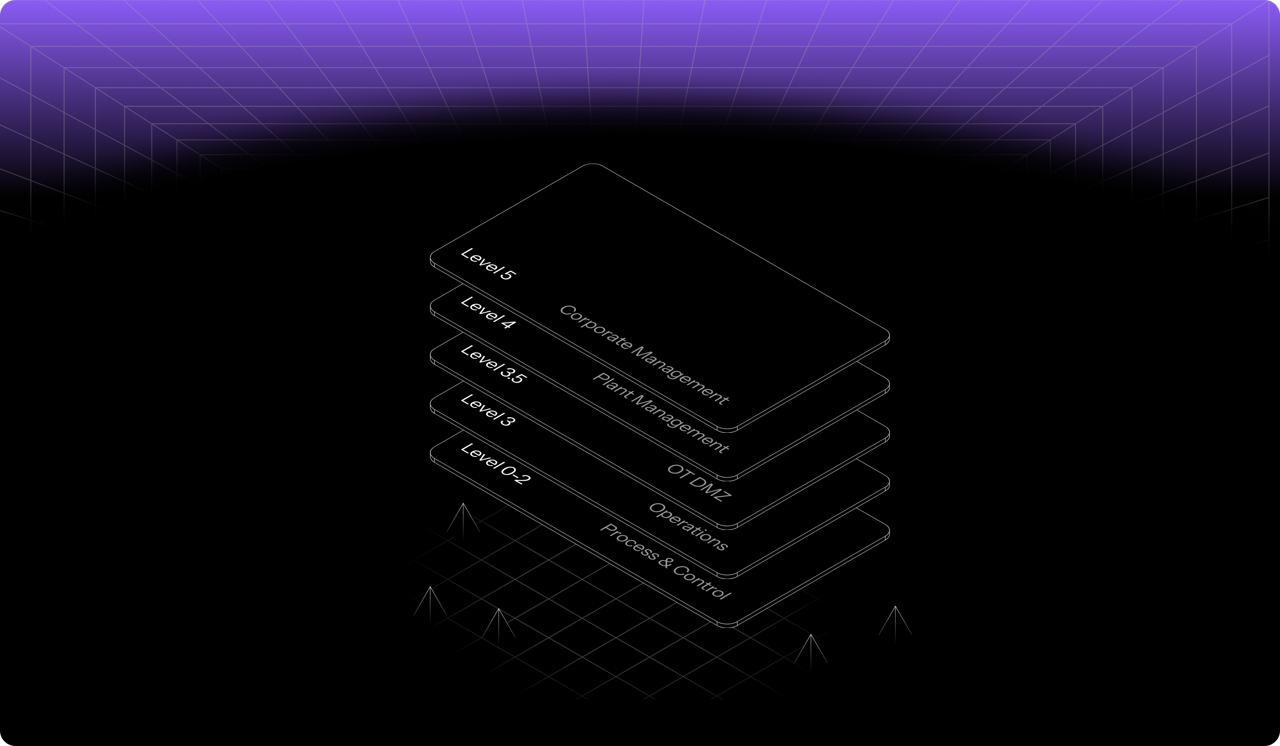
<figure><img src="https://1079732812-files.gitbook.io/~/files/v0/b/gitbook-x-prod.appspot.com/o/spaces%2F5T5Fo32wwisEqZbODG7j%2Fuploads%2Fgit-blob-14327eb6f3af68893d1fcba7453262607d609a18%2F6f13f6d2-4aa1-40b8-816a-1912c8472eb9.png?alt=media" alt="Dispel&#x27;s layered access model across facility levels, from corporate management down to process and control"><figcaption></figcaption></figure>

## 开始使用

刚开始使用 Dispel？从这里开始。

<table data-card-size="large" data-view="cards"><thead><tr><th></th><th></th><th data-hidden data-card-target data-type="content-ref"></th></tr></thead><tbody><tr><td><strong>Dispel 入门</strong></td><td>设置您的组织并建立第一个连接。</td><td><a href="https://docs.dispel.com/documentation/documentation-zh/kai-shi-shi-yong/getting-started-with-dispel.md">Dispel 入门</a></td></tr><tr><td><strong>用户快速入门指南</strong></td><td>登录、申请访问权限并连接到设备。</td><td><a href="https://docs.dispel.com/documentation/documentation-zh/kai-shi-shi-yong/getting-started-with-dispel/user-quick-start-guide.md">用户快速入门指南</a></td></tr><tr><td><strong>关键术语</strong></td><td>核心概念：设施、访问时段和 Wicket。</td><td><a href="https://docs.dispel.com/documentation/documentation-zh/kai-shi-shi-yong/key-terminology.md">关键术语</a></td></tr></tbody></table>

## 连接到设施

<table data-view="cards"><thead><tr><th></th><th></th><th data-hidden data-card-target data-type="content-ref"></th></tr></thead><tbody><tr><td><strong>访问时段</strong></td><td>申请、批准和管理设施的限时访问权限。</td><td><a href="https://docs.dispel.com/documentation/documentation-zh/lian-jie-dao-ni-de-xi-tong/access-windows.md">访问窗口</a></td></tr><tr><td><strong>浏览器连接</strong></td><td>通过浏览器访问设备，无需安装任何软件。</td><td><a href="https://docs.dispel.com/documentation/documentation-zh/lian-jie-dao-ni-de-xi-tong/connection-methods/browser-connect.md">浏览器连接</a></td></tr><tr><td><strong>虚拟桌面</strong></td><td>在设施网络内预留一台桌面设备。</td><td><a href="https://docs.dispel.com/documentation/documentation-zh/lian-jie-dao-ni-de-xi-tong/connection-methods/virtual-desktops.md">虚拟桌面</a></td></tr></tbody></table>

## 管理您的组织

<table data-view="cards"><thead><tr><th></th><th></th><th data-hidden data-card-target data-type="content-ref"></th></tr></thead><tbody><tr><td><strong>用户</strong></td><td>邀请人员、设置其角色并管理访问权限。</td><td><a href="https://docs.dispel.com/documentation/documentation-zh/guan-li-yong-hu-he-fang-wen/users.md">用户</a></td></tr><tr><td><strong>群组</strong></td><td>一次性为多名人员分配权限和访问权限。</td><td><a href="https://docs.dispel.com/documentation/documentation-zh/guan-li-yong-hu-he-fang-wen/groups.md">组</a></td></tr><tr><td><strong>角色与权限</strong></td><td>了解各角色在组织、区域和设施范围内可以执行的操作。</td><td><a href="https://docs.dispel.com/documentation/documentation-zh/guan-li-yong-hu-he-fang-wen/permissions.md">角色与权限</a></td></tr><tr><td><strong>设置</strong></td><td>品牌设置、联系人信息和适用于整个组织的选项。</td><td><a href="https://docs.dispel.com/documentation/documentation-zh/ji-cheng-yu-guan-li/settings.md">设置</a></td></tr></tbody></table>

## 保障安全并进行监控

<table data-view="cards"><thead><tr><th></th><th></th><th data-hidden data-card-target data-type="content-ref"></th></tr></thead><tbody><tr><td><strong>策略构建器</strong></td><td>决定用户登录时是否需要进行 MFA 验证，以及如何验证。</td><td><a href="https://docs.dispel.com/documentation/documentation-zh/bao-hu-yu-zhi-li/policy-builder.md">策略构建器</a></td></tr><tr><td><strong>会话取证</strong></td><td>查看每个会话的风险以及连接期间发生的情况。</td><td><a href="https://docs.dispel.com/documentation/documentation-zh/jian-kong-yu-diao-cha/risk-factor-analysis.md">会话取证 - 风险因素分析</a></td></tr><tr><td><strong>报告</strong></td><td>导出访问和活动记录，用于审计。</td><td><a href="https://docs.dispel.com/documentation/documentation-zh/jian-kong-yu-diao-cha/reports.md">报告</a></td></tr><tr><td><strong>合规性</strong></td><td>将 Dispel 控制措施映射到 IEC 62443、NIST 等标准。</td><td><a href="https://docs.dispel.com/documentation/documentation-zh/bao-hu-yu-zhi-li/overview.md">合规</a></td></tr></tbody></table>


---

# Agent Instructions
This documentation is published with GitBook. GitBook is the documentation platform designed so that both humans and AI agents can read, navigate, and reason over technical content effectively. Learn more at gitbook.com.

## Querying This Documentation
If you need additional information that is not directly available in this page, you can query the documentation by asking a question.

Perform an HTTP GET request on the following URL with the `ask` and `goal` query parameters:

```
GET https://docs.dispel.com/documentation/documentation-zh/huan-ying.md?ask=<question>&goal=<user_goal>
```

`ask` is the immediate question: it should be specific, self-contained, and written in natural language.
`goal` is what the user is ultimately trying to achieve, the reason they need the answer. Sharing it helps GitBook give you a better, more relevant answer. A goal is most helpful when it describes the outcome the user wants rather than restating the question. For example, with `ask=how do I create an API token`, a goal like `automate deployments from our CI pipeline` lets GitBook tailor the answer to that use case.

The response will contain a direct answer to the question and relevant excerpts and sources from the documentation.

Use this mechanism when the answer is not explicitly present in the current page, you need clarification or additional context, or you want to retrieve related documentation sections.
