> For the complete documentation index, see [llms.txt](https://docs.dispel.com/llms.txt). Markdown versions of documentation pages are available by appending `.md` to page URLs; this page is available as [Markdown](https://docs.dispel.com/documentation/documentation-zh/kai-shi-shi-yong/about-dispel.md).
# 关于 Dispel
Dispel Zero Trust Engine 是什么、访问为何按这种方式运作,以及一次连接如何到达 OT 网络内的设备。
Dispel 提供的安全能力,让工业运营运行得更快。
该 **Dispel 零信任引擎** 安全地连接人员、系统和运营数据,跨越复杂的 OT 环境。它取代了工业站点一直依赖的静态 VPN、跳板服务器以及未受管控的供应商访问路径:操作员、OEM 厂商、承包商和工程师通过一个经由代理的连接访问所需系统,该连接限定在一个时间窗口内并会被记录,不会在 OT 网络中留下任何长期开放的通路。
本页介绍平台的组成以及连接如何到达设备。有关本档案中使用的术语,请参见 [关键术语](/documentation/documentation-zh/kai-shi-shi-yong/key-terminology.md).
## 为什么访问这样工作
每个 OT 安全项目都要服务于三类想要不同结果的人。安全部门希望控制最严格;运营部门需要生产持续推进;合规部门需要证明这些控制有效。
当工具无法同时满足这三者时,人们就会想办法绕开它。供应商因为登录太麻烦而向工厂操作员索要共享凭据。工程师因为企业单点登录无法接入本地目录而被锁在外面。承包商因为入门流程要四天而绕开批准路径。纸面上看起来程序无懈可击,而下面却运行着十几条私有隧道。
Dispel 的设计目标是:安全路径也是最快路径。本档案其余部分所描述的大量内容都源于这一目标——为什么访问是按时间窗口授予而不是长期开放,为什么供应商可以自助接入,为什么网络路径会在会话之间重建。
## 平台
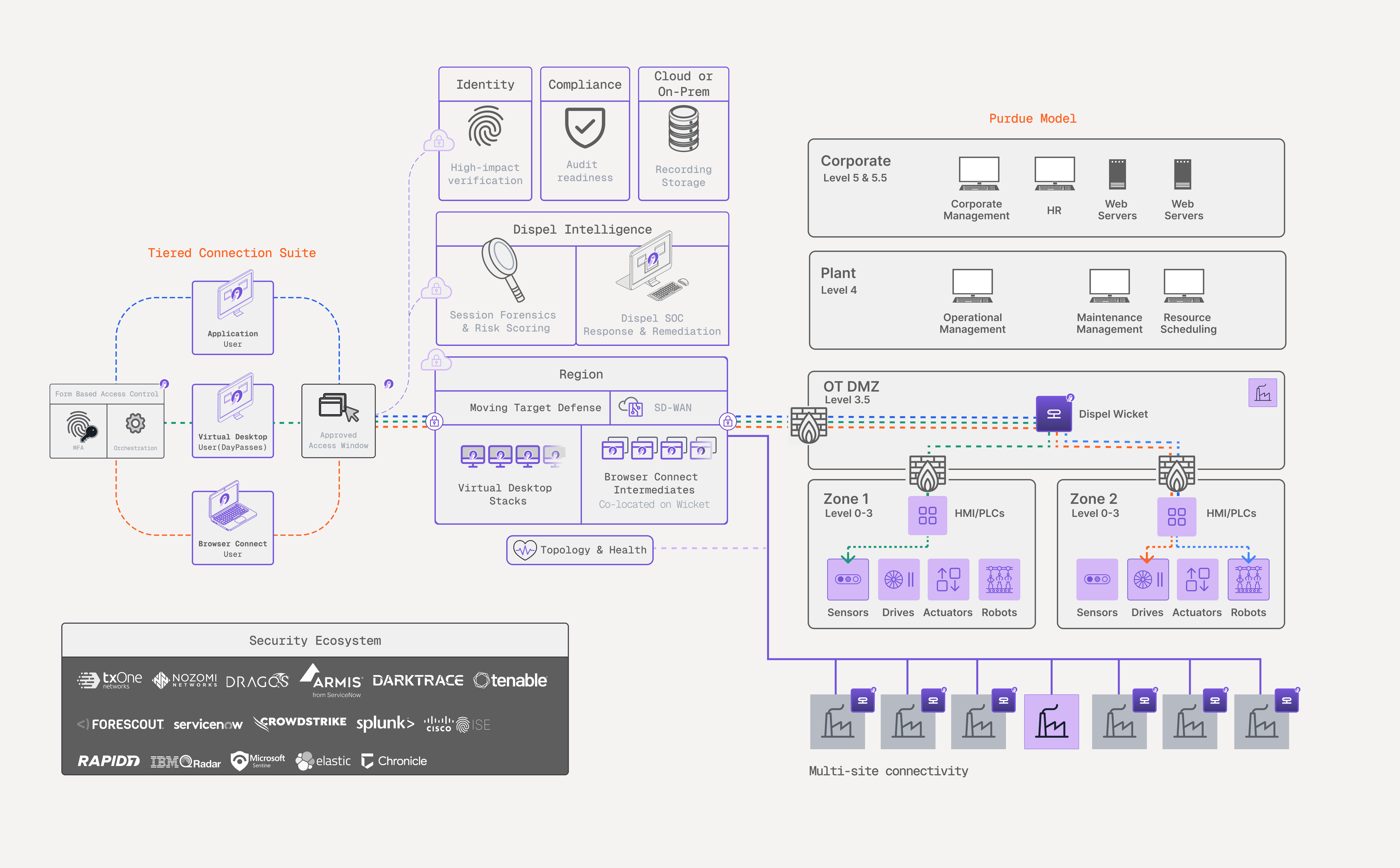
用户通过一个 **区域**,它负责代理会话并将其交给一个 **Wicket** 位于站点的 Wicket。Wicket 处在 OT DMZ 边界,并向下连接到设备所在的单元,因此连接会直接到达设备,而用户的机器从未加入 OT 网络。
| 平台的一部分 | 作用 | 文档说明位置 |
| -------------- | ------------------------------------------------------------------------------------------------------------- | ------------------------------------------------------------------------------------------------------------------------------------------------------------------------------------------ |
| **分层连接套件** | 将访问方式与工作内容相匹配:无客户端的 Browser Connect 适用于快速的供应商会话,隔离的 Virtual Desktop 适用于工程工作,而 Dispel Application 适用于旧系统和专有工具。 | [连接方式](/documentation/documentation-zh/lian-jie-dao-ni-de-xi-tong/connection-methods.md) |
| **访问窗口** | 通过审批或请求,在设定的期限内向某个设施及选定的用户或群组授予访问权限。 | [访问窗口](/documentation/documentation-zh/lian-jie-dao-ni-de-xi-tong/access-windows.md) |
| **Dispel 情报** | 对会话内发生的情况进行评分和记录——身份、设备和行为——从登录到断开连接。 | [会话取证](/documentation/documentation-zh/jian-kong-yu-diao-cha/risk-factor-analysis.md), [UEBA](/documentation/documentation-zh/jian-kong-yu-diao-cha/user-and-entity-behavior-analytics.md) |
| **Dispel 合规性** | 将平台的实时配置与框架基线进行评估,并在你运行的过程中构建证据。 | [合规](/documentation/documentation-zh/bao-hu-yu-zhi-li/overview.md) |
| **Dispel 身份** | 在访问开始之前先确定是谁在连接,而不是仅信任凭据。 | [Dispel 身份](/documentation/documentation-zh/bao-hu-yu-zhi-li/dispel-identity.md) |
| **拓扑** | 覆盖每个区域、设施、Wicket 和设备以及通路健康状况的单一实时视图。 | [拓扑](/documentation/documentation-zh/jian-kong-yu-diao-cha/topology.md) |
该平台可与现有 OT 系统互操作,支持全部 65,000+ 种 TCP/IP 协议,包括 SSH、RDP 和 VNC。Rockwell FactoryTalk、Siemens TIA Portal 和 Mitsubishi GX Works 等专有环境需要转换器。会话和资产风险信号可与您已在使用的 OT 安全工具交换——其中包括 Nozomi Networks、Dragos、Armis、Forescout 和 TXOne Networks。参见 [集成](/documentation/documentation-zh/ji-cheng-yu-guan-li/integrations.md).
## 您的环境如何组织
您的组织会嵌套成多个层级,而同样的分层方式也用于定义角色和权限。
| 层级 | 它是什么 |
| ---------- | --------------------------------------- |
| **区域** | 由 Dispel 托管、面向某一地理区域的远程访问网络,并与其他所有区域隔离。 |
| **设施** | 某个区域内的一个站点——工厂、变电站或网络分段——以及您在那里可以访问的设备。 |
| **Wicket** | 位于站点的硬件或软件设备,用于将设施连接到其所在区域。 |
| **终端设备** | 您操作的 OT 资产,可从其所属设施内部访问。 |
有关部署如何构建以及每个组件的作用,请参见 [部署基础设施](/documentation/documentation-zh/gou-jian-ni-de-huan-jing/infrastructure/deployment-infrastructure.md).
## 连接如何到达设备
1. **登录** 在 [app.dispel.com](https://app.dispel.com)。在这里,你可以请求访问、发起连接,并且——如果你是组织管理员——对其进行管理。
2. **持有一个访问窗口。** 一个 [访问窗口](/documentation/documentation-zh/lian-jie-dao-ni-de-xi-tong/access-windows.md) 涵盖一个设施、一段时间以及一组用户或群组。若该设施没有对应的访问窗口,则没有任何连接方式能够到达那里的设备。
3. **启动一种连接方式。** 预留一个 [Virtual Desktop](/documentation/documentation-zh/lian-jie-dao-ni-de-xi-tong/connection-methods/virtual-desktops.md),打开一个 [Browser Connect](/documentation/documentation-zh/lian-jie-dao-ni-de-xi-tong/connection-methods/browser-connect.md) 会话,或通过 [Dispel Application](/documentation/documentation-zh/lian-jie-dao-ni-de-xi-tong/connection-methods/dispel-application.md)连接。每一种都会经由区域进行路由。
4. **到达设备。** 流量从区域经由 Wicket 中继到设备。您可以到达哪些设备、使用哪些端口和协议,由 [访问规则(ACL)](/documentation/documentation-zh/gou-jian-ni-de-huan-jing/infrastructure/device-management/device-access-acls.md).
5. **访问会随访问窗口结束而终止。** 当访问窗口关闭时,它将停止向该设施授予访问权限,无论您使用了哪种连接方式。Virtual Desktop 在您结束使用后还会被销毁。
## Dispel 配置的内容与您登记的内容
某个区域所运行的网络由 Dispel 的基础设施作为部署的一部分构建。组织管理员之后可以在应用中添加区域,只需为其命名并选择托管位置;在网络准备就绪之前,它会显示为构建中状态。区域内部的一切——设施、Wicket、设备和用户——都由您的团队登记和管理。
## 下一步
* [Dispel 入门指南](/documentation/documentation-zh/kai-shi-shi-yong/getting-started-with-dispel.md) ——设置您的组织并建立第一次连接。
* [关键术语](/documentation/documentation-zh/kai-shi-shi-yong/key-terminology.md) ——本页术语定义。
* [访问窗口](/documentation/documentation-zh/lian-jie-dao-ni-de-xi-tong/access-windows.md) ——授予和请求按时间限定的访问。
* [连接方式](/documentation/documentation-zh/lian-jie-dao-ni-de-xi-tong/connection-methods.md) ——在 Virtual Desktop、Browser Connect 和 Dispel Application 之间进行选择。
---
# Agent Instructions
This documentation is published with GitBook. GitBook is the documentation platform designed so that both humans and AI agents can read, navigate, and reason over technical content effectively. Learn more at gitbook.com.
## Querying This Documentation
If you need additional information that is not directly available in this page, you can query the documentation by asking a question.
Perform an HTTP GET request on the following URL with the `ask` and `goal` query parameters:
```
GET https://docs.dispel.com/documentation/documentation-zh/kai-shi-shi-yong/about-dispel.md?ask=&goal=
```
`ask` is the immediate question: it should be specific, self-contained, and written in natural language.
`goal` is what the user is ultimately trying to achieve, the reason they need the answer. Sharing it helps GitBook give you a better, more relevant answer. A goal is most helpful when it describes the outcome the user wants rather than restating the question. For example, with `ask=how do I create an API token`, a goal like `automate deployments from our CI pipeline` lets GitBook tailor the answer to that use case.
The response will contain a direct answer to the question and relevant excerpts and sources from the documentation.
Use this mechanism when the answer is not explicitly present in the current page, you need clarification or additional context, or you want to retrieve related documentation sections.