> For the complete documentation index, see [llms.txt](https://docs.dispel.com/llms.txt). Markdown versions of documentation pages are available by appending `.md` to page URLs; this page is available as [Markdown](https://docs.dispel.com/documentation/documentation-zh/kai-shi-shi-yong/about-dispel.md). Agents can also search and read this documentation through its [MCP server](https://docs.dispel.com/~gitbook/mcp).
# 关于 Dispel
Dispel Zero Trust Engine 是什么、访问为何按这种方式运作,以及一次连接如何到达 OT 网络内的设备。
Dispel 提供的安全保障,让工业运营更高效。
Dispel **零信任引擎** 可在复杂的 OT 环境中安全连接人员、系统和运营数据。它取代了工业现场长期依赖的静态 VPN、跳板服务器和缺乏管理的供应商接入路径:操作员、OEM、承包商和工程师通过代理连接访问所需系统。连接限定在特定时间窗口内,并会被记录,且不会在 OT 网络中留下长期开放的通道。
本页介绍平台由哪些部分构成,以及连接如何到达设备。如需了解本文档中使用的术语,请参阅 [关键术语](https://docs.dispel.com/documentation/documentation-zh/kai-shi-shi-yong/key-terminology.md).
## 为何采用这种访问方式
每个 OT 安全计划都要服务于三个诉求各异的群体:安全团队希望实施最严格的控制;运营团队需要确保生产持续进行;合规团队则需要证明这些控制确实有效。
如果工具无法满足这三方的需求,人们就会绕过它。供应商嫌登录太麻烦,便向工厂操作员索要共享凭据。工程师因企业 SSO 无法连接本地目录而被拒之门外。承包商觉得入驻流程要花四天,便绕过获批的访问路径。纸面上的安全计划看似完善,背后却运行着十几条私设隧道。
Dispel 的设计目标是让安全路径也成为最快捷的路径。本文档其余部分所述的许多设计都由此而来——例如,为什么访问权限只在特定时间窗口内授予,而不是长期开放;为什么供应商可以自行完成入驻;以及为什么每次会话之间都会重新构建网络路径。
## 平台
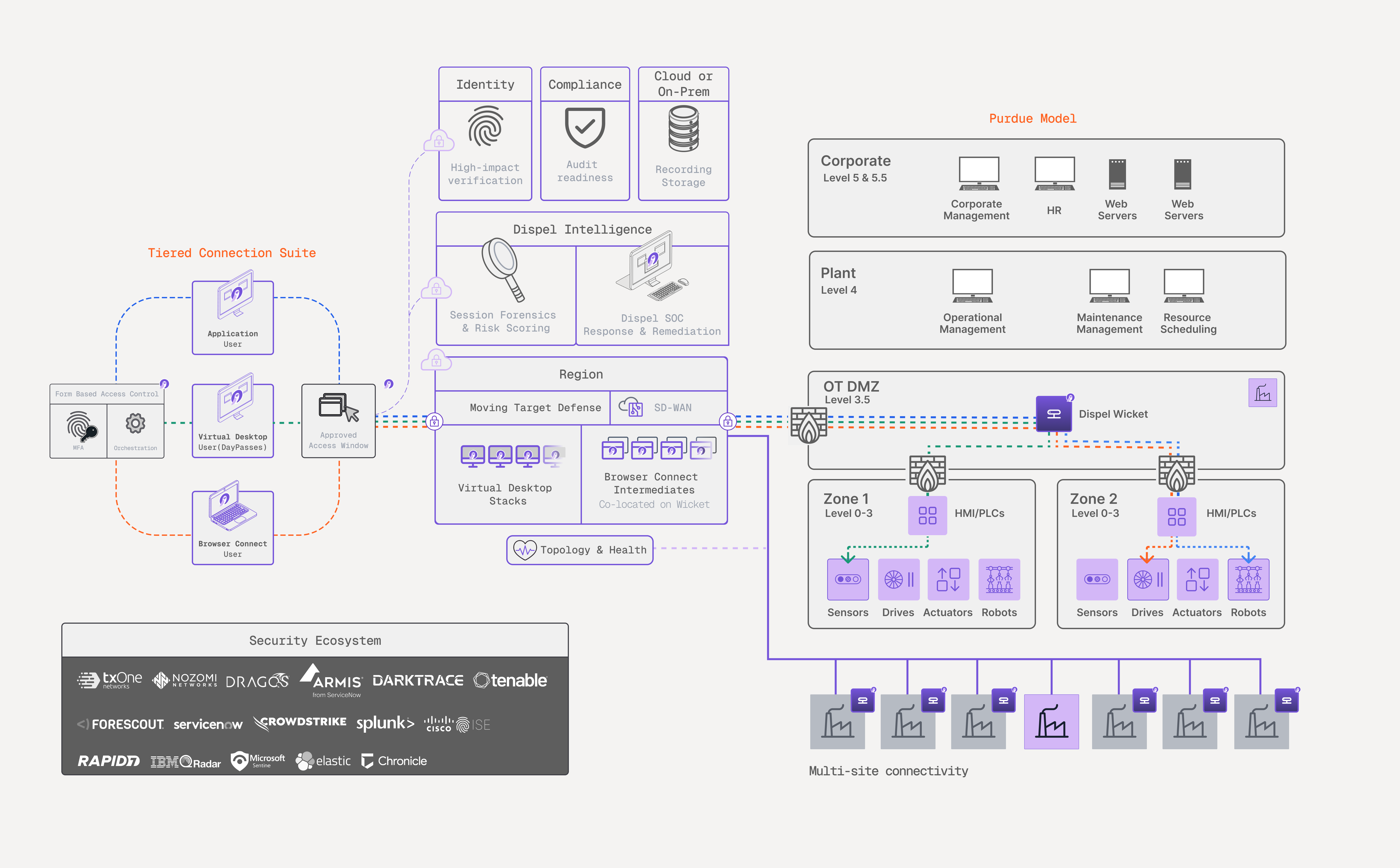
用户通过 **区域**连接,由该区域代理会话并将其转交给现场的 **Wicket** 。Wicket 位于 OT DMZ 边界,并向下连接到设备所在的单元,因此连接能够到达设备,而用户的计算机始终不会加入 OT 网络。
| 平台组成部分 | 作用 | 相关文档 |
| --------------- | ----------------------------------------------------------------------------------- | ---------------------------------------------------------------------------------------------------------------------------------------------------------------------------------------------------------------------------------------- |
| **分层连接套件** | 根据工作需求匹配访问方式:用于快速供应商会话的免客户端 Browser Connect、用于工程工作的隔离虚拟桌面,以及用于旧版和专有工具的 Dispel 应用程序。 | [连接方式](https://docs.dispel.com/documentation/documentation-zh/lian-jie-dao-ni-de-xi-tong/connection-methods.md) |
| **访问时段** | 通过审批或申请,为选定的用户或群组授予在指定时段内访问某个设施的权限。 | [访问时段](https://docs.dispel.com/documentation/documentation-zh/lian-jie-dao-ni-de-xi-tong/access-windows.md) |
| **Dispel 智能分析** | 对会话中的活动进行评分和记录,涵盖身份、设备和行为,范围从登录一直到断开连接。 | [会话取证](https://docs.dispel.com/documentation/documentation-zh/jian-kong-yu-diao-cha/risk-factor-analysis.md), [UEBA](https://docs.dispel.com/documentation/documentation-zh/jian-kong-yu-diao-cha/user-and-entity-behavior-analytics.md) |
| **Dispel 合规** | 根据框架基线评估平台的实时配置,并在您开展运营时持续构建证据。 | [合规性](https://docs.dispel.com/documentation/documentation-zh/bao-hu-yu-zhi-li/overview.md) |
| **Dispel 身份** | 在访问开始前确认连接者的身份,而不是仅凭凭据进行信任。 | [Dispel 身份](https://docs.dispel.com/documentation/documentation-zh/bao-hu-yu-zhi-li/dispel-identity.md) |
| **拓扑** | 实时查看所有区域、设施、Wicket 和设备,以及连接路径的运行状况。 | [拓扑](https://docs.dispel.com/documentation/documentation-zh/jian-kong-yu-diao-cha/topology.md) |
该平台可与现有 OT 系统互操作,支持超过 65,000 种 TCP/IP 协议,包括 SSH、RDP 和 VNC。对于 Rockwell FactoryTalk、Siemens TIA Portal 和 Mitsubishi GX Works 等专有环境,则需要使用转换器。会话和资产风险信号可与您现有的 OT 安全工具交换,包括 Nozomi Networks、Dragos、Armis、Forescout 和 TXOne Networks。请参阅 [集成](https://docs.dispel.com/documentation/documentation-zh/ji-cheng-yu-guan-li/integrations.md).
## 环境的组织结构
您的组织按层级划分,相同的层级结构也用于限定角色和权限。
| 层级 | 说明 |
| ---------- | ---------------------------------------- |
| **区域** | 由 Dispel 托管、覆盖某个地理区域的远程访问网络,与其他所有区域相互隔离。 |
| **设施** | 区域内的单个站点,例如工厂、变电站或网段,以及您在该处访问的设备。 |
| **Wicket** | 部署在现场、用于将设施连接到所属区域的硬件或软件设备。 |
| **终端设备** | 您在设施内部访问并进行操作的 OT 资产。 |
如需了解部署的构建方式以及各组件的作用,请参阅 [部署基础设施](https://docs.dispel.com/documentation/documentation-zh/gou-jian-ni-de-huan-jing/infrastructure/deployment-infrastructure.md).
## 连接如何到达设备
1. **登录** 访问 [app.dispel.com](https://app.dispel.com)。您可在此申请访问权限、启动连接;如果您是组织管理员,还可以管理组织。
2. **创建访问时段。** 一个 [访问时段](https://docs.dispel.com/documentation/documentation-zh/lian-jie-dao-ni-de-xi-tong/access-windows.md) 涵盖一个设施、一段时间以及一组用户或群组。如果设施没有访问时段,任何连接方式都无法连接到该设施中的设备。
3. **启动连接方式。** 预留一个 [虚拟桌面](https://docs.dispel.com/documentation/documentation-zh/lian-jie-dao-ni-de-xi-tong/connection-methods/virtual-desktops.md)、开启一个 [浏览器连接](https://docs.dispel.com/documentation/documentation-zh/lian-jie-dao-ni-de-xi-tong/connection-methods/browser-connect.md) 会话,或通过 [Dispel 应用程序](https://docs.dispel.com/documentation/documentation-zh/lian-jie-dao-ni-de-xi-tong/connection-methods/dispel-application.md)连接。以上方式都会通过区域进行路由。
4. **连接到设备。** 流量从区域经由 Wicket 中继到设备。你可以连接哪些设备、使用哪些端口和协议,取决于 [访问规则 (ACL)](https://docs.dispel.com/documentation/documentation-zh/gou-jian-ni-de-huan-jing/infrastructure/device-management/device-access-acls.md).
5. **访问权限随时段结束而终止。** 访问时段关闭后,无论你使用哪种连接方式,该时段都不再授予对该设施的访问权限。使用完虚拟桌面后,它还会被销毁。
## Dispel 配置的内容与由你注册的内容
区域运行所依托的网络由 Dispel 的基础设施在部署过程中搭建。组织管理员之后可以在应用中添加区域:为其命名并选择托管位置。在网络准备就绪前,区域会显示为正在构建。区域内的所有内容——设施、Wicket、设备和用户——均由你的团队注册和管理。
## 后续步骤
* [Dispel 入门](https://docs.dispel.com/documentation/documentation-zh/kai-shi-shi-yong/getting-started-with-dispel.md) — 设置组织并建立第一个连接。
* [关键术语](https://docs.dispel.com/documentation/documentation-zh/kai-shi-shi-yong/key-terminology.md) — 本页术语的定义。
* [访问时段](https://docs.dispel.com/documentation/documentation-zh/lian-jie-dao-ni-de-xi-tong/access-windows.md) — 授予和申请有时限的访问权限。
* [连接方式](https://docs.dispel.com/documentation/documentation-zh/lian-jie-dao-ni-de-xi-tong/connection-methods.md) — 在虚拟桌面、浏览器连接和 Dispel 应用程序之间进行选择。
---
# Agent Instructions
This documentation is published with GitBook. GitBook is the documentation platform designed so that both humans and AI agents can read, navigate, and reason over technical content effectively. Learn more at gitbook.com.
## Querying This Documentation
If you need additional information that is not directly available in this page, you can query the documentation by asking a question.
Perform an HTTP GET request on the following URL with the `ask` and `goal` query parameters:
```
GET https://docs.dispel.com/documentation/documentation-zh/kai-shi-shi-yong/about-dispel.md?ask=&goal=
```
`ask` is the immediate question: it should be specific, self-contained, and written in natural language.
`goal` is what the user is ultimately trying to achieve, the reason they need the answer. Sharing it helps GitBook give you a better, more relevant answer. A goal is most helpful when it describes the outcome the user wants rather than restating the question. For example, with `ask=how do I create an API token`, a goal like `automate deployments from our CI pipeline` lets GitBook tailor the answer to that use case.
The response will contain a direct answer to the question and relevant excerpts and sources from the documentation.
Use this mechanism when the answer is not explicitly present in the current page, you need clarification or additional context, or you want to retrieve related documentation sections.