> For the complete documentation index, see [llms.txt](https://docs.dispel.com/llms.txt). Markdown versions of documentation pages are available by appending `.md` to page URLs; this page is available as [Markdown](https://docs.dispel.com/get-started/about-dispel.md).
# About Dispel
What the Dispel Zero Trust Engine is, why access works the way it does, and how a connection reaches a device inside an OT network.
Dispel delivers security that makes industrial operations run faster.
The **Dispel Zero Trust Engine** securely connects people, systems, and operational data across complex OT environments. It replaces the static VPNs, jump servers, and unmanaged vendor pathways industrial sites have relied on: operators, OEMs, contractors, and engineers reach the systems they need through a brokered connection that is scoped to a time window and recorded, with no standing path left open into the OT network.
This page covers what the platform is made of and how a connection reaches a device. For the vocabulary used throughout this documentation, see [Key Terminology](/get-started/key-terminology.md).
## Why access works this way
Every OT security program serves three groups that want different things. Security wants the tightest controls. Operations needs production to keep moving. Compliance needs to prove the controls work.
When the tooling doesn't serve all three, people work around it. A vendor asks a plant operator for shared credentials because signing in is too hard. An engineer is locked out because corporate SSO doesn't reach the local directory. A contractor routes around the approved path because onboarding takes four days. The program looks sound on paper while a dozen private tunnels run underneath it.
Dispel is built so the secure path is also the fastest one. Much of what the rest of this documentation describes follows from that goal — why access is granted for a window instead of standing open, why vendors can onboard themselves, why the network pathway is rebuilt between sessions.
## The platform
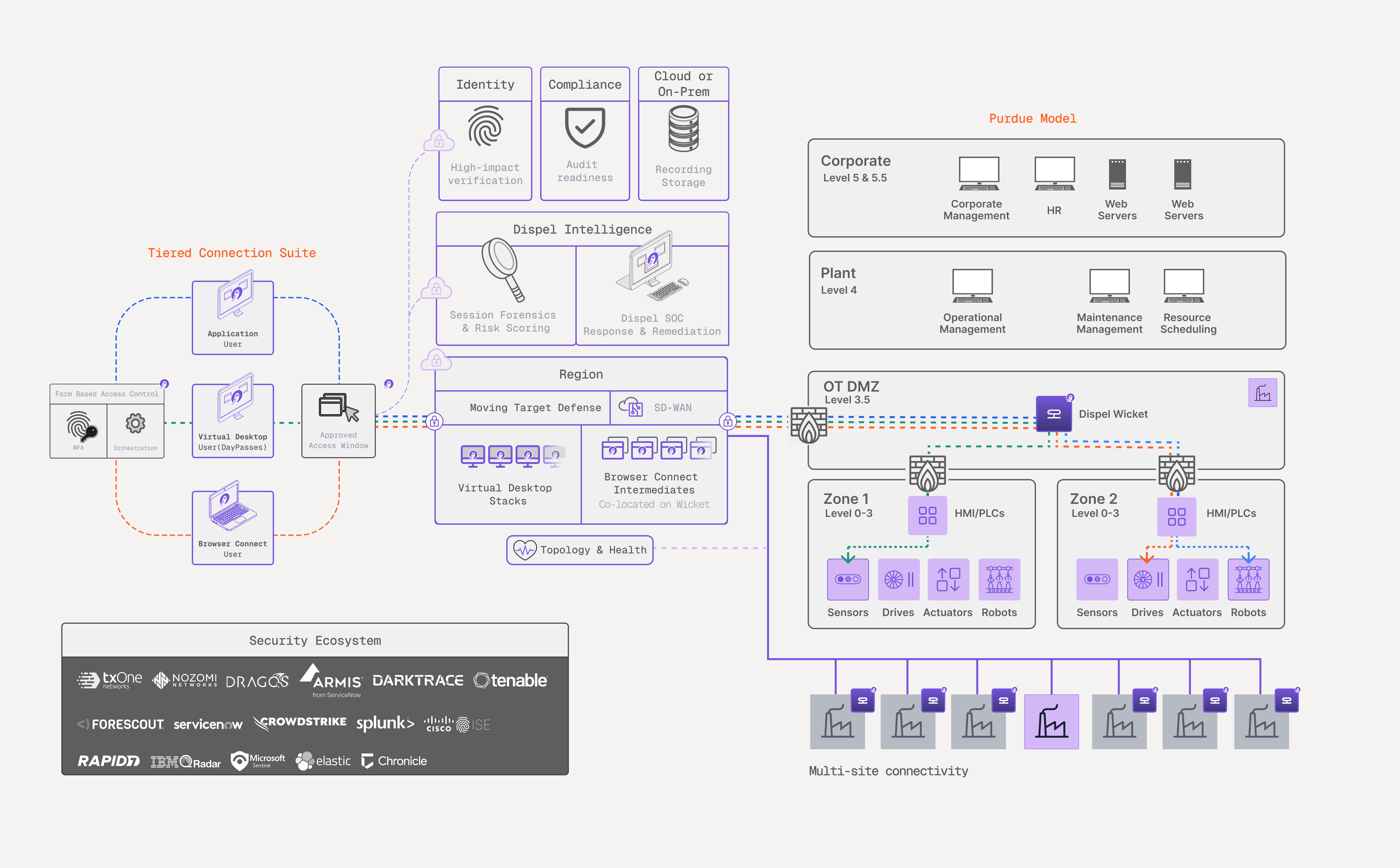
Users connect through a **Region**, which brokers the session and hands it to a **Wicket** at the site. The Wicket sits at the OT DMZ boundary and reaches down into the cells where the equipment lives, so a connection arrives at the device without the user's machine ever joining the OT network.
| Part of the platform | What it does | Where it's documented |
| --------------------------- | ------------------------------------------------------------------------------------------------------------------------------------------------------------------------------------------------------------- | --------------------------------------------------------------------------------------------------------------------------------------------- |
| **Tiered Connection Suite** | Matches the access method to the work: clientless Browser Connect for quick vendor sessions, an isolated Virtual Desktop for engineering work, and the Dispel Application for legacy and proprietary tooling. | [Connection Methods](/connect-to-your-systems/connection-methods.md) |
| **Access windows** | Grant access to a facility for a set period and a chosen set of users or groups, by approval or by request. | [Access Windows](/connect-to-your-systems/access-windows.md) |
| **Dispel Intelligence** | Scores and records what happens inside a session — identity, device, and behavior — from sign-in through disconnect. | [Session Forensics](/monitor-and-investigate/risk-factor-analysis.md), [UEBA](/monitor-and-investigate/user-and-entity-behavior-analytics.md) |
| **Dispel Compliance** | Evaluates the platform's live configuration against framework baselines and builds the evidence as you operate. | [Compliance](/secure-and-govern/overview.md) |
| **Dispel Identity** | Establishes who is connecting before access begins, rather than trusting the credential alone. | [Dispel Identity](/secure-and-govern/dispel-identity.md) |
| **Topology** | One live view of every region, facility, Wicket, and device, with pathway health. | [Topology](/monitor-and-investigate/topology.md) |
The platform is interoperable with existing OT systems across all 65,000+ TCP/IP protocols, including SSH, RDP, and VNC. Proprietary environments such as Rockwell FactoryTalk, Siemens TIA Portal, and Mitsubishi GX Works require a translator. Session and asset risk signals exchange with the OT security tools you already run — Nozomi Networks, Dragos, Armis, Forescout, and TXOne Networks among them. See [Integrations](/integrate-and-administer/integrations.md).
## How your environment is organized
Your organization nests into layers, and the same layering scopes roles and permissions.
| Layer | What it is |
| -------------- | ------------------------------------------------------------------------------------------------------------ |
| **Region** | A Dispel-hosted remote-access network for a geographic area, kept separate from every other Region. |
| **Facility** | One site inside a Region — a plant, substation, or network segment — along with the devices you reach there. |
| **Wicket** | The hardware or software appliance at the site that links a facility to its Region. |
| **End device** | The OT asset you work on, reached from inside its facility. |
For how a deployment is built and what each component does, see [Deployment Infrastructure](/build-your-environment/infrastructure/deployment-infrastructure.md).
## How a connection reaches a device
1. **Sign in** at [app.dispel.com](https://app.dispel.com). This is where you request access, launch connections, and — if you administer the organization — manage it.
2. **Hold an access window.** An [access window](/connect-to-your-systems/access-windows.md) covers a facility, a period of time, and a set of users or groups. Without one for the facility, no connection method reaches a device there.
3. **Launch a connection method.** Reserve a [Virtual Desktop](/connect-to-your-systems/connection-methods/virtual-desktops.md), open a [Browser Connect](/connect-to-your-systems/connection-methods/browser-connect.md) session, or connect through the [Dispel Application](/connect-to-your-systems/connection-methods/dispel-application.md). Each routes you through the Region.
4. **Reach the device.** Traffic relays from the Region across the Wicket to the device. Which devices you reach, over which ports and protocols, comes from [access rules (ACLs)](/build-your-environment/infrastructure/device-management/device-access-acls.md).
5. **Access ends with the window.** When the access window closes it stops granting access to that facility, whichever connection method you used. A Virtual Desktop is additionally destroyed once you're finished with it.
## What Dispel provisions and what you register
The network a Region runs on is built by Dispel's infrastructure as part of your deployment. An organization administrator can add a Region later from the app by naming it and choosing a hosting location; it shows a building state until the network is ready. Everything inside a Region — facilities, Wickets, devices, and users — your team registers and manages.
## Next steps
* [Getting Started with Dispel](/get-started/getting-started-with-dispel.md) — set up your organization and make a first connection.
* [Key Terminology](/get-started/key-terminology.md) — definitions for the terms on this page.
* [Access Windows](/connect-to-your-systems/access-windows.md) — grant and request time-boxed access.
* [Connection Methods](/connect-to-your-systems/connection-methods.md) — choose between Virtual Desktops, Browser Connect, and the Dispel Application.
---
# Agent Instructions
This documentation is published with GitBook. GitBook is the documentation platform designed so that both humans and AI agents can read, navigate, and reason over technical content effectively. Learn more at gitbook.com.
## Querying This Documentation
If you need additional information that is not directly available in this page, you can query the documentation by asking a question.
Perform an HTTP GET request on the following URL with the `ask` and `goal` query parameters:
```
GET https://docs.dispel.com/get-started/about-dispel.md?ask=&goal=
```
`ask` is the immediate question: it should be specific, self-contained, and written in natural language.
`goal` is what the user is ultimately trying to achieve, the reason they need the answer. Sharing it helps GitBook give you a better, more relevant answer. A goal is most helpful when it describes the outcome the user wants rather than restating the question. For example, with `ask=how do I create an API token`, a goal like `automate deployments from our CI pipeline` lets GitBook tailor the answer to that use case.
The response will contain a direct answer to the question and relevant excerpts and sources from the documentation.
Use this mechanism when the answer is not explicitly present in the current page, you need clarification or additional context, or you want to retrieve related documentation sections.